
Social media teams are under pressure to produce more videos without sacrificing quality. Short-form platforms reward volume, consistency, and relevance, but traditional workflows simply don’t scale. That’s where the best AI-driven tool for scalable social media video production comes in handy. By automating editing, enhancement, and repurposing, AI-powered video production helps brands keep up with demand, adapt content across platforms, and improve engagement without multiplying tools, costs, or production time.
Meta’s own creator and business insights show that videos with clear audio, strong visual focus, and format-native framing hold attention longer and perform better across feeds, especially in the first few seconds. Consistency matters, but only when quality stays steady across platforms. That combination is difficult to achieve with fragmented workflows.
This guide looks at what defines the best AI-driven tool for scalable social media video production. It also covers how experienced creators structure workflows that keep quality high while increasing output and how platforms like Async fit into a production process designed for speed, clarity, and scale.
What is AI-driven video production?
Short answer:
AI-driven video production uses artificial intelligence to automate and support key parts of creating, editing, and distributing video content, making it possible to produce high-quality social videos at scale.
The more technical answer:
In practice, AI-driven video production changes how teams approach video altogether. Instead of manually editing every asset from scratch, AI helps analyze footage, apply consistent editing logic, enhance audio and visuals, generate captions, and adapt videos to different formats and platforms. This turns video production from a linear, time-intensive task into a repeatable workflow.
For social media teams, this shift matters because performance depends on more than just creative quality. Volume, consistency, and speed all influence reach and engagement. AI makes it realistic to repurpose one recording into multiple platform-ready videos, maintain quality across large content libraries, and respond quickly to what audiences are engaging with. The sections below break down how this works in detail, which features matter most, and how the best tools support scalable social media video production.
Definition of AI in video production:
In a modern marketing context, AI in video production usually refers to a set of practical capabilities that support production at scale. These include analyzing video and audio to identify structure, speech, and usable segments; automating repetitive editing tasks, enhancing visuals and sound, and generating supporting elements like captions or summaries.
The key distinction is that AI does not replace creative direction. Instead, it reduces the manual effort required to meet platform standards repeatedly. Teams can spend less time on mechanical edits and more time on messaging, pacing, and performance optimization.
Importance of AI in social media engagement:
Social platforms have made one thing very clear: video performance is closely tied to quality, format, and consistency. Meta’s best practices for Facebook Reels emphasize high-quality vertical video, clear visuals, good lighting, readable text, and ongoing experimentation, while actively discouraging recycled or low-resolution content. This sets a high production bar for brands publishing video regularly.
As a result, many AI-driven video platforms now function as social media engagement tools, helping teams optimize content not just for production speed, but for how audiences actually interact with video across feeds.
At the same time, volume has become a baseline expectation. Short-form video continues to drive engagement across major platforms, and marketing teams are expected to publish frequently, test different formats, and adjust quickly based on performance. This shift has pushed many teams to look for ways to support higher output without expanding production resources.
This creates a real operational challenge. Higher quality standards combined with higher output expectations put pressure on traditional, manual video workflows. AI-driven production tools help close that gap by making it easier to maintain consistent visual and audio quality, adapt content to vertical-first formats, iterate faster based on engagement signals, and scale output without increasing production overhead.
Key features of the best AI-Driven video production tools
Not all AI video tools are built for scale. Some focus on single-use generation, others on creative experimentation. Tools that actually work for social media teams have a different set of priorities. They need to support volume, speed, and consistency without breaking the creative workflow.
The features below are what separate tools that look impressive in demos from tools that hold up in real production environments.
Scalability for high-volume production
Scalability is the defining feature for social media video production. Platforms reward teams that publish frequently and adapt quickly, which means the ability to process large amounts of content without slowing down is essential.
The best AI-driven tools are designed to handle long-form source material and turn one recording into multiple platform-ready assets, without increasing manual editing time. This might mean generating several short clips from one recording, applying the same formatting rules across dozens of videos, or producing variations tailored to different platforms. What matters is that scaling output does not require linear increases in editing time or manual effort.
Video content creation capabilities
Strong AI tools support the creation process itself, not just post-production. This includes helping teams structure content, identify strong moments, and prepare videos that are aligned with how people consume content on social platforms.
In practice, this often looks like AI clips, automatic caption generation, and tools that help adapt pacing and length for short-form formats. These capabilities allow creators and marketers to focus on storytelling and messaging while the system handles the repetitive groundwork.
Video enhancement tools
Quality still matters, especially in feeds where users scroll quickly and judge content in seconds. AI-driven video enhancement tools help maintain a consistent production standard across large volumes of video.
This typically includes improving visual clarity, adjusting framing for vertical formats, and cleaning up audio so dialogue stays clear and balanced across different clips. Features like AI audio cleanup become particularly important here, since poor sound quality is one of the fastest ways to lose attention, even when the visuals are strong.
Multi-format and platform adaptation
Social media video is no longer one-size-fits-all. Each platform favors different aspect ratios, durations, and viewing behaviors. The best tools make it easy to adapt a single piece of content into multiple formats without re-editing everything from scratch.
This kind of flexibility allows teams to test content across platforms, reuse successful ideas, and respond to changing platform requirements without rebuilding their workflow every time.
Workflow automation and collaboration
Finally, scalability depends on how well a tool fits into a real team environment. AI-driven video production tools need to support repeatable workflows, not just individual edits.
This includes automation for common tasks, consistent output settings, and collaboration features that allow multiple stakeholders to review, adjust, and approve content efficiently. When these pieces are in place, AI stops being a novelty and becomes a reliable part of the production process.
Top AI-driven tools for social media video production
The tools below vary significantly in scope and focus. Some are designed as end-to-end platforms for ongoing social media video production, while others specialize in specific parts of the workflow, such as clipping, captioning, or script-based video creation. To reflect how these tools are typically used in real-world marketing teams, the primary platform is covered in more depth, with the remaining tools included for comparison and context.
Async
Overview:
Async is built as an end-to-end workspace for creating, editing, and repurposing social media video. Instead of focusing on a single AI capability, it combines recording, video editing, audio editing, transcription, subtitles, AI clips, and text-to-speech in one browser-based environment. This unified approach is designed for teams that need to move quickly from raw recordings to multiple platform-ready videos without juggling several tools.
Key features:
• Browser-based recording studio for audio and video
• Integrated video and audio editors optimized for social formats
• AI-powered clips, subtitles, transcription, and text-to-speech
• Support for short-form, vertical, and platform-specific video formats
• Tiered plans that scale with production needs
Pros:
• Strong focus on real social media workflows rather than generic video editing
• Reduces tool switching by combining creation, editing, and repurposing
• Emphasis on speed, repeatability, and consistency
• Accessible for solo creators, small teams, and growing marketing teams
Cons:
• More opinionated workflow compared to traditional timeline-heavy editors
• Teams coming from highly technical post-production environments may need an adjustment period
• Feature set is actively evolving, which can require teams to adapt as new capabilities are introduced
Pricing and plans:
Async uses a tiered pricing model designed around usage rather than one-off exports. Plans scale based on recording time, transcription and subtitle hours, and text-to-speech usage, with higher tiers supporting significantly larger volumes of video and audio production.
This structure makes it easier for teams to start small and expand as their content output grows, without committing upfront to enterprise-level plans.
What Async is best for?
Async is best suited for social media teams and creators who prioritize speed, consistency, and scalability over highly specialized post-production work. It works particularly well for workflows built around recurring content, such as podcasts, interviews, educational videos, and brand series that need to be repurposed into multiple short-form clips.
Teams that want a single platform to handle recording, editing, subtitling, and repurposing will benefit most from Async’s all-in-one approach, especially when producing content regularly across multiple social platforms and relying on features like AI audio cleanup to maintain consistent quality across large volumes of video.
Descript
Overview:
Descript approaches video and audio editing through a text-based workflow, allowing users to edit media by editing the transcript. It is widely used for podcasts, talking-head videos, and educational content, especially where clarity and scripting matter.
Key features:
• Text-based audio and video editing
• Transcription and subtitles
• Screen recording and basic video editing tools
Pros:
• Intuitive for teams working heavily with spoken content
• Strong transcription accuracy
• Well-documented and widely adopted
Cons:
• Less optimized for high-volume social clip production
• Visual editing and formatting tools are more limited compared to social-first platforms
Best for: Teams working primarily with spoken-word content who value text-based editing and fast revisions.
VEED
Overview:
VEED is a browser-based video editor focused on quick edits, captions, and format adjustments for social media. It is commonly used for short-form video and simple marketing assets.
Key features:
• Online video editor with templates
• Automatic subtitles and translations
• Social media-friendly export options
Pros:
• Easy to use with minimal learning curve
• Strong captioning and subtitle tools
• Useful for quick turnaround content
Cons:
• Advanced editing workflows can feel constrained
• Scaling production across many assets may require more manual steps
Best for: Quick-turnaround social videos where captions, formatting, and speed matter more than complex workflows.
Kapwing
Overview:
Kapwing positions itself as a collaborative, browser-based editor for teams. It supports a wide range of media formats and is often used for social posts, memes, and short-form videos.
Key features:
• Collaborative editing environment
• Support for multiple media types
• Captioning and basic AI-assisted tools
Pros:
• Strong collaboration features for teams
• Flexible for different types of social content
• Accessible for non-technical users
Cons:
• AI features are more supportive than central to the workflow
• Not specifically optimized for high-volume repurposing from long-form content
Best for: Collaborative teams creating lightweight social content across multiple formats with minimal setup.
Opus Clip
Overview:
Opus Clip focuses on one core use case: turning long-form videos into short, shareable clips using AI. It is commonly used by creators and teams repurposing podcasts, interviews, or webinars.
Key features:
• AI-driven clip selection
• Automatic formatting for short-form platforms
• Emphasis on virality and pacing
Pros:
• Very fast at generating short clips from long videos
• Clear focus and simple workflow
• Useful as part of a repurposing stack
Cons:
• Limited beyond clipping and repurposing
• Often used alongside other editing tools rather than as a full solution
Best for: Repurposing long-form video into short clips quickly as part of a broader content stack.
Pictory
Overview:
Pictory is designed to turn scripts or long-form text into video content, often using stock visuals and automated layouts. It is frequently used for explainer videos and promotional content.
Key features:
• Script-to-video generation
• Stock media integration
• Basic editing and captioning tools
Pros:
• Useful for fast content creation from written material
• Minimal editing required
• Suitable for straightforward marketing videos
Cons:
• Less control over creative output
• Not ideal for teams working with original filmed footage
Best for: Turning scripts or written content into simple marketing videos without filming original footage.
Comparing AI video production tools
Choosing the right AI video production tool is less about individual features and more about how well a platform fits your workflow, budget, and content volume. Some tools are designed to support full social media video workflows from start to finish, while others focus on a specific task like clipping, captioning, or turning scripts into videos.
The comparison below looks at pricing, ease of use, flexibility, and typical use cases to help you understand where each tool fits best.
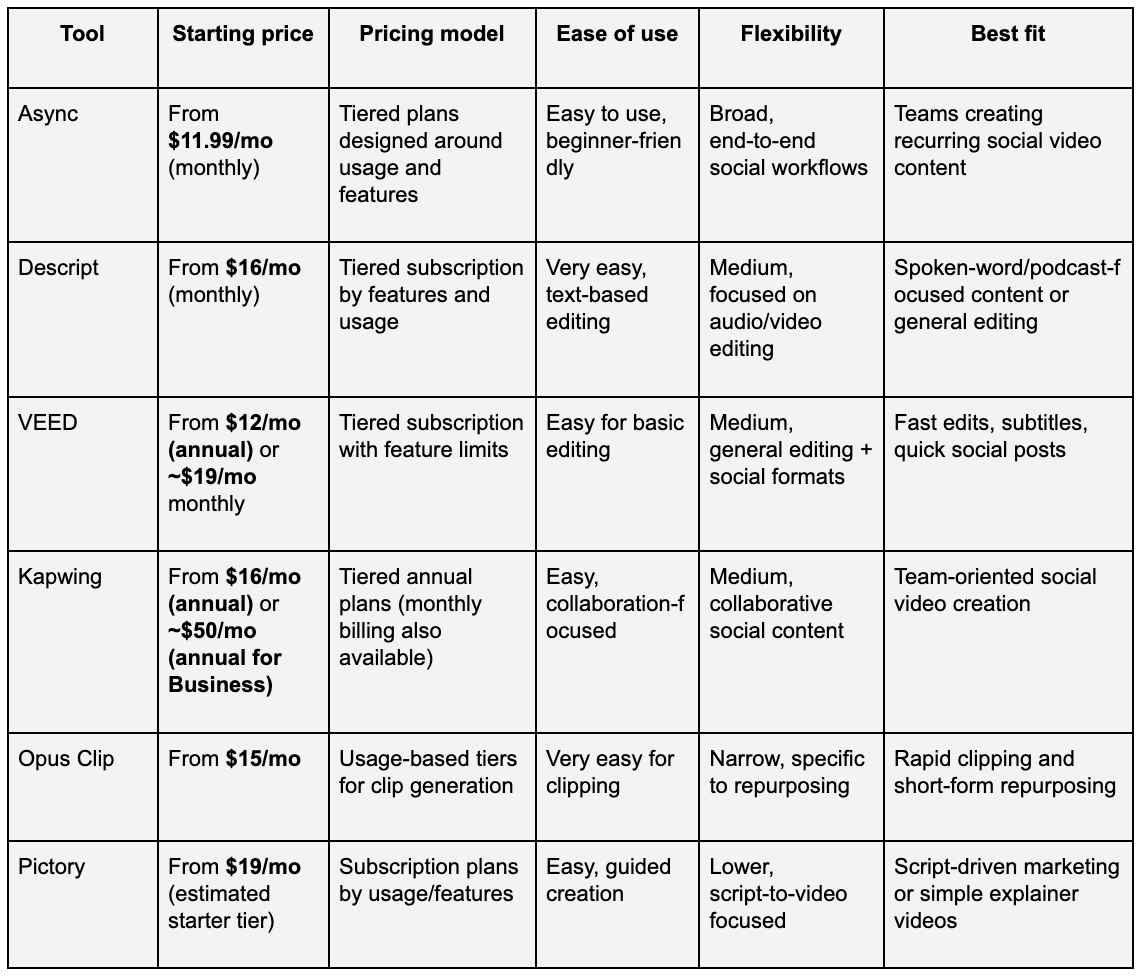
Prices reflect publicly listed entry plans at the time of writing. Actual costs may vary based on usage, features, billing cycle, or team size.
How to interpret this comparison
The main difference across these tools is whether they solve a single production task or support a full, repeatable social media video workflow. Tools with lower starting prices often focus on one part of the process, such as clipping or captions, while platforms built for ongoing social media production tend to bundle more capabilities into a single workspace and scale pricing based on usage.
For teams publishing video regularly, flexibility and workflow fit usually matter more than the headline price alone.
Best practices for using AI-driven tools in marketing video production
Short answer:
AI-driven tools work best when they support a clear video strategy, consistent quality standards, and a feedback loop that helps teams improve content over time.
Longer answer:
Using AI in marketing video production is less about automating everything and more about using the right automation in the right places. The most effective teams use AI to speed up production, maintain consistency, and test ideas faster, while still making intentional creative decisions. The best practices below focus on how to get reliable results from AI tools without sacrificing quality or losing control over the message.
In the context of marketing video production, this balance is what allows teams to scale output without losing clarity, brand consistency, or creative intent.
Ensuring quality content
AI can speed up production, but quality still sets the ceiling for performance. Clear visuals, readable captions, and clean audio remain essential, especially in fast-scrolling social feeds. Teams should define basic quality standards upfront, such as framing, subtitle style, and audio clarity, and apply them consistently across all videos.
Using AI to handle repetitive tasks like formatting or audio improvement helps maintain that baseline without adding extra manual work. This allows teams to focus more attention on storytelling, pacing, and clarity rather than technical cleanup.
Measuring engagement and effectiveness
AI-driven tools make it easier to produce more content, but volume alone is not the goal. Performance should be measured using platform-native signals such as watch time, retention, saves, shares, and comments, not just views.
Teams should regularly review which formats, hooks, and video lengths perform best, then use those insights to guide future production. AI-supported workflows are most effective when they are paired with clear performance benchmarks and regular review cycles.
Iterating based on feedback
One of the biggest advantages of AI-driven production is speed. Faster turnaround makes it possible to test ideas, learn quickly, and iterate without long production delays. Feedback can come from performance data, audience comments, or internal reviews.
Instead of treating each video as a finished product, high-performing teams treat content as a series of iterations. AI tools make it easier to adjust pacing, captions, or formats and redeploy updated versions based on what resonates.
Building repeatable workflows
Consistency becomes much easier when video production follows a repeatable process. AI-driven tools are most effective when they are integrated into a defined workflow, from recording and editing to publishing and analysis.
Teams that document their processes and reuse proven setups tend to scale faster and with fewer errors. This is where platforms that combine multiple steps into one workspace, such as Async, can help reduce friction and keep production organized as output increases.
Final thoughts
AI-driven video production has quickly moved from a nice-to-have to a practical requirement for teams producing social media content at scale. As platforms continue to favor frequent, high-quality video, the challenge is no longer whether to use AI, but how to use it to support consistency, speed, and creative control.
The most effective tools are the ones that fit into real workflows, reduce friction, and make it easier to turn ideas into publishable content without multiplying effort. Whether a team needs a focused solution for clipping or a broader system that supports the full production cycle, choosing the right tool comes down to workflow fit rather than feature count.
For teams looking to streamline recording, editing, and repurposing into a single, repeatable process, platforms like Async offer an approach designed specifically for ongoing social media video production.
FAQs
What is the best AI-driven tool for scalable social media video production?
The best tool depends on how much content you produce and how complex your workflow is. For teams publishing video regularly and needing to record, edit, subtitle, and repurpose content efficiently, an end-to-end platform like Async is often a strong fit. Tools that focus on a single task, such as clipping or captions, can work well when used alongside a broader production system.
What is the best AI to use for social media content?
There is no single “best” AI for all social media content. Some tools specialize in editing and repurposing video, others in generating scripts, captions, or visuals. The most effective setups usually combine AI features that support speed and consistency with human input for creative direction and messaging.
What is the 30% rule in AI?
The 30% rule generally refers to the idea that AI should assist rather than fully replace creative work. In marketing, this often means using AI to handle repetitive or time-consuming tasks, while humans remain responsible for strategy, storytelling, and final decisions. It’s not a formal standard, but a guideline for balanced use.
What is the 5 3 2 rule for social media?
The 5-3-2 rule is a content mix guideline suggesting that out of ten posts, five should educate or inform, three should engage or entertain, and two should promote. While not strict, it helps teams maintain variety and avoid overly promotional feeds.
Can ChatGPT make social media posts?
Yes, ChatGPT can help generate captions, hooks, content ideas, and outlines for social media posts. However, it works best as a starting point or support tool. Human review is still important to ensure accuracy, brand voice, and alignment with campaign goals.