
The best time to post on YouTube is typically between 3 PM and 5 PM on weekdays and 9 AM to 11 AM on weekends, giving the algorithm time to index your video before peak evening viewing. But here’s the truth: the “perfect” time depends on your audience, your content, and how consistently you test and adapt.
If you’ve ever uploaded a video you knew was good… and it still flopped, timing might be the missing piece.
Because on YouTube, it’s not just about what you post, it’s about when your audience is ready to watch, engage, and signal to the algorithm that your content deserves to be pushed further.
In this guide, we’re not just throwing random time slots at you. You’ll learn the actual data behind posting times, the difference between long-form videos and Shorts, what real creators are saying, and how to find your own best posting time so you can consistently grow.
Let’s get into it.
What is the best time to post on YouTube
If you want the clearest possible answer, here it is: for long-form YouTube videos, the strongest general posting window right now is Sunday morning, with Sunday at 10 a.m. standing out as the top-performing slot in Buffer’s 2026 analysis of 1.8 million YouTube videos. Across the week, morning uploads also performed especially well, with strong windows showing up around 8 a.m. to 11 a.m. for long-form content.
What current data suggests
That matters because a lot of older advice around the best time to post on YouTube focused on weekday afternoons. Buffer’s latest dataset found that this pattern has shifted: instead of late-afternoon weekdays dominating, morning uploads and weekend publishing, especially Sundays, now appear to have the edge for long-form videos.
Best days and time slots
Here’s the bigger picture. According to Buffer’s breakdown, the strongest days for long-form YouTube uploads are Sunday, Tuesday, and Monday, while Wednesday and Thursday tend to be the weakest overall. Their top time slots by day include Monday at 9 a.m., Tuesday at 9 a.m., Friday at 12 p.m., Saturday at 12 p.m., and Sunday at 10 a.m.
A practical starting point
So, what is the best time to post on YouTube? If you want a starting point backed by current platform-wide data, use this:
- Best overall time for long-form: Sunday at 10 a.m.
- Best general range: 8 a.m. to 12 p.m.
- Best fallback weekday slot: Tuesday morning
- Best alternative if you cannot post on Sunday: Friday around 12 p.m.
Why channel-specific data still matters
But this is where a smart creator stops treating generic studies like law.
YouTube itself points creators back to their own analytics. On the official YouTube Creators site, YouTube says audience analytics can show what time of day your viewers are on YouTube, which helps you get more strategic about when to post future content. Its Help documentation also explains that the Audience tab in YouTube Analytics gives you a view of who is watching and helps you understand your audience better. In other words, broad studies are useful for a starting schedule, but your channel data should be the final decision-maker.
What real creators are saying
That lines up with what creators themselves say. In the Reddit discussion, several creators said upload timing made little difference to long-term performance, especially for smaller channels, while others pointed out that the real answer depends on your target audience, their time zones, and your YouTube Analytics. One commenter also noted that videos posted at different times of day ended up with similar average views by the next day, even if there was sometimes a small short-term lift early on. That is not hard science, but it is a useful real-world context: timing can help, yet it usually does not rescue weak content or replace audience fit.
The most honest answer
So when people ask, what’s the best time to post on YouTube, the most honest answer is this: start with proven high-performing windows like Sunday morning or Tuesday morning, then refine from your own audience behavior in YouTube Studio. That gives you the best of both worlds: a data-backed default and a channel-specific strategy.
Timing matters, but consistency matters too
One more thing worth knowing: consistency still matters. YouTube’s own upload schedule guidance says a consistent, sustainable release schedule is important for building audience expectations. So yes, timing matters, but consistency matters too. A channel that posts at a good-enough time every week will usually outperform one that chases “perfect” timing but uploads randomly.
The takeaway
So, if you are looking for the practical version, use this rule:
Post long-form videos on Sunday morning if you can. If not, aim for Tuesday morning or Friday around noon. Then check your YouTube Analytics and adjust based on when your viewers are actually online.
Best time to post shorts on YouTube
If you’re focusing on Shorts, the timing game changes a bit.
The best time to post Shorts on YouTube is generally between 12 PM and 3 PM, and again between 7 PM and 10 PM, when people are most likely to scroll casually on their phones. Unlike long-form content, Shorts rely heavily on immediate engagement, so posting when your audience is already active matters even more.
Why timing matters more for Shorts
Shorts are built for speed.
When you upload a Short, YouTube quickly tests it with a small audience. If it gets strong signals early on, likes, watch time, replays, it gets pushed further into the Shorts feed. If not, it dies fast.
That means your posting time directly impacts your initial performance window.
According to multiple platform studies and creator insights, Shorts tend to perform best during:
- Lunch breaks (12 PM - 2 PM) when people scroll during downtime
- Evenings (7 PM - 10 PM), when users relax and consume short-form content
- Late nights (after 10 PM) in some niches, especially for younger audiences
This aligns with broader short-form behavior trends seen across platforms like TikTok and Instagram Reels, where mobile-first consumption dominates.
Best days to post Shorts
Unlike long-form videos, Shorts are less dependent on specific days and more on frequency and timing.
That said, data suggests:
- Monday to Thursday → consistent performance windows
- Friday evening → strong engagement boost
- Weekend afternoons → highly competitive but high potential
In simple terms, Shorts reward consistency over perfection. Posting regularly at strong time windows matters more than finding one “perfect” day.
What creators are actually experiencing
From creator discussions and real-world testing, a common pattern shows up:
Many creators notice that Shorts can take off hours or even days after posting, meaning timing is important, but not always decisive. Some Shorts posted at “bad” times still go viral later once the algorithm picks them up again.
At the same time, others report that posting during peak activity windows gives their Shorts a stronger initial push, which increases the chances of early traction.
So again, timing helps, but it’s not magic.
How to find your best time to post Shorts
If you want to move beyond generic advice, here’s what actually works:
Start by checking your YouTube Studio → Audience tab, where you can see when your viewers are most active. This is your strongest signal.
Then test consistently:
- Post at the same time for a week (for example, 1 PM)
- Compare performance
- Shift to another time slot (like 8 PM)
- Track what actually improves reach and watch time
Over time, you’ll identify your own best time to post on YouTube Shorts, which is far more valuable than any general recommendation.
A smart strategy most creators miss
Here’s something most people overlook:
If you’re posting both long-form videos and Shorts, use Shorts to warm up your audience before a main upload.
For example:
- Post a Short at 1 PM
- Drop your long-form video at 5 PM
This creates momentum on your channel and can improve early engagement signals across both formats.
And if you’re repurposing content, this gets even easier. Tools like an AI clip generator can quickly turn your long videos into Shorts, while adding captions automatically so your content still performs when people watch on mute.
The best time to post shorts on YouTube is usually midday and evening, when mobile usage peaks. But more importantly, Shorts reward consistency, testing, and fast feedback loops.
So don’t overthink it. Pick a time, stay consistent, and let your data guide you.
How to find your own best time to post on YouTube
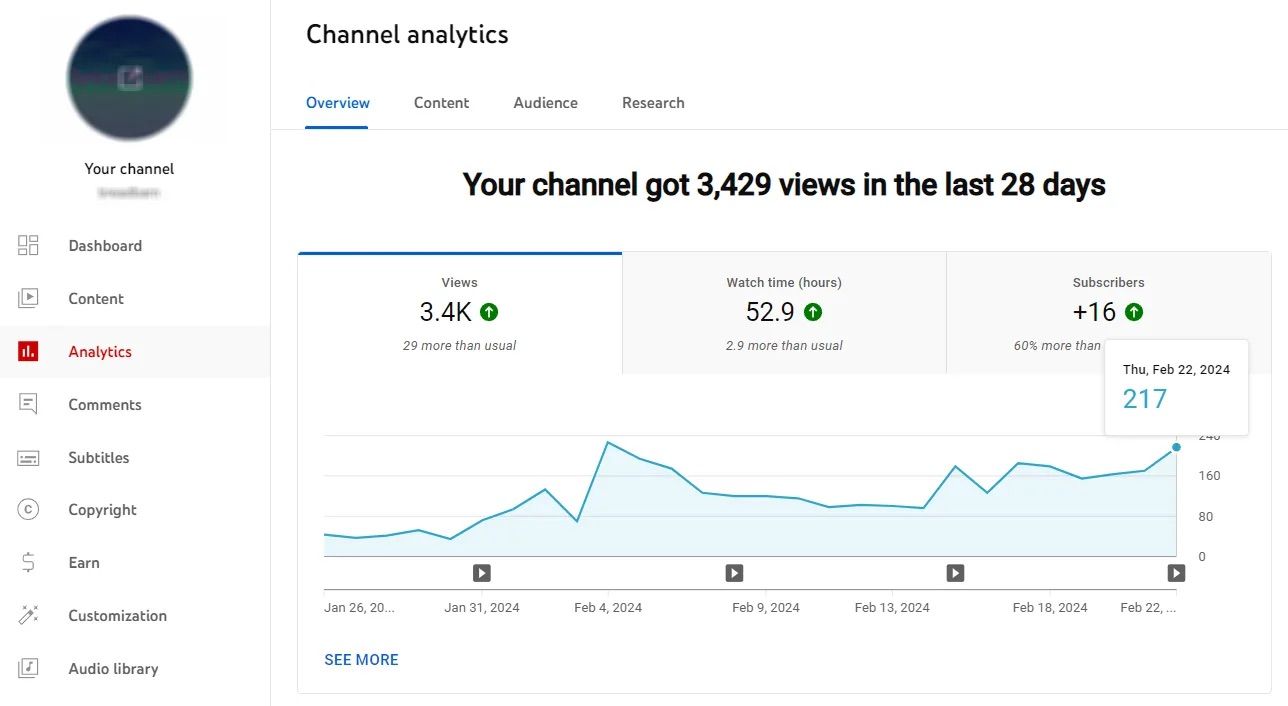
Here’s where you stop relying on generic advice and start building a strategy that actually works for your channel.
Because the truth is, the best time to post on YouTube is not universal. It’s specific to your audience, your niche, and your content behavior.
Step 1: Check when your audience is actually online
Go to YouTube Studio → Analytics → Audience.
There, you’ll find one of the most important graphs on your channel:
“When your viewers are on YouTube.”
This shows:
- The exact days your audience is most active
- The hours they’re online
- Patterns you can actually use to schedule uploads
If you see that your viewers are most active around 6 PM, don’t post at 6 PM, post 2-3 hours earlier so your video has time to index and gain traction.
That small shift can make a big difference in early performance.
Step 2: Post before peak, not during peak
This is one of the biggest mistakes creators make.
They think:
“My audience is online at 7 PM, so I should post at 7 PM.”
But YouTube needs time to:
- Process your video
- Test it with small audiences
- Start recommending it
That’s why most high-performing strategies recommend posting 1-3 hours before peak activity.
So if your audience peaks at:
- 7 PM → post at 4-5 PM
- 12 PM → post at 9-10 AM
This aligns your video with the moment your viewers actually start watching.
Step 3: Test consistently (not randomly)
You cannot find your best time if you keep changing everything at once.
Instead:
- Pick one time (for example, Tuesday at 10 AM)
- Stick with it for a few uploads
- Track performance (CTR, watch time, views in first 24 hours)
Then compare with another time slot.
The goal is not guessing, it’s controlled testing.
Step 4: Pay attention to early performance signals
When you change your posting time, focus on:
- Views in the first 2-6 hours
- Click-through rate (CTR)
- Average view duration
If your timing is right, you’ll usually see:
- Faster initial traction
- More impressions early on
- Better recommendation signals
If nothing changes, your timing might not be the issue, your packaging (title + thumbnail) or content might need work.
Step 5: Adjust based on your content type
Different types of content behave differently.
For example:
- Educational content → often performs well in the morning
- Entertainment content → tends to peak in the evening
- Shorts → more flexible, driven by mobile usage
So your best time to post on YouTube also depends on why people watch your content.
Step 6: Use your content to create momentum
Here’s a strategy most creators ignore:
Instead of thinking about one upload, think about content flow.
You can:
- Post a Short earlier in the day
- Build engagement
- Then drop your main video
This signals activity on your channel and can help your video get stronger early traction.
And if you’re creating multiple pieces of content from one video, this becomes much easier. Instead of manually editing everything, you can repurpose long-form content into short clips and publish them strategically across the day, keeping your channel active without extra production time.
Finding your best time to post on YouTube is not about guessing the “perfect hour.” It’s about understanding your audience, testing consistently, and aligning your uploads with real viewer behavior.
Start with proven time windows, but don’t stop there.
Your data will always be more powerful than any general advice if you actually use it.
How timing affects views and how to actually go viral
Timing is not a magic trick, but it can give your content a serious advantage when used correctly. The goal is not just to post at the right time, but to make sure your video performs well from the moment it goes live.
Here is how timing actually impacts your views and growth:
- Posting when your audience is active increases the chances of getting immediate clicks and watch time
- The first few hours after publishing are critical for how far your video will be pushed
- Strong early engagement signals help YouTube expand your video to a wider audience
- Posting too late or when your audience is offline can slow down momentum
- Good timing works best when combined with strong content, including a clear hook and high retention
- Videos that are easy to understand, engaging, and curiosity-driven perform better with the algorithm
- Consistent posting helps build audience habits and improves long-term performance
- Repurposing content into shorter clips can keep your channel active and drive more attention to your main videos
At the end of the day, the best time to post on YouTube gives your video a strong start, but it is the combination of timing, content quality, and consistency that actually leads to growth.
A simple YouTube posting strategy you can follow
Now that you know the best time to post on YouTube, the next step is turning that knowledge into something you can actually follow every week.
Because timing only works if you have a system behind it.
A simple system that actually works
Start simple.
Pick one or two time slots based on everything we covered earlier. For example, you might choose Sunday at 10 a.m. for long-form videos and weekday afternoons for Shorts.
The key here is not perfection, it is consistency. Stick to your chosen schedule for a few uploads so your audience starts to recognize when you show up.
Then pay attention to performance. Look at how your videos perform in the first 24 hours, how quickly they pick up views, and how your engagement compares across different upload times.
From there, adjust. Small changes based on real data will always outperform guessing.
How to stay consistent without burning out
One of the biggest challenges for creators is not knowing when to post, it is keeping up with posting consistently.
That is where a smarter workflow comes in.
Instead of creating content from scratch every time, start thinking in batches. Film multiple videos in one session, plan your uploads ahead, and give yourself room to stay consistent without pressure.
Even more importantly, stop thinking in single uploads. Think in systems.
One piece of content should not live as just one video. It should fuel multiple posts across your channel.
Build a repeatable content workflow
If you want to grow on YouTube, consistency matters just as much as timing.
But consistency does not come from motivation. It comes from having a workflow you can repeat without overthinking every upload.
Instead of deciding what to do each time, create a simple system you can follow every week. For example, you might film content on one day, edit on another, and schedule your posts in advance based on your chosen time slots.
This removes pressure and helps you stay consistent, even when you are busy or not feeling creative.
How to turn one YouTube video into multiple posts with Async

Instead of creating more content, you can get significantly more results by using what you already have.
When you rely on a single upload, your growth depends on one moment. But when you turn one video into multiple pieces of content, you create more opportunities to reach your audience at different times of the day.
Start with one strong long-form video
Everything begins with your main video. This is your core content, the piece that carries your main idea, story, or value.
Instead of thinking “what should I post next,” think “how can I extend the life of this video?”
Turn key moments into Shorts
From that one video, you can pull out short, high-impact moments. These can be quick tips, strong hooks, or interesting parts that stand on their own.
With Async’s AI clip maker, you can quickly generate these Shorts without manually cutting everything yourself, making it much easier to stay consistent.
Add subtitles for mobile viewers
A huge portion of Shorts and social videos are watched without sound.
Adding subtitles helps your content stay engaging even when viewers are scrolling silently. Using a subtitle generator makes this process fast and consistent across all your clips.
Use a video editor to streamline everything
Instead of switching between tools or spending hours editing, having everything in one AI video editor helps you move faster and stay focused on publishing.
This is especially important when you are working with multiple clips and trying to maintain a consistent schedule.
Post across different time slots
Now you are not limited to one upload.
You can post a Short earlier in the day, another in the evening, and your main video at your primary posting time. This keeps your channel active and increases your chances of reaching more viewers.
When you combine smart timing with a system like this, you stop relying on single uploads and start building consistent momentum.
That is what actually drives growth on YouTube.
Common mistakes creators make when choosing a posting time
Even when you know the best time to post on YouTube, a few small mistakes can still hold you back. Most of them come down to overthinking or focusing on the wrong things.
- Chasing the “perfect” time instead of staying consistent
- Posting exactly at peak hours instead of a bit before
- Ignoring YouTube Analytics and relying only on general advice
- Changing your schedule too often without testing properly
- Blaming timing when the real issue is content or packaging
The goal is not to get everything perfect. It is to stay consistent, test smartly, and let your data guide you.
So… when should you actually post?
If you want a simple answer, start with Sunday morning for long-form videos and midday or evening for Shorts. That is a strong baseline backed by data.
But the real answer is this: the best time to post on YouTube is the time that works for your audience and your workflow.
Start with proven time slots, stay consistent, and adjust based on your analytics. Combine that with strong content and a repeatable system, and you will start seeing results that feel less random and more predictable.
That is when YouTube starts working for you, not against you.
FAQs
What is the best time to post on YouTube?
The best time to post on YouTube is usually between 8 a.m. and 12 p.m., with Sunday around 10 a.m. performing especially well for long-form videos. However, your ideal time depends on when your audience is most active.
What’s the best time to post on YouTube for views?
To maximize views, post 1–3 hours before your audience is most active. This gives your video time to gain early engagement and perform better when more viewers come online.
Best time to post Shorts on YouTube?
The best time to post Shorts on YouTube is typically between 12 p.m. and 3 p.m. or 7 p.m. and 10 p.m., when people are more likely to scroll on their phones.
Does posting time matter on YouTube?
Yes, posting time can affect early performance, which influences how far your video is pushed. However, content quality and consistency still matter more overall.
How often should I post on YouTube?
Posting once or twice a week for long-form content and a few times per week for Shorts is a good starting point. The key is to stay consistent with a schedule you can maintain.
Is it better to post in the morning or evening?
Both can work, but morning uploads often perform well for long-form videos, while evenings are strong for Shorts and entertainment content. The best option depends on your audience's behavior.