If your Reels aren't getting the views you hoped for, focus on three things:
- The first 1–2 seconds: Give people a reason to stop scrolling.
- The pacing: Cut unnecessary pauses and get to the point.
- The payoff: Make viewers laugh, learn something, or want to share the video with a friend.
But here’s where most people get stuck: they either overthink the content or underestimate how important structure and pacing are. Going viral on Instagram isn’t just about posting consistently, it’s about understanding how the algorithm measures engagement. Watch time, replays, shares, and saves matter far more than likes. That’s why even simple videos can outperform highly edited ones if they hook viewers quickly and keep them watching until the end.
Right now, we’re also seeing a major shift toward AI-generated Reels, from surreal storytelling formats like AI “fruit dramas” to fully generated videos that don’t require filming at all. These formats are exploding because they’re fast to produce, highly engaging, and easy to scale.
In this guide, we’ll break down exactly what works today: proven tips and tricks, the types of Reels that consistently go viral, and how to use AI to create high-performing content faster, even if you don’t want to be on camera.
Why some Instagram Reels go viral (and others don’t)
Instagram doesn’t recommend every Reel to the same audience. A video might receive plenty of likes from existing followers without reaching many new people, while another finds an audience well beyond the account that published it. The platform uses predictions about what people will watch and interact with, but no single metric guarantees a viral hit.
What Instagram actually looks at
Instagram ranks content differently depending on where it appears, with separate systems for Feed, Stories, Explore, and Reels. That means a strategy that works well for Feed posts will not have the same effect on Reels recommendations.
According to Social Media Today’s report on Adam Mosseri’s ranking insights, three particularly important signals are watch time, likes, and sends, meaning people sharing content privately. Likes have slightly more importance for connected reach, while sends have slightly more importance for reaching non-followers.
A tiny-kitchen makeover can get different reactions. One viewer watches to see how the cramped space turns out, another likes the finished kitchen, and a third sends the Reel to a friend who's always complaining about having no counter space.
Saves and comments can tell you more about how people respond to a Reel, but Instagram doesn't necessarily weigh every type of interaction the same way.
Why engagement doesn’t tell the whole story
A cooking account posts a beautifully plated pasta dish, and its regular followers leave plenty of likes. A few days later, the same account shares a quick fix for pasta sauce that keeps separating. That video might get fewer likes, but someone struggling with the same problem could send it to a friend who's complained about their sauce turning oily. Looking only at likes would miss that difference in how people respond to the two Reels.
The pasta-sauce Reel has something the plated dish doesn’t: a problem someone might recognize while making dinner. A viewer could send it to a friend who’s complained about their sauce splitting, even if they’ve never come across the cooking account before.
That’s the detail worth looking for in your own Reels. When one gets shared more often than another, watch it again and consider what prompted someone to send it. The answer might be buried in a single useful demonstration rather than the overall quality of the footage.
How to make Instagram Reels go viral: tips and tricks
The best editing choice depends on what the Reel is supposed to communicate. These eight tips cover decisions you can make while planning, filming, editing, and reviewing content, without relying on a promised algorithm shortcut.
1. Start with a stronger hook than you think you need
If you watch the first five seconds of your latest Reel with the sound off, can you tell what it’s about? For a video explaining why homemade bread turns out dense, you might have filmed the flour, mixing, kneading, and finished loaf in chronological order. But the most useful image is probably the one filmed last: slicing the bread to reveal its gummy center.
Open with that slice and a question such as “Why does homemade bread turn out like this?” Then use the mixing footage to explain the problem. The viewer knows what they’re watching for before the tutorial begins, and you haven’t had to record another shot.
This doesn’t mean every Reel needs to reveal its ending. A comedy sketch might need a moment to establish the characters, while a travel Reel might work better with a gradual reveal. The question is whether the opening earns the time it takes. Someone adjusting their camera or explaining that they’re about to explain something often doesn’t.
Try watching two versions of your next edit: one in its original order and another that starts with the most intriguing moment. The difference may be more obvious than any transition you could add.
2. Give people something worth sharing
A restaurant could post a beautiful close-up of a burger being assembled. The cheese melts, the sauce drips, and existing fans leave likes. Now imagine the same restaurant showing exactly what’s included in its meal for two, with the real portions on a table.
The second video answers a question people might genuinely send to a friend: “Should we order from here tonight, and is this enough for both of us?” It isn’t necessarily more entertaining. It has a practical reason to travel from one conversation to another.
The same principle works for creators. A freelancer demonstrating the difference between an unusable client brief and a helpful one might end up in agency group chats. A designer explaining why a menu font is difficult to read could attract other designers facing the same issue. A very specific joke can be just as shareable when it reminds someone of a particular colleague.
A restaurant owner might hear customers ask every weekend whether the sharing platter is big enough for three people. Showing the actual portions on a table gives those customers something they can send to the group chat while deciding what to order. That’s a much better reason to make the Reel than hoping someone will tag a friend because the caption asked them to.
3. Keep your Reel as long as the idea needs
A creator filming a sourdough tutorial might spend two minutes explaining why the starter keeps dying, especially when showing what a healthy starter should look like. Cutting that explanation down to 15 seconds could leave viewers with a nice montage of bread-making footage but no answer to the problem they came to solve. The extra time earns its place when it's actually helping someone understand what went wrong.
Instagram’s Help Center has described Reels up to 20 minutes and a distinction for recommendations of videos longer than three minutes. Those platform limits are separate from the creative question of whether a particular explanation needs 20 or 90 seconds.
In a 45-second Reel about crispy roasted potatoes, the video shows how to rough up the edges after boiling them, with the creator explaining that this helps create the crispy texture. A few seconds later, the same explanation plays over a different camera angle. Cutting that repeated part could bring the Reel down to 38 seconds, while still showing viewers how to prepare the potatoes, add the oil, and roast them.
Cutting the boiling step only to reach a trendy 15-second duration is an even worse decision, because viewers will miss an essential part of the technique. Instead, trim repetitive parts, dead space, and shots that add no information, and give the actually important actions the time they deserve.
Even a satisfying visual loop is optional; sometimes the finished potatoes are all the ending you need.
4. Make your content original, even when following a trend
Following a trend is only a part of how to make Instagram Reels go viral. Say you find a popular Reel featuring two characters arguing edited with quick cuts. The structure is appealing, but simply reproducing the exact dialogue doesn’t give your audience a reason to watch your version.
A social media manager can use the format to recreate a familiar client meeting situation: the client wants a viral campaign, but the brief doesn't even explain what the product does. The account manager keeps asking for details, only to hear, “Just make it creative.” This same back-and-forth can also work for a real estate agent dealing with a buyer who’s insisting on a dream apartment that is nowhere near their budget. In both cases, the humor comes from the format, conversations people in those industries know all too well.
Instagram has been cracking down on accounts that repeatedly repost other creators’ work without adding anything meaningful. This means that when it finds identical Reels, it will recommend the original version rather than the others. Also, accounts that keep publishing unoriginal material can face restrictions on recommendations. Using a popular sound or recreating a familiar transition is still fine, though. The problem starts when the finished video is essentially someone else’s Reel with a few minor changes.
If the awkward silence before the punchline in the client-versus-account-manager sketch made you laugh, keep that timing in mind when you’re writing your own version. But the joke itself should come from something you’ve actually experienced with a client; the kind of request you’d recognize immediately if it appeared in your inbox.
5. Make your Reel understandable without sound
A chef is explaining why a steak-cooking technique works while the camera follows the meat in the pan. The seasoning goes on, the steak cooks, and the finished result looks great. But with the sound off, viewers will miss the whole explanation. In this case, subtitles would let them follow what the chef is saying, as long as the text stays readable without covering the cooking footage.
A reel is distracting enough without Instagram's username, description, and interaction buttons covering part of the text, let alone trying to follow while every subtitle flashes onto the screen separately. So keep subtitles in a clear, high-contrast font, position them where they're easy to read on a phone, and use separate labels when viewers need to identify a product, measurement, or action that the footage doesn't make clear.
For example, a skincare creator comparing two products might subtitle their explanation and label whichever product is being applied. Review automatic transcription carefully, especially brand names, measurements, and unfamiliar terminology. Watching the export with sound off is a useful final check.
6. Use trends when they actually fit your content
You’ve probably seen businesses place a trending sound over unrelated product clips because the audio happens to be popular. This makes the video look current but doesn’t give anyone a reason to actually watch the Reel.
Consider the familiar format in which someone confidently announces a plan before everything goes wrong. A bakery could adapt it by showing a cake design that looked straightforward on paper, followed by a decorating process that’s anything but straightforward. The humor comes from an actual situation the bakery recognizes, not merely from using the right sound.
A bakery spots a trending Reel format on Monday, but its next shoot isn't until Thursday. By the time the footage is edited and approved, dozens of other accounts have already posted their versions of the same joke. The bakery's recurring customer questions or funny exchanges between staff could give it material to film regularly, without having to catch a trend before everyone gets tired of it.
Async’s guide to Instagram Reels formats has examples of POV skits, quick lessons, and transformation videos. Look at what makes the format work, then adapt it to your own subject. The useful ingredient may be the timing of a reveal rather than the audio itself.
7. Edit for retention, not constant movement
Picture this edit: the stylist is explaining why the jacket doesn't fit, and she's about to point out the shoulder seam. Suddenly, the editor zooms in on her face. A sound effect follows, and only then do we cut back to the full outfit as she's already talking about the sleeves. All that and we still haven't had a decent look at the shoulder she was trying to explain.
The close-up we needed was of the shoulder. Everything else made a fairly simple explanation harder to follow.
The opposite problem happens when an editor leaves too much in. A photographer demonstrating window lighting might show the original portrait, move the subject closer to the window, and reveal the difference by second 25. Another 15 seconds explaining why the new lighting looks better probably won’t add much when viewers can already see it.
Reviewing audience retention can help you investigate moments where viewers lose interest. Async’s guide to Reel retention tips covers ways to investigate audience drop-off. A decline in watch time doesn’t prove one particular cut caused the problem, but it gives you a reason to review what was happening at that moment.
8. Use performance data to improve your next Reel
Two Reels from the same account perform very differently. One gets 800 views, while the other reaches 18,000. The second video opens with the finished result, gets straight into the demonstration, and happens to be shorter. It's tempting to use that exact approach again, but the view counts alone can't tell which of those editing choices made the difference.
Instagram Insights provides better context. Average watch time tells you how long people watched on average, shares show whether people passed the video along, and non-follower reach indicates how far it traveled beyond your existing audience. Likes, saves, comments, and follows provide additional detail depending on the goal of the video.
Compare Reels with similar purposes. An employee comedy sketch and a technical product announcement might have different results because they serve different needs. Look for patterns across several uploads before deciding a particular editing technique deserves more use.
Types of Reels that go viral
If you’ve ever wondered why some Reels explode while others barely move, it often comes down to format, not just content. Certain types of reels are naturally more shareable, rewatchable, and engaging because they tap into how people consume content on Instagram.
The good news? You don’t need to reinvent the wheel. Most viral Reels fall into a few proven categories, you just need to adapt them to your style or niche.
Here are the formats that consistently perform
Relatable / POV content
POV content is one of the easiest ways to go viral on Instagram.
Relatable Reels work because people see themselves in the content and feel the urge to share it with someone else. That “this is so me” reaction is exactly what drives shares.
Examples:
• “POV: you said ‘just one episode’ at 11 pm.”
• “When you open Instagram for 5 minutes and it’s suddenly 2 hours later”
• “POV: your life starts feeling like a movie”
Why it works:
• High shareability
• Emotional connection
• Quick to understand
Educational quick tips
Short, useful content performs extremely well, especially when it delivers value fast.
Think:
• “3 things I wish I knew before…”
• “Stop doing this if you want to grow on Instagram”
• “One trick to instantly improve your Reels”
Why it works:
• People save it for later
• Feels actionable
• Builds authority quickly
Storytelling / mini drama
This is where things get interesting.
Reels that tell a short story, especially with tension or a twist, tend to keep people watching until the end. And that’s exactly what the algorithm loves.
Examples:
• “This is how I accidentally went viral…”
• “I tested this trend and didn’t expect this result”
• Short “drama-style” narratives
Why it works:
• Creates curiosity loops
• Boosts watch time
• Often leads to replays
Trend-based / meme Reels
Trends are still one of the fastest ways to go viral, but only if you move quickly.
This includes:
• Trending sounds
• Popular formats
• Viral edits
Why it works:
• Already proven format
• Lower friction for viewers
• Instagram often boosts trending content
But: copying trends exactly won’t get you far anymore. The Reels that perform best usually add a twist or niche-specific angle.
Transformation / before-and-after
People LOVE progress and contrast.
Examples:
• Room makeovers
• Glow-ups
• Editing transformations
• “Before vs after editing”
Why it works:
• Visual satisfaction
• Strong retention (people wait for the reveal)
• Easy to loop
Fast-cut, visually dynamic Reels
These are highly edited, fast-paced Reels that constantly change visuals to keep attention.
Examples:
• Travel edits
• Fashion transitions
• Aesthetic lifestyle clips
Why it works:
• Keeps dopamine high
• Prevents drop-off
• Feels polished and engaging
Weird, unexpected, or curiosity-driven content
This is where a lot of newer viral formats are coming from.
Content that feels slightly “off,” unusual, or unpredictable tends to stop the scroll immediately.
Examples:
• Strange AI-generated stories
• Unexpected plot twists
• Random but intriguing visuals
Why it works:
• Triggers curiosity instantly
• Makes people watch “just to see what happens”
• Often gets shared because it’s unusual
What all viral reel types have in common
Even though these formats look different, they all share a few key traits:
• They grab attention instantly
• They create curiosity or emotion
• They are easy to understand quickly
• They give a reason to watch until the end
• They are highly shareable
Once you recognize these patterns, you can start combining formats (for example: relatable + storytelling, or educational + trend-based) to create even stronger Reels.
The rise of AI Reels (and why they’re blowing up)
If you’ve been scrolling Instagram lately, you’ve probably noticed something… different.
Reels are getting weirder, more unpredictable, and honestly, a bit chaotic, from AI-generated “fruit dramas” with emotional storylines to surreal mini-movies that feel like they came out of nowhere. And the crazy part? These AI-generated Reels are pulling in millions of views.
So what’s actually going on?
We’re in the middle of a shift where creators are no longer limited by filming, locations, or even reality. With AI, you can generate entire scenes, characters, and stories in minutes. That opens the door to a completely new type of content, one that’s faster, more experimental, and often more attention-grabbing than traditional Reels.
Here’s why AI Reels are blowing up right now
• Curiosity-driven content: AI content often looks unusual or unexpected, which immediately stops the scroll. When something feels slightly “off” or different, people instinctively want to understand it.
• Unpredictability keeps people watching: Unlike traditional content, AI Reels can take surprising turns. This creates mini “curiosity loops” that push viewers to watch until the end.
• Low effort, high output: Instead of filming, editing, and sourcing assets manually, creators can generate content much faster. That means more experiments, more uploads, and more chances to hit something viral.
• Perfect for storytelling formats: AI makes it easy to create characters, scenes, and narratives, which is why formats like short dramas, POV stories, and episodic content are growing so fast.
The result? A new category of content that’s built for virality from the ground up, fast to produce, easy to scale, and highly engaging.
How AI tools make viral Reels easier
Let’s be real for a second. One of the biggest reasons people struggle to go viral on Instagram isn’t creativity, it’s execution.
Filming takes time. Editing takes time. Finding the right visuals, recording voiceovers, adding captions… it all adds up. And by the time your reel is ready, the trend you wanted to jump on is already gone.
That’s exactly why more creators are shifting toward AI-powered workflows.
Instead of doing everything manually, AI tools now handle a huge part of the process, making it faster and, honestly, way less overwhelming to create content consistently, even if you don’t want to be on camera.
Here’s how
AI clips speed up content creation
Turning ideas into actual Reels used to require filming or sourcing footage. Now, creators can generate or repurpose content into short-form videos in minutes.
For example, instead of recording everything from scratch, you can:
• Turn long-form content into short clips
• Generate visuals for storytelling formats
• Test multiple versions of the same idea quickly
This makes it much easier to post consistently and experiment with what works.
AI subtitles improve retention and reach
A huge portion of users watch Reels without sound. If your video relies only on audio, you’re losing viewers instantly.
That’s why captions and text overlays are no longer optional, they’re part of what makes a reel watchable.
With AI subtitles, you can:
• Automatically generate captions
• Make your content easier to follow
• Increase watch time and completion rate
More retention = more reach
AI voiceovers remove the need for recording
Not everyone wants to record their voice, and that’s okay.
AI voice generation makes it possible to:
• Add narration without recording
• Create consistent voiceovers across videos
• Experiment with different tones and styles
This is especially powerful for storytelling and educational reels.
Repurposing content becomes effortless
Another major advantage of AI is how easy it makes repurposing.
Instead of creating something new every time, you can:
• Turn one idea into multiple Reels
• Adapt content for different formats
• Scale your output without burning out
This is one of the biggest differences between creators who go viral once and those who do it consistently.
The biggest shift here is simple: instead of spending hours creating a single reel, you can now focus on testing ideas quickly and scaling what works.
And that’s exactly how viral creators think.
Create viral AI Reels in one workflow
One of the biggest advantages of using AI for content creation is speed. But that only works if your workflow is simple. If you’re still jumping between tools, you’re slowing yourself down.
With Async, you can generate and edit everything in one place, without breaking your creative flow. Here’s how to create an AI-generated reel step by step
Step 1: Open the video editor
Start by opening Async’s video editor and creating a new project. This is where your entire reel will come together.
Step 2: Go to “Generate new content”
On the left panel, click “Generate new content” to explore the available AI tools inside your workspace.
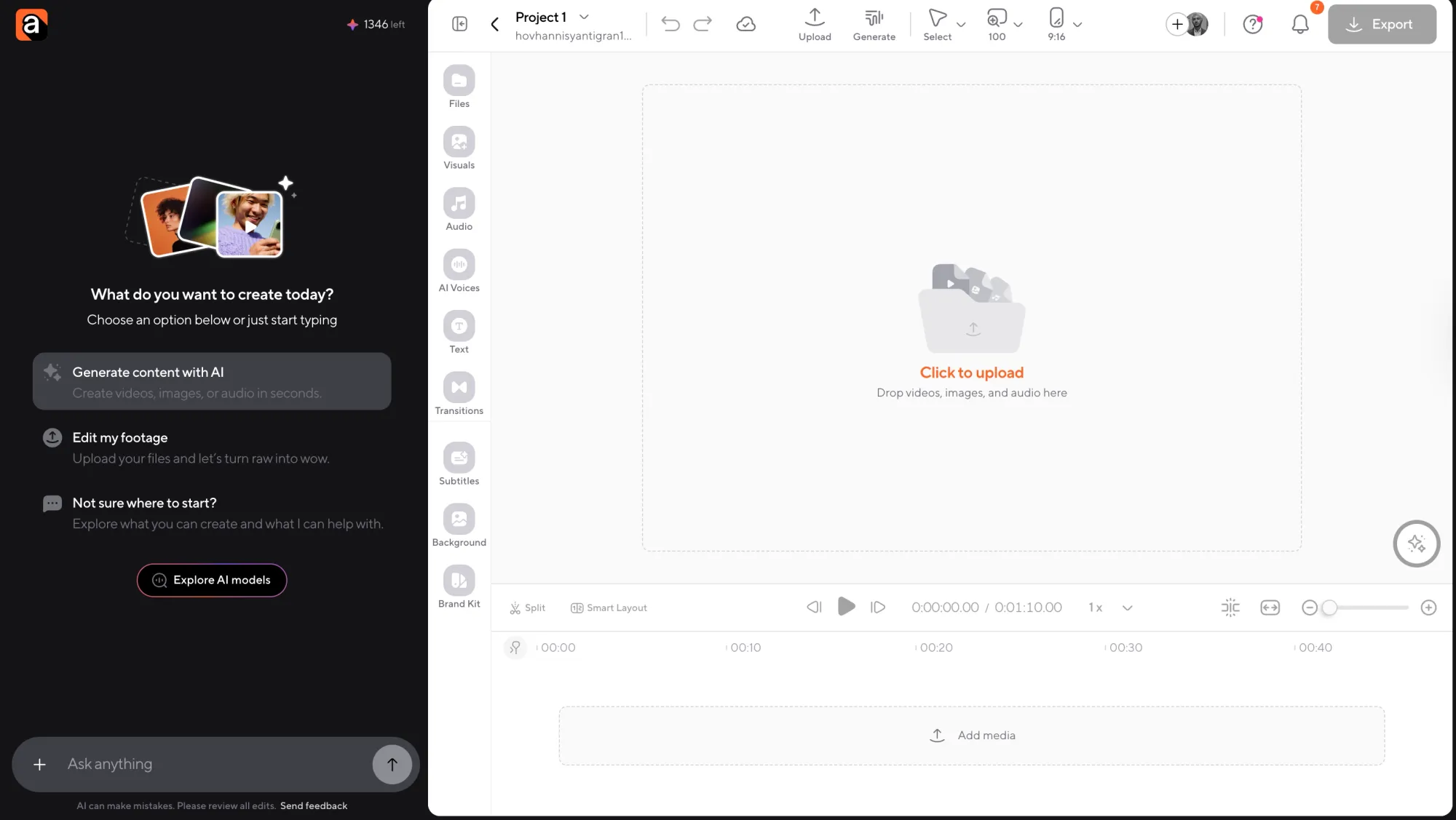
Step 3: Browse available AI models
You’ll see access to 100+ AI models for generating videos, images, and more, all directly inside the editor.
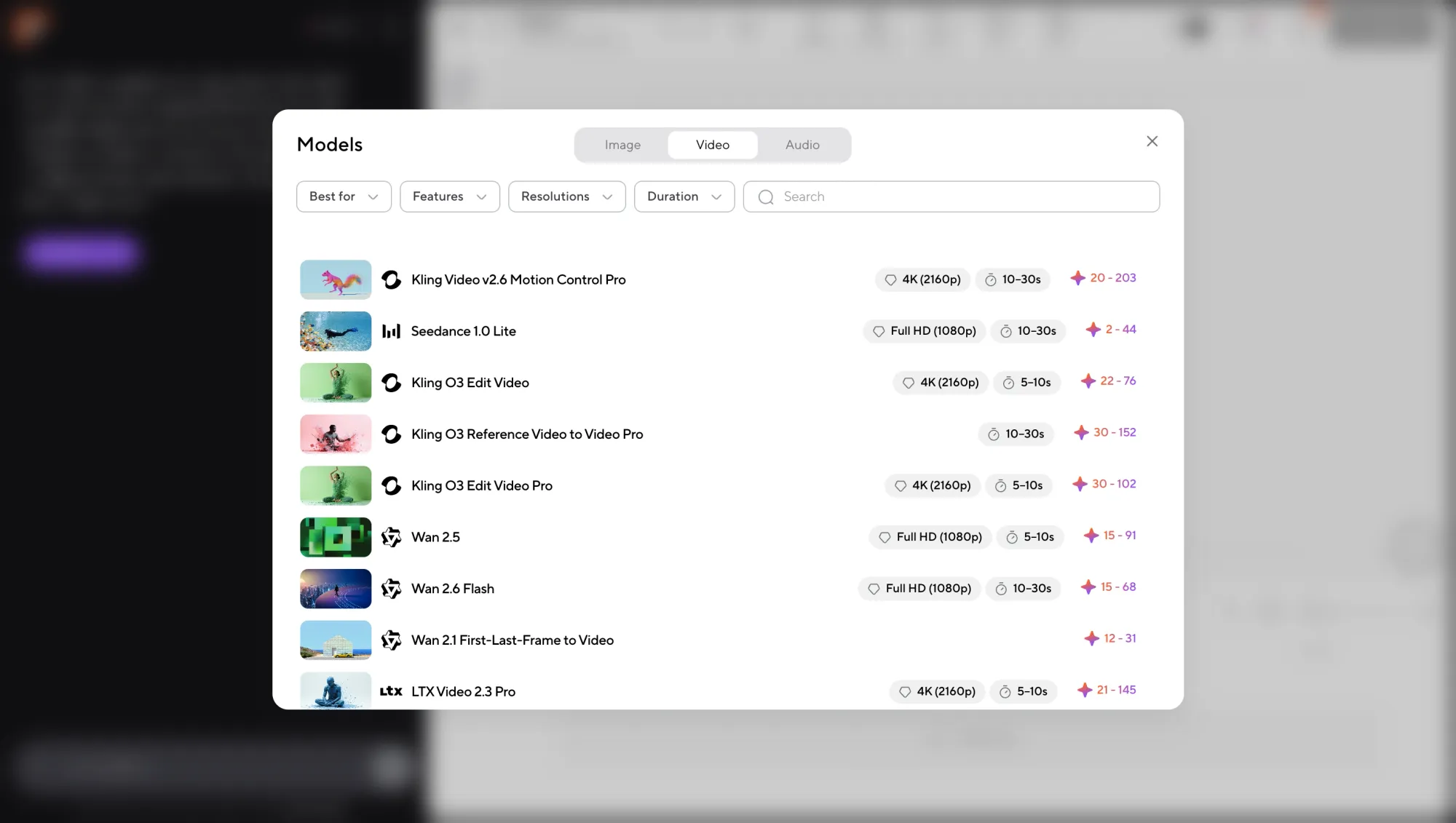
Step 4: Choose what you want to generate
Select the type of content you need:
• video clips
• images
• visual elements for your reel
Once you choose a model and input your idea, the AI will generate the content for you.
Step 5: Add it to your timeline and export
Bring your generated assets into the timeline, make quick edits if needed, and export your reel when it’s ready.
That’s it. No switching tools, no complicated setup, just a faster way to go from idea to finished reel in one workflow.
Why your Reels are not reaching more people
You’ve re-edited the opening, checked the captions, and published the Reel again. It still isn’t reaching many people outside your followers. At that point, another transition probably isn’t going to tell you much.
There are a couple of things worth checking in Instagram itself, particularly whether the video makes sense to people unfamiliar with your account and whether Instagram has flagged any recommendation eligibility issues.
Your Reel makes sense only to existing followers
A photography account posts a tutorial titled with the technical name of a camera setting. Its followers understand the terminology, but someone encountering the video through recommendations may not know why the setting matters. Opening with the photograph it helps produce could make the explanation accessible without watering down the subject.
This applies to recurring series, inside jokes, and clips extracted from longer conversations. Someone opening a Reel with “That’s why I stopped doing it” won’t make sense unless the viewer knows what it refers to. Give each video enough context to work on its own.
Your account may have a recommendation eligibility issue
Instagram has rules for which content it can recommend to people who don’t follow an account. As Meta’s recommendation guidelines explain, some material may be allowed on the platform without being eligible for recommendation.
Professional accounts can check Account Status from their Instagram settings and review any issues affecting recommendation eligibility. The location of the menu can vary by app version; where Instagram provides an explanation, review available options to edit, remove, or appeal the affected content. Profile elements can matter as well as individual posts.
A Reel might get very few views even when Instagram considers it eligible for recommendations. That alone doesn't mean the account has been penalized. Before spending hours cutting the footage again, check whether Instagram has flagged anything that could affect how widely the Reel gets recommended. The editing might have nothing to do with the problem.
Trial Reels let you experiment with unfamiliar ideas
A food creator who’s spent two years filming polished recipe videos wants to try something different: short clips of herself talking through mistakes that happen during preparation. She isn’t sure whether the people following her for carefully edited recipes will enjoy the messier format.
Trial Reels give her somewhere to try it. Instagram initially shows trial content to non-followers, so she can see how unfamiliar viewers respond before deciding whether to publish more videos in that style.
Once a Trial Reel has been live for roughly 24 hours, you can start checking how it's performing by tracking its views, likes, comments, and shares, as explained in Meta’s Trial Reels announcement. Try it yourself by looking for the Trial option when you're about to share a Reel, but note that this feature is not available on every account.
Trial Reels aren’t guaranteed exposure and don’t create a controlled A/B test. They do offer another way to explore a format without making every experiment part of your regular follower-facing publishing routine.
How to test your Reels and improve performance
Open Instagram Insights and select a handful of recent Reels serving similar purposes. Comparing three recipe tutorials will teach you more about your recipe editing than comparing one with a staff celebration or a product launch.
Say a cooking account posts three Reels about roasted potatoes and wants to figure out which editing choices are worth repeating. Here's what the numbers might look like:
These are fictional figures used to illustrate the comparison, not results from a real Instagram account.
Reel B stands out. People watched it for an average of 21 seconds, shared it 116 times, and it reached 5,400 non-followers, more than either of the other videos. It's also the shortest at 32 seconds, although that doesn't necessarily explain the difference. Maybe Reel B opened with someone breaking apart a crispy potato while the others spent their first few seconds chopping ingredients. Trying that opening again would help the creator see whether it played a part in the stronger performance.
Compare sharing fairly
A Reel might have more shares simply because more people saw it. To see how often viewers actually shared each video, calculate the share rate = shares ÷ accounts reached × 100. Reel A comes out at 0.58%, while Reel B reaches 1.49%. That means a larger proportion of Reel B's audience chose to share it, even after accounting for the difference in reach.
Those numbers aren’t Instagram-wide success benchmarks. They’re useful only in the context of the videos being compared. Likewise, average watch time includes replays, so don’t treat it as an exact completion percentage.
Turn observations into the next edit
For the next few recipes, the creator could open with the finished texture while keeping the subject and overall presentation reasonably similar. After publishing, they’d compare results with their earlier tutorials. Perhaps the new openings hold attention longer, or perhaps the biggest difference turns out to be whether the recipe solves a problem people often ask about.
Writing down the decision in a simple note: “Tested finished-food opening; watch time improved across two similar recipes; try another before changing the whole format” is worth trying again before making bigger changes. Had the second video also switched to a different recipe, presenter, soundtrack, and editing style, it would be much harder to tell whether showing the finished dish earlier had made any difference.
After a month of testing, the cooking creator might notice that her crispy-potato videos receive more shares when the opening shows someone breaking one apart. She still won’t know exactly why one video reached 20,000 people and another reached 5,000, but she’ll have a useful editing decision to carry into her next shoot. That’s a more practical way to approach how to go viral on Instagram than trying to recreate one successful Reel perfectly.
Your next Reel might already be on your camera roll
Remember the iced coffee Reel? We didn’t need another camera angle, a new filming setup, or a completely different recipe. We just needed to find the espresso shot buried in the footage and give it a better place in the edit.
That’s worth remembering the next time a Reel doesn’t perform the way you expected. Before scrapping the idea, watch it again. Maybe the opening takes too long, or you’ve spent fifteen seconds explaining something the footage already shows. You might discover the editing is fine and the subject simply didn’t interest as many people as you’d hoped.
Learning how to make Reels go viral involves getting comfortable with that uncertainty. You can study Insights, experiment with openings, and get better at recognizing what your audience enjoys. Some videos will still surprise you, and the footage for your next good idea might already be sitting on your camera roll.
FAQs
How do you go viral on Instagram Reels?
To go viral on Instagram Reels, focus on strong hooks, high watch time, and shareable content. Your reel should grab attention within the first 1-2 seconds, keep viewers watching until the end, and give them a reason to share or save it. Consistency and testing different formats also play a big role.
Is 20,000 views in 2 days viral on Instagram?
It depends on your account size. For smaller accounts, 20,000 views in 2 days can be considered viral because it means your content reached far beyond your followers. For larger accounts, it may be a solid performance but not necessarily viral.
How long should Instagram Reels be to go viral?
Shorter Reels (around 7-30 seconds) tend to perform best because they’re easier to watch fully and rewatch. However, the most important factor is completion rate, not just length. A longer reel can still go viral if it keeps viewers engaged until the end.
Can AI-generated Reels go viral?
Yes, AI-generated Reels can absolutely go viral. In fact, many trending formats today use AI visuals, storytelling, and voiceovers. These reels often perform well because they’re unique, fast to produce, and highly engaging.
Do hashtags still matter for Reels?
Hashtags still help with discoverability, but they’re not the main factor anymore. Instagram prioritizes content quality, watch time, and engagement signals. Use a few relevant hashtags, but focus more on the content itself.
How often should I post Reels?
Posting 3-5 times per week is a good starting point for growth. The key is consistency and testing different formats. The more you post, the more data you get on what works, which increases your chances of going viral.