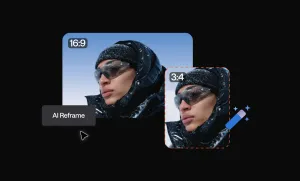
If you create video content today, you’ve probably run into the same issue: one video rarely fits every platform.
A clip that looks great on YouTube can feel awkward on TikTok or Instagram Reels. Horizontal videos get cropped, faces move out of frame, and important moments disappear once the format changes.
That’s where AI reframe comes in.
Instead of manually cropping every shot, AI reframe automatically adapts your video to different aspect ratios. It analyzes the footage, detects the main subject, and keeps the important elements centered while resizing the video for different platforms.
This matters because modern platforms are vertical-first. TikTok, Instagram Reels, and YouTube Shorts prioritize vertical videos that fill the screen and hold attention.
Manual cropping can solve this, but it’s slow and repetitive. Editors often have to adjust frames one by one and export multiple versions of the same video.
With automated AI video reframing, you can reframe video with AI, automatically generating vertical, square, or horizontal versions in minutes.
In simple terms, AI reframe turns one video into multiple formats automatically.
In this guide, we’ll explore what AI reframing is, how it works, and how you can use it to automatically resize videos, adapt content for social media, and dramatically speed up your editing workflow.
What is AI reframe?
AI reframe is a technology that automatically adjusts a video to fit different aspect ratios without requiring manual cropping.
Instead of editors resizing and repositioning every frame, AI analyzes the video and identifies the most important visual elements, such as faces, speakers, or moving subjects. The system then automatically adjusts the crop so the subject stays visible when the video is resized.
This process is known as AI video reframing.
When you reframe video with AI, the software tracks what’s happening in the scene and dynamically updates the frame as the video plays. If a speaker moves across the screen or two people are talking, the frame shifts to keep them in view.
The result is an automated way to perform video aspect ratio conversion and AI video resizing while preserving the key moments of the original footage.
For example, a horizontal video recorded in 16:9 can be automatically converted into a 9:16 vertical video for social media. The AI adjusts the crop throughout the video so the main subject remains centered instead of being cut out.
In practical terms, AI reframe allows creators to auto-resize videos for different platforms while keeping the most important content in frame.
Why creators reframe their videos and how it can help you too
Creators reframe videos because format now affects distribution, not just appearance.
The same video may need to work on YouTube, Shorts, Instagram Reels, TikTok, and even LinkedIn. Those platforms don’t just display content differently, they prioritize different shapes and viewing experiences. Google explicitly says vertical 9:16 videos are best suited for YouTube Shorts and perform better there, while horizontal assets may appear with blurred space added in the Shorts feed.
That matters because creators are no longer publishing for one destination. LinkedIn’s own video specs support 16:9, 1:1, 4:5, and 9:16, which shows how multi-format publishing has become part of the workflow itself. Reframing helps turn one source video into several usable versions instead of forcing a separate edit for each platform.
There’s also a strong performance reason behind this shift. HubSpot reports that short-form video is the most leveraged media format among marketers, and 49% say it delivers the highest ROI. Wistia’s 2025 video data adds that videos under one minute perform especially well, with how-to videos under one minute keeping viewers for an average of 82% of the video.
Here’s why reframing matters in practice:
• It protects usable screen space. A horizontal video often feels less native in vertical feeds, even when the content itself is strong. Google notes that vertical assets are better suited for Shorts.
• It makes repurposing realistic at scale. When one video needs to become a Reel, a Short, and a feed post, reframing removes a large part of the repetitive editing work. That matters even more in a market where short-form video is one of the biggest ROI drivers.
• It helps content feel native, not recycled. A speaker-centered crop for vertical viewing often feels more intentional than simply shrinking a horizontal frame into a mobile-first feed.
Another reason this matters is simple: people spend a lot of time in these environments. DataReportal’s Digital 2026 report says online adults use social media on average 4.21 days per week, and when video-centric platforms like YouTube and TikTok are included, average weekly consumption rises to 18 hours and 36 minutes. Reframing helps creators meet audiences where they already watch.
So yes, reframing helps with aspect ratios. But more importantly, it helps one video travel further, across more platforms, in more native formats, with much less manual work.
How to reframe video AI?
Reframing a video used to mean cropping manually, repositioning the frame, exporting multiple versions, and repeating the process for every platform. With modern tools, that entire workflow can now happen automatically.
Using an AI video editor like Async, you can upload a single video and let the system automatically track the subject and adjust the frame for different formats. Instead of manually resizing clips, the AI analyzes the footage and performs the video aspect ratio conversion for you.
Below is a step-by-step look at how to reframe video with AI using Async’s AI Reframe feature.
Step 1: Upload your video or paste a YouTube link
Start by uploading the video you want to reframe.
Async supports long-form source content such as podcasts, interviews, tutorials, and webinars. Once uploaded, the video appears in the editing workspace where you can begin preparing it for AI video resizing and repurposing.
This is typically the starting point for AI video repurposing, because one horizontal source video can later be transformed into several different formats.

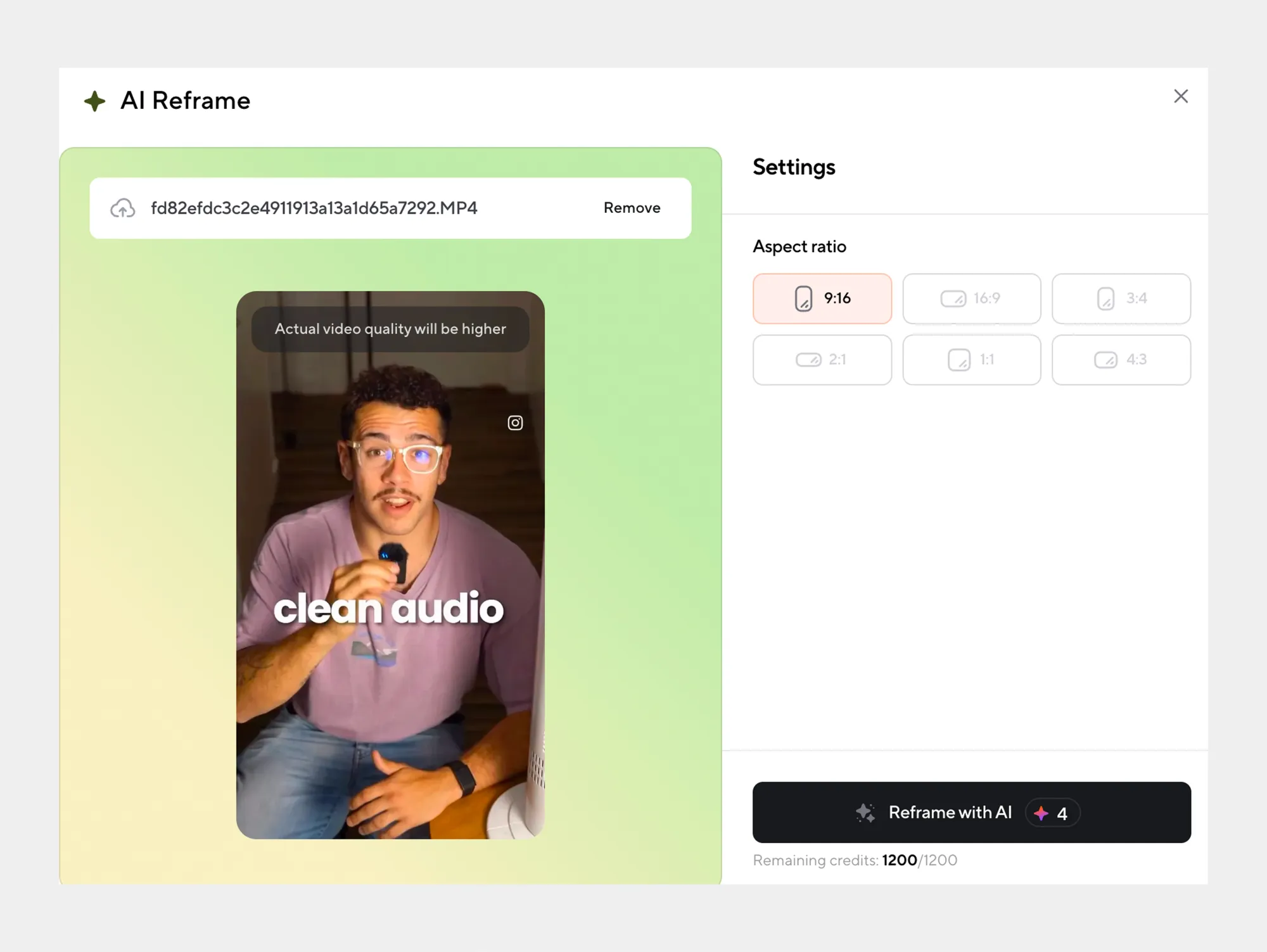
Step 2: Choose the target aspect ratio
Next, select the format you want the video to be adapted to.
Common options include:
• 9:16 for TikTok, Instagram Reels, and YouTube Shorts
• 1:1 for Instagram and LinkedIn feeds
• 16:9 for YouTube and long-form platforms
This step performs the AI video format conversion, allowing the same source footage to be automatically resized for different distribution channels.
Step 3: Let AI track the subject
Once the aspect ratio is selected, Async’s AI analyzes the footage and detects the main subject.
The system tracks faces, speakers, and moving objects across the timeline. As the subject moves within the frame, the AI dynamically adjusts the crop so the important elements remain visible.
This is the core of AI video reframing, instead of a fixed crop, the frame intelligently shifts as the video plays.
Step 4: Preview and fine-tune the result
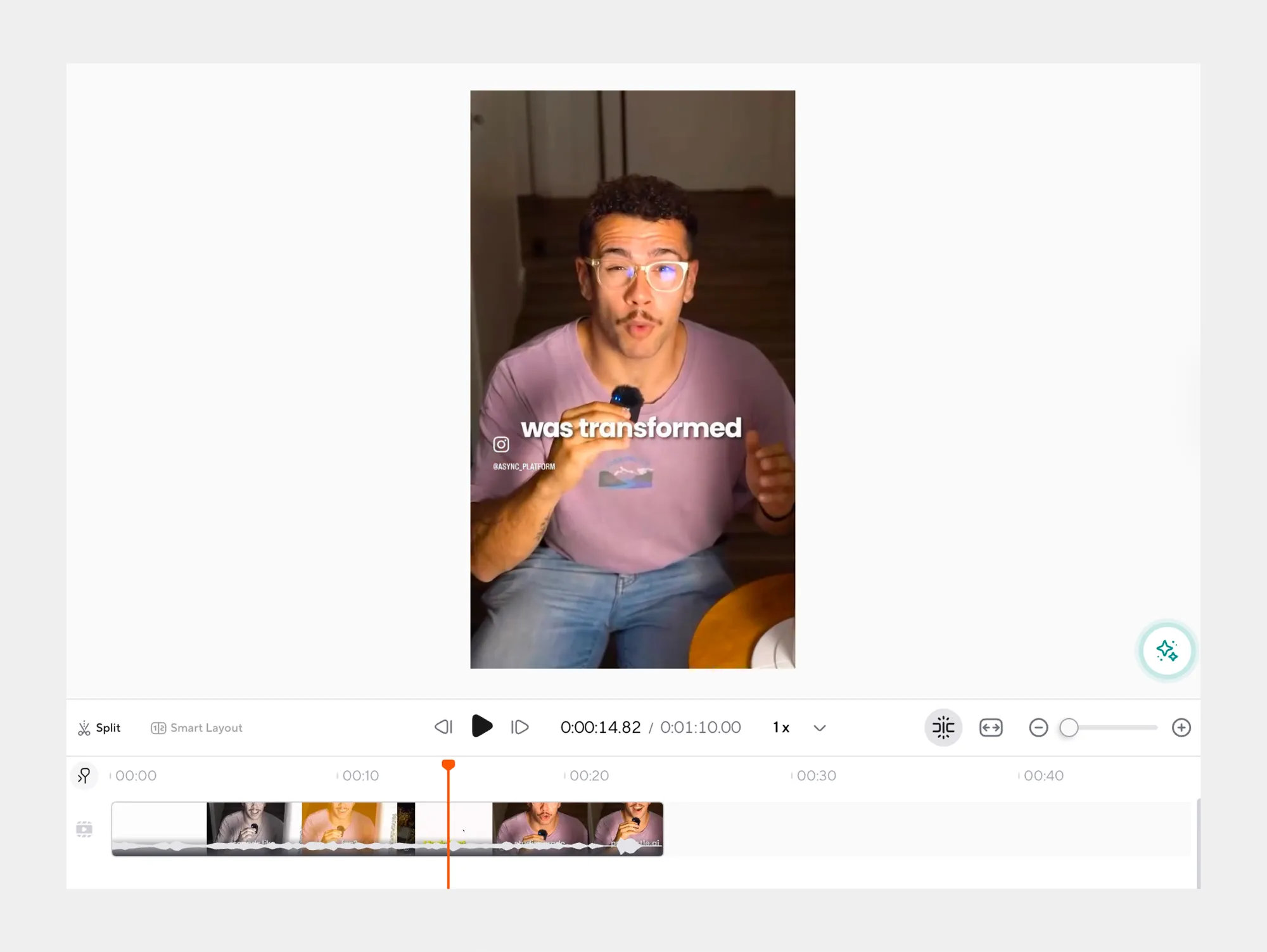
After the reframing process is complete, you can preview the updated version of the video.
The AI will have automatically resized the video while keeping the subject centered. If needed, you can still make manual adjustments or tweak framing for specific moments.
This hybrid approach combines automation with editorial control, allowing you to auto-resize videos while maintaining creative flexibility.
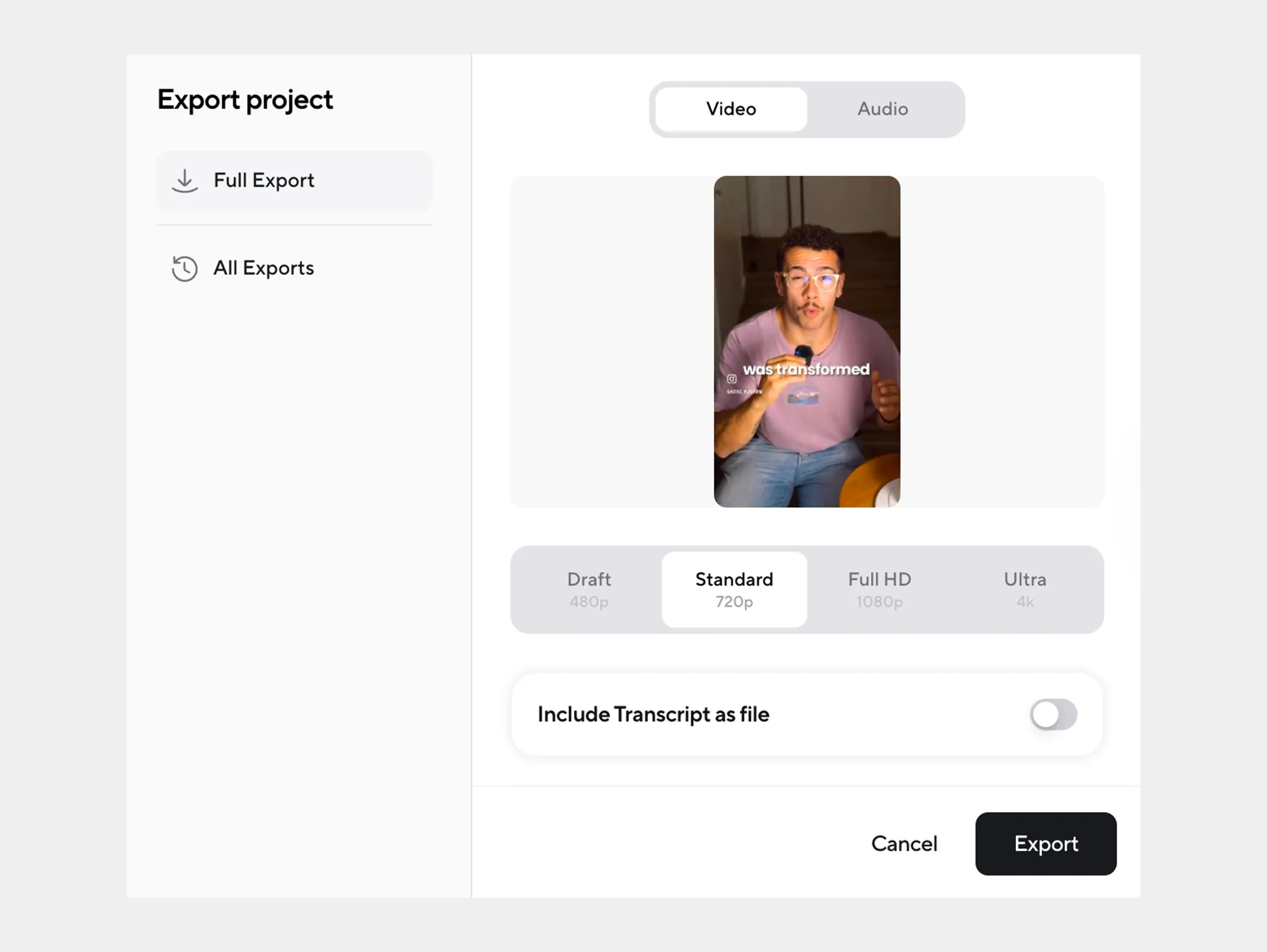
Step 5: Export the reframed video
Once you’re satisfied with the result, export the final version.
Your original horizontal video can now become a vertical clip, square social post, or multiple formats ready for distribution. This makes it easy to reframe videos for social media without repeating the editing process for every platform.
In just a few steps, AI reframe turns one video into multiple platform-ready formats.
How AI reframe works
Once you’ve seen the workflow, the next question is obvious: what is the AI actually doing?
At a practical level, AI reframe is constantly making framing decisions for you. Instead of applying one fixed crop to the whole video, it analyzes what is happening in the shot and adjusts the frame over time so the most important subject stays visible in the new aspect ratio. Adobe describes this as automatically identifying the action in a video and reframing clips for different aspect ratios.
Subject detection
The first job is figuring out what matters most in the frame.
In many videos, that means identifying the most relevant visual focus point, usually a face, speaker, or moving subject. Adobe’s reframe guidance notes that the system can detect and focus on the visually largest subject for reframing, which is why the tool often works especially well for talking-head videos, interviews, and presenter-led content.
Motion tracking
After that, the tool has to follow the subject as the shot changes.
This is where tracking comes in. Adobe’s Auto Reframe settings include different motion presets for slower motion, default, and faster motion, which shows that the system is not just cropping once, it is following action across the clip and adjusting based on how much movement the footage contains. In faster-motion footage, Adobe says the tool adds more keyframes to keep the moving object in frame.
Dynamic cropping
Once the subject is identified and tracked, the AI decides how to crop the frame for the new format.
That crop changes depending on where the subject is and what aspect ratio you choose. Adobe says Auto Reframe can automatically adapt content for square, vertical, and widescreen formats, while Apple describes Smart Conform as a way to automatically transform projects for square or vertical delivery. In other words, the crop is not random, it is format-aware.
Frame adjustments over time
What makes AI reframing useful is that those crop decisions are not static.
As the subject moves, the frame can shift with them. Adobe explicitly notes that more motion can require more keyframes, and also warns that complex sequences with multiple points of interest or rapid movement may still need manual fine-tuning afterward. That is an important clue about how these tools work in practice: they automate the bulk of the framing, then leave room for human adjustments where a scene is more complicated.
Why does this matter in real editing
The goal is not technical perfection. The goal is a video that still feels watchable and intentional after video aspect ratio conversion.
That matters even more on vertical platforms, where framing mistakes become more obvious. Google’s guidance for YouTube vertical video highlights safe areas and warns that important elements can be covered or cropped depending on placement and player behavior. AI reframing helps reduce that risk by keeping the key subject inside the most usable part of the frame, rather than leaving you with a simple center crop that cuts off what viewers actually came to watch.
So when you reframe video with AI, the logic is fairly simple: detect the subject, follow the motion, crop for the target format, and keep adjusting as the shot evolves. That is what makes AI video reframing feel far more natural than manual resizing or a fixed crop applied from start to finish.
Manual reframing vs AI reframe
Reframing a video can be done manually, but the process is often slow and difficult to scale. Editors must crop the frame, track subjects as they move, adjust the crop repeatedly, and export multiple versions of the same video for different platforms.
For short clips, that might be manageable. But when you’re working with long-form content like podcasts, webinars, or interviews, manual reframing quickly becomes time-consuming.
That’s why many creators are shifting toward AI reframe. Instead of manually adjusting the frame, AI analyzes the video, tracks subjects automatically, and performs the video aspect ratio conversion for you.
This difference becomes especially noticeable when you need to produce multiple formats from a single source video.
Manual reframing
Manual reframing typically involves a traditional editing workflow:
• Cropping the video to a new aspect ratio
• Manually repositioning the frame across the timeline
• Adding keyframes to track moving subjects
• Exporting separate versions for each platform
This process works, but it can take significant time, especially when converting horizontal video to vertical or adapting long videos for short-form platforms.
It also increases the chance of inconsistencies. A subject may move out of frame, or the crop might not update smoothly during motion.
AI reframe
With AI video reframing, the system performs most of the framing work automatically.
Instead of manually tracking the subject, the AI detects faces, speakers, and movement. It then dynamically adjusts the crop to keep the key elements centered as the video plays.
This makes it much faster to auto-resize videos and generate multiple formats from the same footage.
Manual vs AI reframing comparison
In practice, this means creators can focus more on storytelling and less on repetitive editing work. With AI reframe, the technical process of resizing and reframing videos becomes largely automatic, making it easier to reframe videos for social media and publish content across multiple platforms without duplicating effort.
Common use cases for AI reframe
AI reframe is most useful when one video needs to do more than one job. Instead of treating reframing as a last-minute resize, creators use it to turn a single source file into multiple platform-ready versions without rebuilding the edit from scratch. That is especially useful now that major platforms support different preferred formats, from 16:9 and 1:1 to 4:5 and 9:16.
Reframing horizontal videos into vertical
One of the most common use cases is taking a horizontal YouTube video, webinar, or podcast recording and converting it into a vertical clip for Shorts, Reels, or TikTok. This matters because YouTube says 9:16 vertical videos are best suited for Shorts, while TikTok also recommends 9:16 as the standard vertical format. In practice, AI reframe helps keep the speaker or action centered so the converted version feels native rather than like a cropped-down afterthought.
Reframing long-form content into clips
AI reframe is also valuable when repurposing long-form content into short clips. A single interview, tutorial, or podcast episode can be turned into multiple short-form assets, each framed for mobile-first viewing. This use case has become more important as short-form video continues to dominate marketer attention and ROI, making it more worthwhile to extract several smaller pieces from one source video rather than publish only the original full-length version.
Reframing interviews and podcasts
Interviews and podcasts are a natural fit for AI video reframing because the visual priority is usually clear: keep the active speaker in frame. Instead of manually keyframing every crop, AI reframe can follow faces and adjust the crop as speakers shift position or the conversation moves between participants. That makes it especially useful for talk-to-camera content, remote interviews, and side-by-side podcast recordings that need to be adapted for narrower vertical formats.
Reframing videos for different social platforms
Another major use case is preparing one video for several social placements at once. Reels are built around vertical delivery, TikTok recommends 9:16, and LinkedIn supports multiple aspect ratios, including 1:1, 4:5, 9:16, and 16:9. So, reframing is not just about converting horizontal to vertical, it is also about making the same content usable across feeds, ads, and short-form surfaces without creating separate edits for each destination.
What makes Async’s AI reframe different
Many editing tools now offer automatic reframing, but Async’s AI reframe is built specifically for modern content workflows where creators need to adapt one video for multiple platforms quickly.
Here’s what sets it apart:
• Automatic subject tracking: Async’s AI analyzes the footage and detects the main subject, such as a speaker, face, or moving object, keeping it centered as the frame adjusts. This makes AI video reframing feel natural rather than like a simple crop.
• Designed for short-form content: Since platforms like TikTok, Instagram Reels, and YouTube Shorts prioritize vertical viewing, Async helps creators quickly convert horizontal video to vertical and produce clips that fit mobile-first feeds.
• Works with long-form source videos: Podcasts, interviews, webinars, and tutorials can be reframed without manually adjusting the crop throughout the timeline. This makes AI video repurposing much faster when turning long videos into multiple shorter clips.
• Built into a full AI video editor: Reframing happens directly inside Async’s editing workflow. After the video aspect ratio conversion, you can immediately continue editing, trimming clips, adding subtitles, or preparing the video for publishing.
In short, Async’s AI reframe isn’t just about resizing a video. It’s about making it easier to reframe videos for social media and turn one source video into multiple platform-ready formats
Best aspect ratios when using AI reframe
Choosing the right aspect ratio is what makes AI reframe actually useful. The goal is not just to resize a video, but to adapt it to the way people watch on each platform. In most workflows, that means creating different versions of the same source video rather than relying on one format everywhere.
9:16 for Shorts and Reels
9:16 is the most important ratio for vertical-first platforms. Google says vertical 9:16 videos are best suited for YouTube Shorts and deliver better performance there, while Meta recommends 9:16 for Instagram Reels to capture the full screen. This is why creators often use AI reframe first to convert horizontal footage into a vertical version for mobile viewing.
1:1 for feeds
1:1 still matters because it works well in feed-based environments where vertical full-screen playback is not always the default. LinkedIn officially supports square video, and Google’s video specs also list 1:1 as a supported square format. In practice, square is useful when you want a version that feels compact, balanced, and easy to reuse across social feeds.
16:9 for original content
16:9 remains the standard for long-form video, especially on YouTube. YouTube says the standard aspect ratio on desktop is 16:9, which is why most podcasts, interviews, tutorials, and webinars are still recorded and published that way first. AI reframe becomes valuable here because it lets you keep that original widescreen version while also creating vertical or square adaptations from the same source file.
So if you want the simplest rule of thumb: use 16:9 for your main long-form video, 9:16 for Shorts, Reels, and TikTok, and 1:1 when you need a feed-friendly version. That is exactly why AI video reframing is so useful, it helps one video work across all three formats without rebuilding the edit each time.
AI reframe for different platforms
Different platforms prioritize different video formats. This is where AI reframe becomes especially useful, as it allows the same video to be quickly adapted to the format each platform prefers without manually editing multiple versions.
AI reframe for Instagram Reels
Instagram Reels are built around vertical 9:16 videos, designed to fill the entire mobile screen. When you reframe video with AI, horizontal footage can be automatically converted into a vertical version while keeping the subject centered. This makes it easier to turn podcasts, tutorials, or interviews into mobile-friendly Reels without losing the main visual focus.
AI reframe for YouTube Shorts
YouTube Shorts also prioritizes 9:16 vertical videos. Since many creators still record long-form content in 16:9, AI reframing helps convert those horizontal videos into Shorts-ready clips. Instead of applying a simple center crop, AI video reframing tracks the subject and adjusts the frame dynamically, helping the final clip feel more natural.
AI reframe for TikTok
TikTok recommends 9:16 vertical video to maximize screen coverage and viewer immersion. Using AI video resizing, creators can quickly convert existing footage into the vertical format TikTok favors. This makes it easier to repurpose content from YouTube, webinars, or interviews and publish it as TikTok-ready videos without rebuilding the edit from scratch.
One last thought on reframing your content
Video no longer lives in just one place. The same idea might appear as a YouTube video, a Reel, a Short, and a TikTok clip, each with its own format and viewing experience.
That’s why AI reframe has become so valuable. Instead of treating aspect ratios as a technical obstacle, it turns them into an opportunity to extend the reach of your content. One video can become several platform-ready versions without repeating the editing process.
If you’re already creating videos, chances are your content could travel much further. Sometimes it just needs the right format to reach the audience that’s already there waiting to watch.
FAQ
Is there any 100% free AI video generator?
Yes, there are AI video tools that offer free plans, though they usually come with limitations such as watermarks, export restrictions, or limited features. Free tiers are often useful for testing AI-powered editing, subtitle generation, or basic video creation. However, more advanced capabilities like automated editing, AI video reframing, and high-resolution exports are typically available in paid plans.
How to use Async for AI reframe?
To use Async’s AI reframe, upload your video into the editor and select the AI Reframe feature. Then choose the target aspect ratio, such as 9:16 for vertical content or 1:1 for square formats. The AI will analyze the video, detect the main subject, and automatically adjust the crop to keep the subject centered as the video plays. After previewing the result, you can export the reframed version for your chosen platform.
How to auto-reframe a video?
To auto-reframe a video, upload it to an AI video editor that supports automated reframing. Once uploaded, select the desired aspect ratio and activate the reframing feature. The AI analyzes the video, tracks the main subject, and dynamically adjusts the crop as the video progresses. This allows you to quickly convert horizontal videos into vertical or square formats without manually adjusting each frame.
What is auto-framing?
Auto-framing is a video editing technique where software automatically adjusts the crop of a video to keep important subjects in view. Instead of using a fixed crop, the system tracks faces, speakers, or moving objects and shifts the frame as the subject moves. This is commonly used for video aspect ratio conversion, especially when adapting videos for vertical or square formats.
How to restyle a video with AI?
Restyling a video with AI typically involves using AI-powered editing tools that can adjust visual elements, formats, or structure automatically. This can include AI video resizing, converting horizontal videos into vertical formats, generating subtitles, trimming clips, or adapting the content for different social platforms. AI tools help automate these processes, making it easier to repurpose and optimize videos for multiple channels.