Yes, sometimes. TikTok can show some people who viewed a recent post through Post View History, but it isn’t a complete list of everyone who watched. Profile View History and Story viewers work separately, and each one has its own rules.
That’s the part most guides blur together. When people ask who viewed my TikTok, they usually mean one of three things: who watched a post, who visited a profile, or who opened a Story. TikTok treats each one differently, with different time windows, settings, and eligibility rules.
This guide is for creators and everyday users who want a straight and simple answer. You’ll see how each viewer history feature works, how to turn it on, what it reveals about your own activity, and which TikTok Studio analytics help when names aren’t available.
Can you see who viewed your TikTok video?
Sometimes. Post View History can show some people who viewed one of your recent posts, but it doesn’t list everyone who watched. TikTok says it covers posts from the last seven days, and it’s only available to people aged 16 or older with fewer than 5,000 followers.
According to TikTok’s Post View History support page, the list can include:
- Followers who have turned on Post View History and viewed your post.
- People who don’t follow you but have liked or commented on your post. This applies whether or not they have the setting on.
- Views on posts that were published within the last 7 days.
That makes the list partial by design. A follower who keeps the setting off won’t show up, and neither will a non-follower who watched without liking or commenting. A long view count with a short viewer list is expected.
Eligibility matters here too. Accounts with 5,000 or more followers, as well as users under 16, don’t have access to that feature. Plus, TikTok also keeps Story view history separate from post view history.
How to turn on Post View History
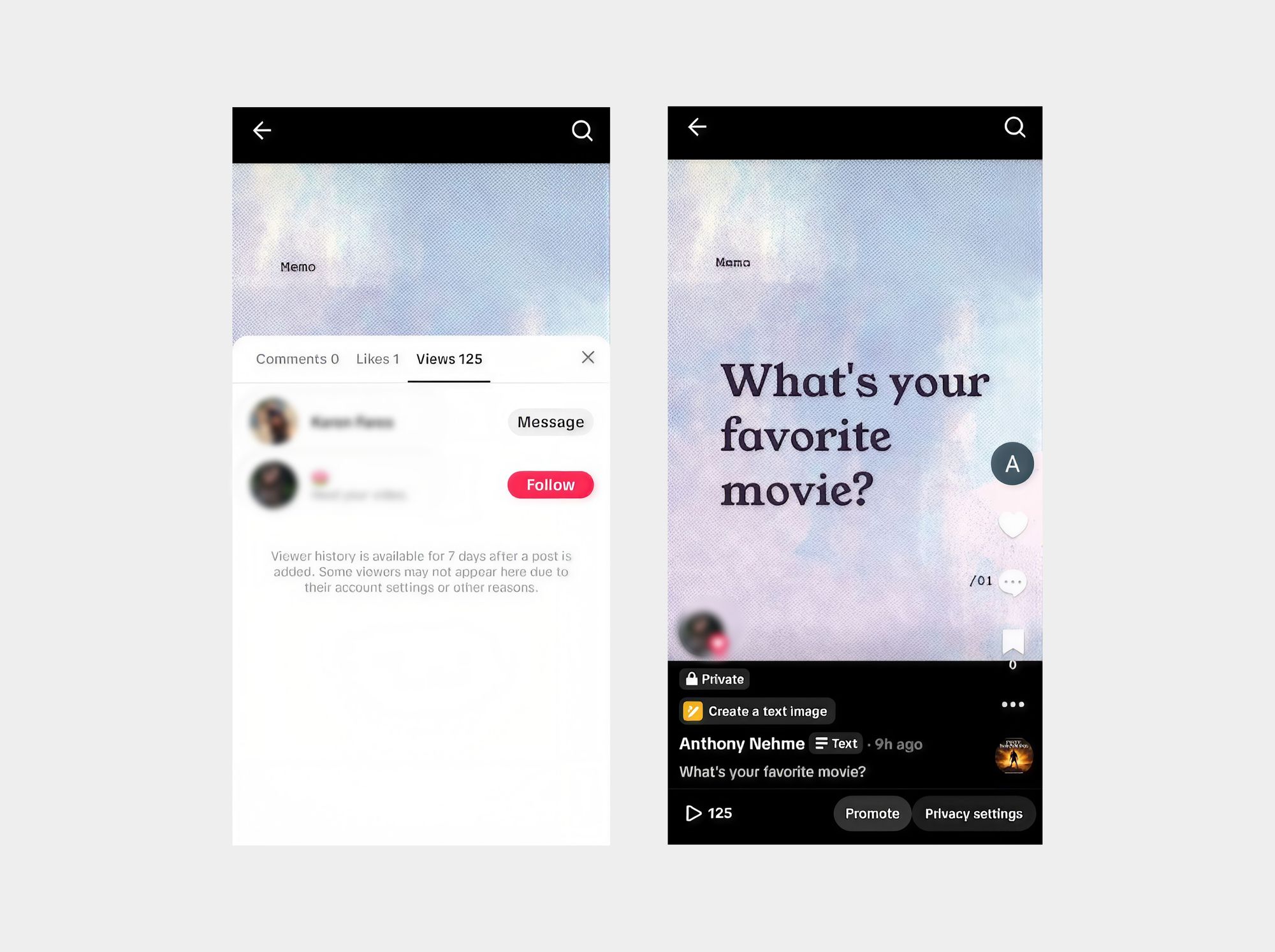
Open your profile, tap the menu, go to Settings and privacy, then Views, and switch on Viewer history. Once it’s on, you can see eligible viewers of your recent posts, and eligible people you follow can see when you view theirs.
- Open TikTok and tap Profile.
- Tap the ☰ menu in the top-right corner.
- Select Settings and privacy.
- Tap Viewers.
- Turn on Viewer history.
Note that some versions of TikTok will have a slightly different path, as follows:
- In the TikTok app, tap Profile.
- Tap the Menu ☰ button, then Settings and privacy.
- Tap Privacy, then Post views.
- Turn Post view history on.
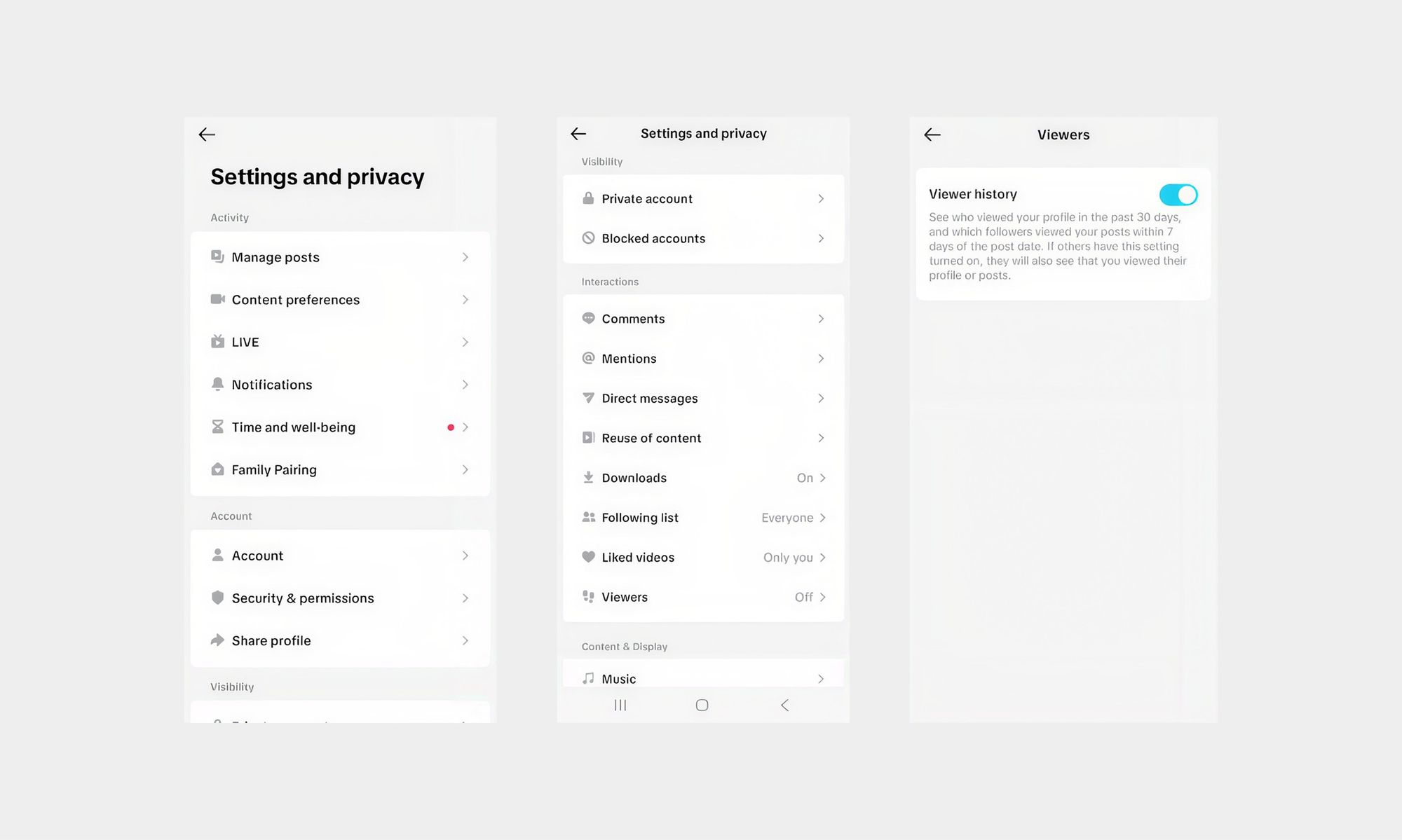
To check the list of viewers on your posts, open one of your videos and look for the viewer list on the post. It should be visible on the bottom left as you open the post.
What you give up when you turn it on
Viewer history works in both directions. If you turn on Post View History, people you follow who also have it on can see that you viewed their posts. Even with the setting off, TikTok says your likes and comments on someone else’s post still show up to them as views.
So the trade-off is simple: more visibility into your own audience means a bit less anonymity when you browse. If you prefer to stay low-key, you can turn the setting off in the same place.
Can you see who viewed your TikTok profile?
Yes, if you’re eligible. Profile View History can show some accounts that visited your profile in the past 30 days, but only accounts that also have the setting turned on. In most versions of TikTok, it is activated together with the Post View History under the name “Viewer History”. However, it’s different from Post View History and is limited to users who are 16 or older with fewer than 5,000 followers.
Also, know that TikTok’s Profile view history page says you’ll only see visits from accounts that have the setting on, and that if you visit another account that has it on, they’ll see your visit. The setting is off by default, so you need to turn it on first.
To turn it on:
- Open TikTok and tap Profile.
- Tap the ☰ menu in the top-right corner.
- Select Settings and privacy.
- Tap Viewers.
- Turn on Viewer history.
As with the Post views setting, some versions of TikTok will have a slightly different path to turn on Profile Views, as follows:
- In the TikTok app, tap Profile.
- Tap the Menu ☰ button, then Settings and privacy.
- Tap Privacy, then Profile views.
- Turn Profile view history on.
To see who visited, tap Inbox, then Activities, and open the profile views notification or Profile views. You can also tap the Profile views button at the top of your own profile. To turn the feature off, use the same toggle.
Can you see who viewed your TikTok Story?
Yes. Unlike posts, TikTok Stories have a viewer list you can open on your own Story. Open your Story, swipe up, and you’ll see who watched. Stories last 24 hours, and Story viewers are separate from Post View History and Profile View History.
Basically follow these steps:
- Open your active Story
- Swipe up
- Review the viewer list
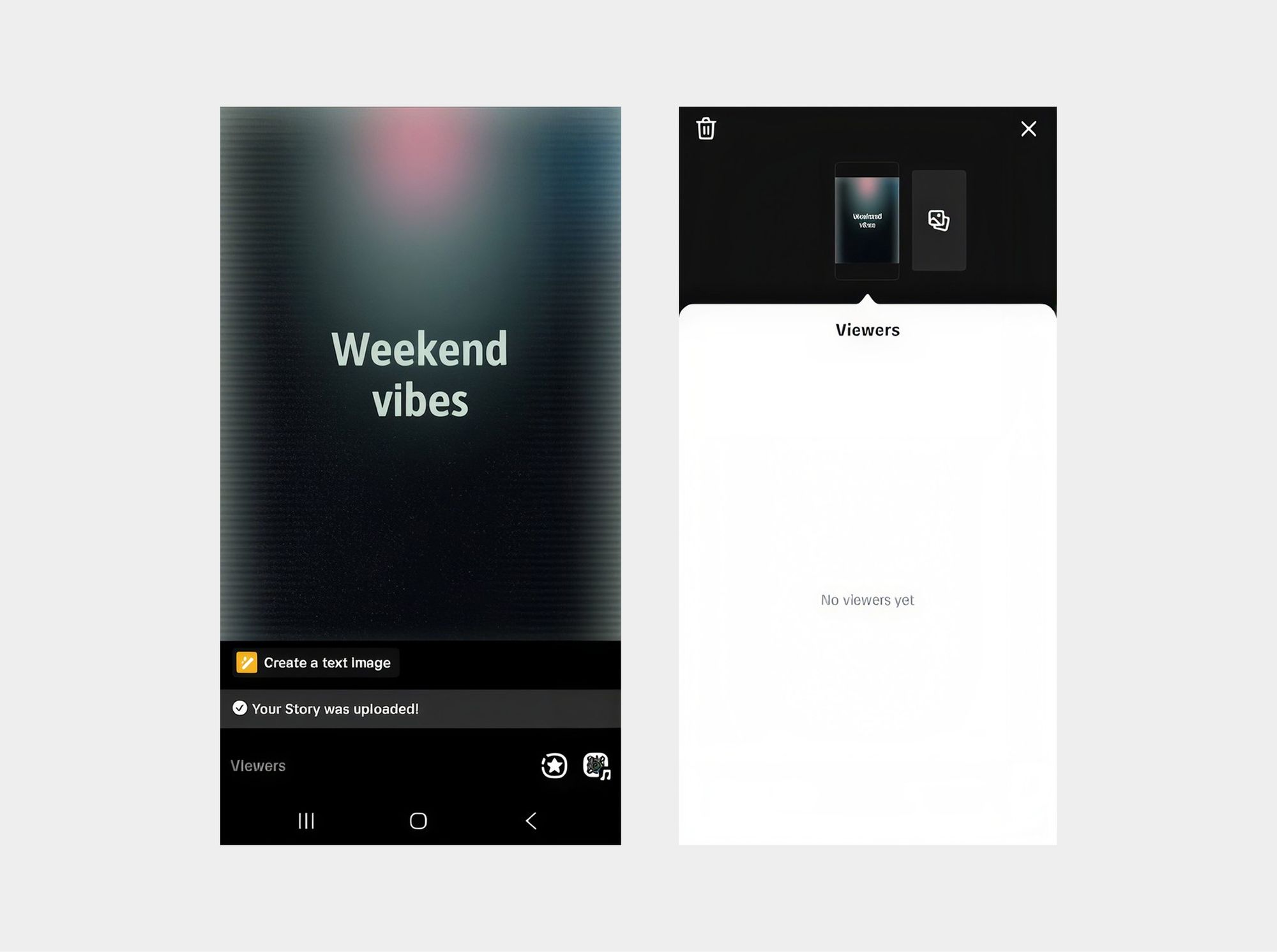
Keep in mind that Story viewers don’t depend on the other two settings. TikTok says Story view history is separate from post view history, so the Post View History toggle doesn’t control who appears on your Story list.
Post views vs profile views vs Story views
There are three distinct viewer experiences on TikTok: Post View History looks at recent posts, Profile View History looks at visits to profiles, and Story viewers look at Stories. Each of these uses different time periods and settings, meaning that a name that appears in one won’t necessarily appear in another.
Will someone know if I viewed their TikTok?
It depends on what you viewed. A post view or profile visit can usually be seen only in limited cases, when the relevant setting is on for both sides. A Story view is different: TikTok says people can see that you viewed their Story, even if your account is private.
If you view someone’s post
Possibly. If you turn on Post View History, people you follow who also have it on can see that you viewed their posts. Liking or commenting on someone’s post also shows up to them as a view, even if your Post View History setting is off.
If you visit someone’s profile
Only in limited cases. If you visit a profile where you both have Profile View History on, they can see your visit. If you turn your own Profile View History off, this feature won’t show your visits to other people.
If you watch someone’s Story
Yes. TikTok says people can see that you viewed their Story, even if your account is private or your Profile View History is turned off. Story viewing works separately from the other two settings, so they don’t hide it.
How to check TikTok analytics
If you want to check your TikTok analytics figures, you just have to open your profile, tap the menu, choose TikTok Studio and then select Analytics. The catch is that TikTok displays the total figures rather than the specific names.
The dashboard provides information on views, watch time, retention, engagement, and audience insights where available. These statistics show you how the viewers behaved, even though you can't technically identify who they were.
To recap:
- Tap Profile, then the Menu ☰ button.
- Select TikTok Studio.
- Under Tools, tap View all in the Analytics section.
- Switch between Overview, Content, Viewers, Followers, and LIVE to see different groups of metrics.
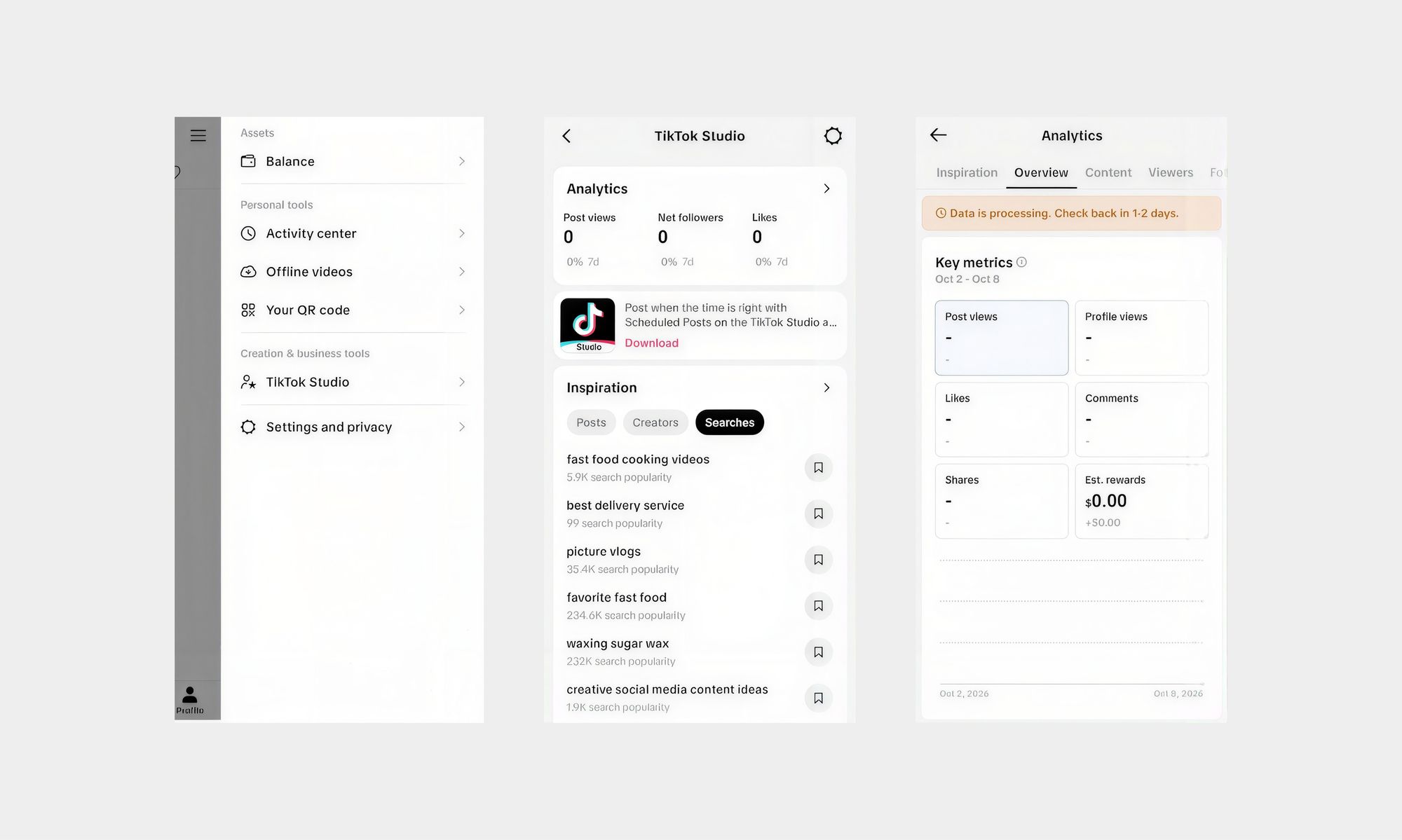
To check analytics for a single video, open it from the Content tab or tap More data on the post. These metrics are the most useful as you’ll check:
- Views: how many times a post or your account’s videos were watched.
- Watch time: average watch time and total play time.
- Retention: video retention rate and the share of viewers who watched the full video.
- Engagement: likes, comments, shares, and saves.
- Audience insights: new versus returning viewers, followers versus non-followers, demographics, and most active times, where available.
If you’re like a lot of creators out there asking why people stop watching your videos, looking at these analytics can help you figure out the causes.
You can’t identify every viewer, but you can see where they stop watching
You see, TikTok doesn't provide the identities of all the people who have watched, but its analytics can indicate whether viewers stayed. That kind of question is usually the more useful one. If people leave within the first few seconds, your viewer list will not explain why, but your retention data can show you where to focus.
Once you know where attention drops, you should be able to fix it through editing. Simply check which parts the retention data show you should re-edit first, then hop into an AI video editor like Async and adjust your video in just a couple of quick clicks to keep viewers hooked from start to end.
From there, the practical edits are simple: tighten weak openings, remove dead space, improve pacing, add captions, reframe for TikTok’s vertical format, and test shorter versions of the same idea.
Final thoughts
So can you see who viewed your TikTok? Sometimes, depending on whether you’re referring to a post, a profile, or a Story. Each of these has its own settings, time limits, and privacy trade-offs, so make sure to check the labels in the app before you rely on any of them.
The more reliable figure is how long viewers stay, and that needs a well-made, properly edited video before anything else. That’s why the next step after figuring out analytics is knowing how to edit TikTok videos in a way that hooks viewers in and keeps them engaged from the first to the last second.
FAQ
Can you see who viewed your TikTok video?
Sometimes. Post View History can show some people who viewed a post from the last 7 days, including followers who have the setting on and non-followers who liked or commented. It’s not a full list of everyone who watched, and it’s limited to users who are 16 or older with fewer than 5,000 followers.
Can someone see if I viewed their TikTok?
Sometimes. If you have Post View History on, people you follow who also have it on can see you viewed their posts, and likes or comments count as views. Profile visits can be seen when both sides have Profile View History on. TikTok says Story views can be seen even if your account is private or Profile View History is off.
Can you see who viewed your TikTok profile?
Yes, in some cases. Profile View History shows eligible accounts that visited your profile in the past 30 days, as long as they also have the setting on. You must be 16 or older with fewer than 5,000 followers, and the setting is off by default, so you need to turn it on first.
Can you see who viewed your TikTok Story?
Yes, you can see who viewed your TikTok story. To do that, open your Story and swipe up to see the viewer list. Stories last 24 hours, and Story viewers are separate from Post View History and Profile View History, so they work independently of each other.
Why can’t I see Post View History?
Usually because you’re not eligible or the setting is off. Post View History requires users to be 16 or older with fewer than 5,000 followers, and you need to turn it on under Privacy. The list also only covers posts from the last 7 days, and followers with the setting off won’t appear.
How long does TikTok Post View History last?
Post View History lasts seven days. It covers views on posts that were published within the last 7 days, so older posts fall outside that window. However, Profile View History works on a different window, covering visits from the past 30 days.
Does TikTok show every person who viewed your video?
No. Post View History shows followers who have turned the setting on and non-followers who liked or commented, within the recent window. A follower with the setting off, or anyone who watched without liking or commenting, won’t appear, so the list will usually be shorter than your total view count.
Can people see that I viewed their profile if I turn Profile View History off?
Not through Profile View History. TikTok’s feature only shows your visits when your setting is on, so turning it off stops your profile visits from being shown. You also lose the ability to see who visited yours. Story views are different, since TikTok says they can be seen even when Profile View History is off.