Most agents do not have a footage problem. You walked the property with your phone, got the drone up, recorded a quick intro at the front door, and now there are 40 minutes of clips sitting on a memory card. The listing goes live Thursday.
Real estate video editing is the bottleneck. It is the part that gets pushed to the weekend, then pushed again, and eventually turns into a single unedited walkthrough that nobody watches. This guide covers the three realistic ways to edit property footage, the workflow that actually works for listings, and how AI-assisted editing changes the math when you are producing video for more than one property at a time.
What is the best way to edit real estate videos?
The best way to edit real estate videos depends on how many you produce. If you shoot one or two listings a month, a traditional editor gives you full control. If you shoot weekly and need a walkthrough plus social cuts from every property, an AI video editor is faster because it handles the repetitive work: trimming dead space, sequencing rooms, adding captions, and resizing for each platform.
There are three options, and agents usually end up mixing them.
Traditional software rewards the time you put in, and punishes the time you do not have. Editing services solve the skill problem but introduce a queue, and a queue is expensive when a listing needs to be live before the weekend. AI video editing for real estate agents sits in the middle: you describe the edit, review the first pass, and fix what is wrong instead of building everything from zero.
What should a real estate video editor actually help you do?
A real estate video editor should handle the jobs that come up on every single property, not just offer effects you will never open. Judged by the work rather than the feature list, a good editor lets you:
- Trim raw walkthrough footage down to the parts worth showing
- Remove dead space, bad takes, and the ten seconds where you fumbled the door handle
- Reorder rooms and scenes so the tour follows a logical path
- Add captions, since most social video is watched on mute
- Clean up audio recorded in an empty room with hard floors
- Add music that fits the price point of the property
- Overlay property details: address, bedrooms, square footage, price
- Reframe horizontal footage for vertical social content
- Cut a long walkthrough into shorter clips
That is the entire job. Everything beyond it is a bonus. When you compare a real estate video maker against a general editor, run the comparison against that list rather than against the marketing page.
It is worth being clear about what editing does not fix. A dark, badly framed room stays dark and badly framed. Editing is where you decide what a buyer sees and in what order, which is most of the value in real estate video marketing, but it does not replace basic care on the shoot: steady movement, a few seconds of hold in each room, and one clean take of whatever you say to camera.
Best types of real estate videos to edit
Not every property needs the same video. The formats agents get the most mileage from:
- Listing walkthroughs. The core asset, usually 60 to 180 seconds.
- Property reveal videos. Short, hook-driven, built for the feed.
- Agent talking-head videos. You on camera explaining the property or the market.
- Neighborhood guides. Evergreen content that outlives the listing.
- Instagram Reels. Vertical, captioned, fast.
- Open-house promos. Time-sensitive, often posted twice.
- Luxury property videos. Slower pacing, music-led, minimal captions.
- Drone and interior montages. Exterior context cut against interior detail.
Each of these can come from the same shoot, which is the point we will get to further down.
The real estate video editing workflow, step by step
The workflow matters more than the software. Here it is applied to one real property: a three-bedroom on Larkspur Lane, shot in about 25 minutes with a phone gimbal, a drone, and a short intro recorded at the front door.
1. Import the footage. Everything goes in: drone exterior, front door intro, room-by-room walkthrough, backyard, and the two clips of the kitchen you shot twice because the first one was shaky.
2. Choose the strongest clips. Watch once and mark what stays. The second kitchen take is the good one. The hallway pass is 40 seconds of nothing and gets cut to eight.
3. Clean the audio. The front-door intro has street noise behind it and the empty living room adds echo. Fix this before you build the edit, not after.
4. Arrange the walkthrough. Follow the path a buyer would walk: exterior, entry, living room, kitchen, bedrooms, bathrooms, backyard. Buyers get confused when the video jumps between floors.
5. Add text and property details. Address and price on the opening frame, room labels as you enter each space, square footage on the exterior shot.
6. Add music and B-roll. One track, mixed under the narration. A neighborhood exterior shot if the location is a selling point.
7. Resize. The 16:9 version goes on the listing page and YouTube. The 9:16 version goes to Reels, TikTok, and Stories.
8. Export. One master, one vertical cut, and whatever short clips you need for the week.
Manually, that is two to four hours for an agent who is comfortable in editing software. The steps do not change when you use AI. What changes is how many of them you perform by hand.
Two habits make every version of this workflow faster. First, name your clips on the shoot, even roughly, so that step two is a sort rather than a search. Second, decide the opening shot before you start editing. Most walkthroughs that lose viewers lose them in the first four seconds, and the fix is almost always a stronger first frame rather than a better cut halfway through.
How to edit real estate videos with AI
AI real estate video editing works by describing the edit in plain language instead of building it on a timeline. In Async, you upload the property footage and tell the editor what you want, then correct the first pass in chat or by hand on the timeline.
Here is the Larkspur Lane edit run through Async, step by step.
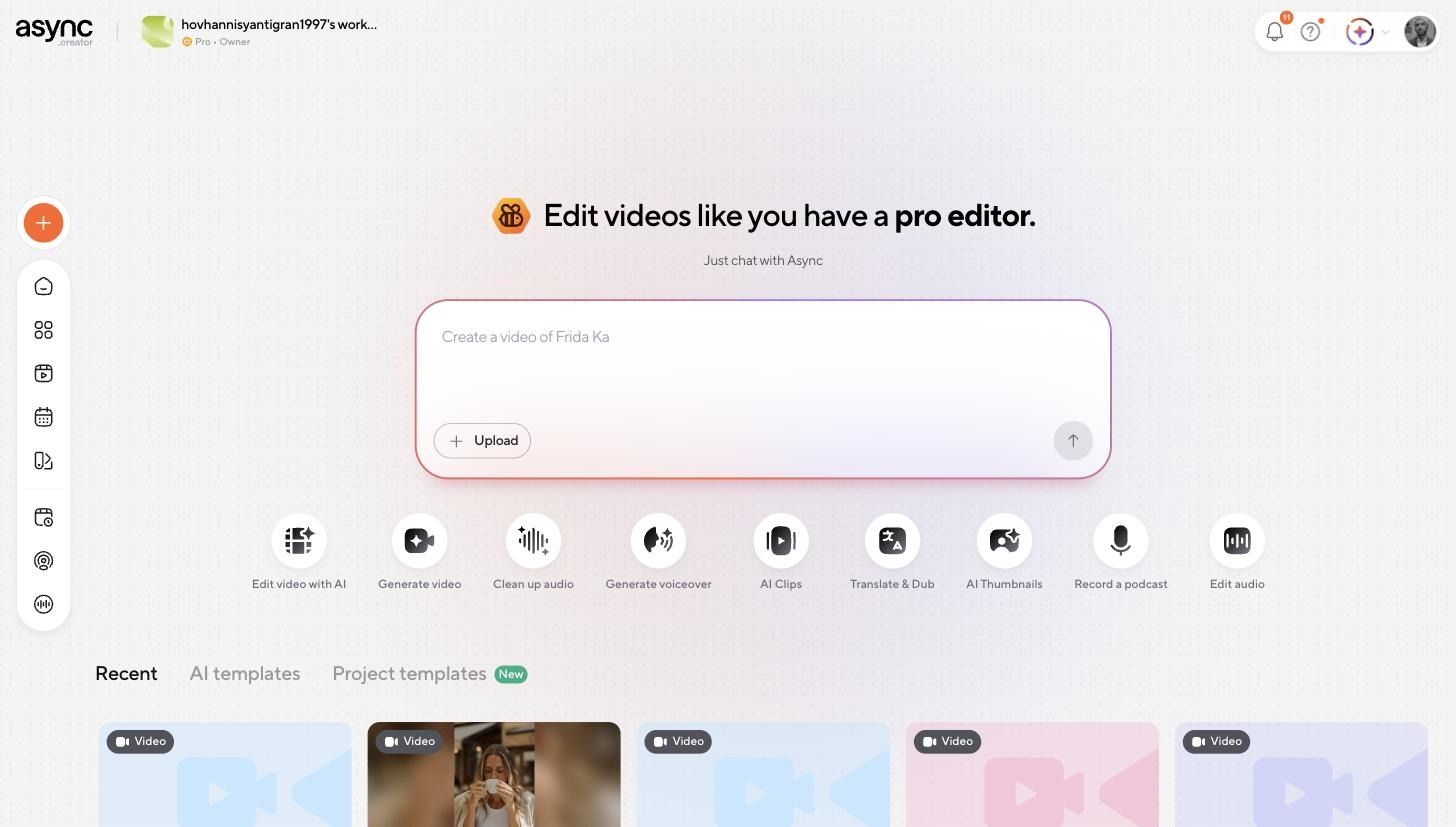
Upload the footage. From the workspace, you can drop footage straight into the prompt box or start from one of the editing actions: Edit video with AI, Clean up audio, AI Clips, and others.
Describe the edit. The chat panel sits to the left of the timeline, so you can give an instruction and watch the result land in the same screen. For a walkthrough, the first prompt usually covers four jobs at once:
Cut the shaky sections from this walkthrough, put the rooms in order (exterior, living room, kitchen, primary bedroom, backyard), clean up the narration audio and add captions.
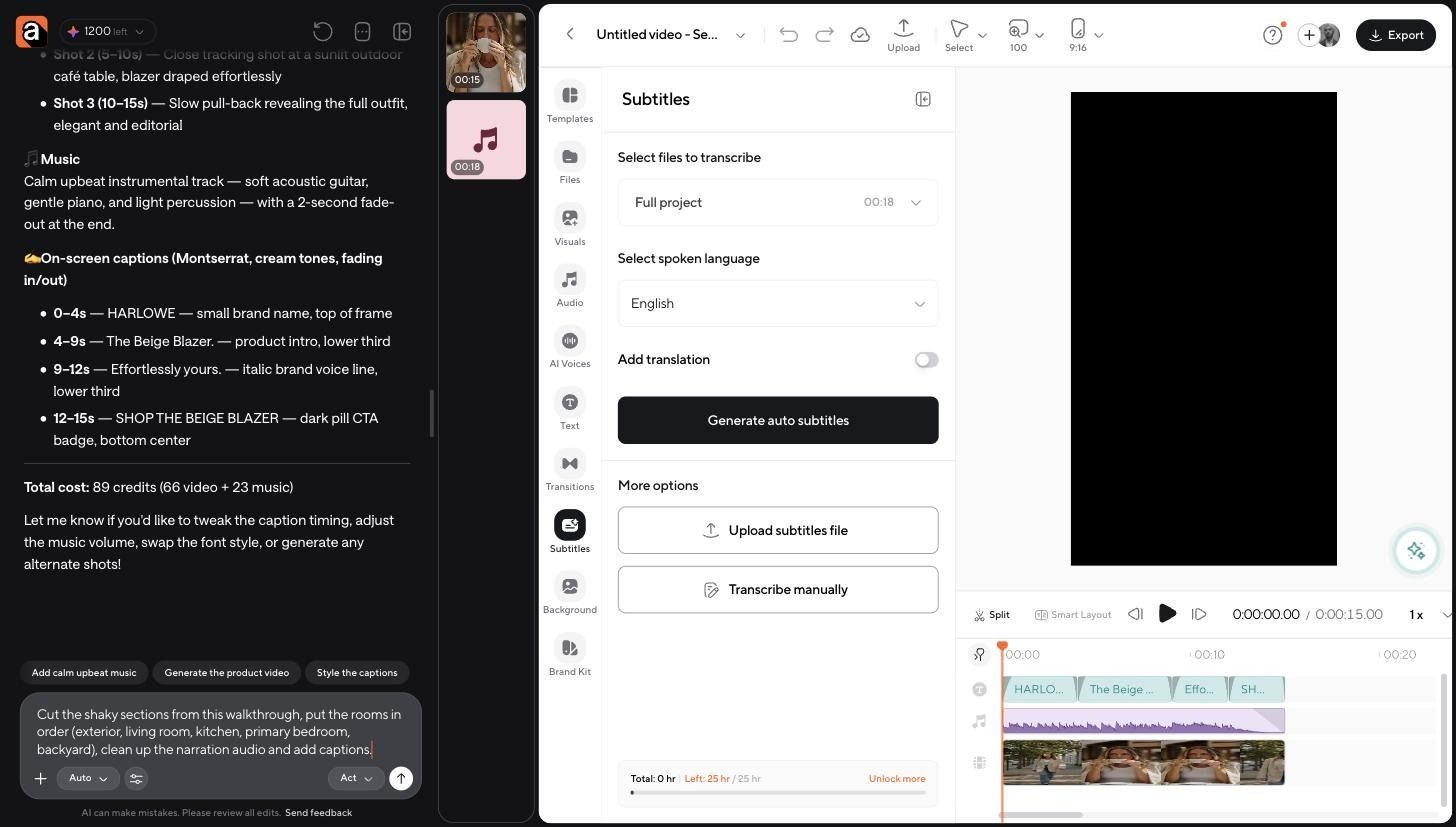
Review the first pass. This is the step you do not skip. AI is good at removing filler, pauses, repeats, and bad takes, and it is good at sequencing. It does not know that the second bedroom is the one with the view, or that you promised the seller the garage would be in the video. Watch it once and note what is wrong.
Correct it. Follow-up instructions handle most fixes: hold the kitchen shot longer, swap the bedroom order, drop the music under the narration. The timeline is still there when a change is faster to make by hand, with split, layer controls, and panels for text, transitions, audio, and visuals.
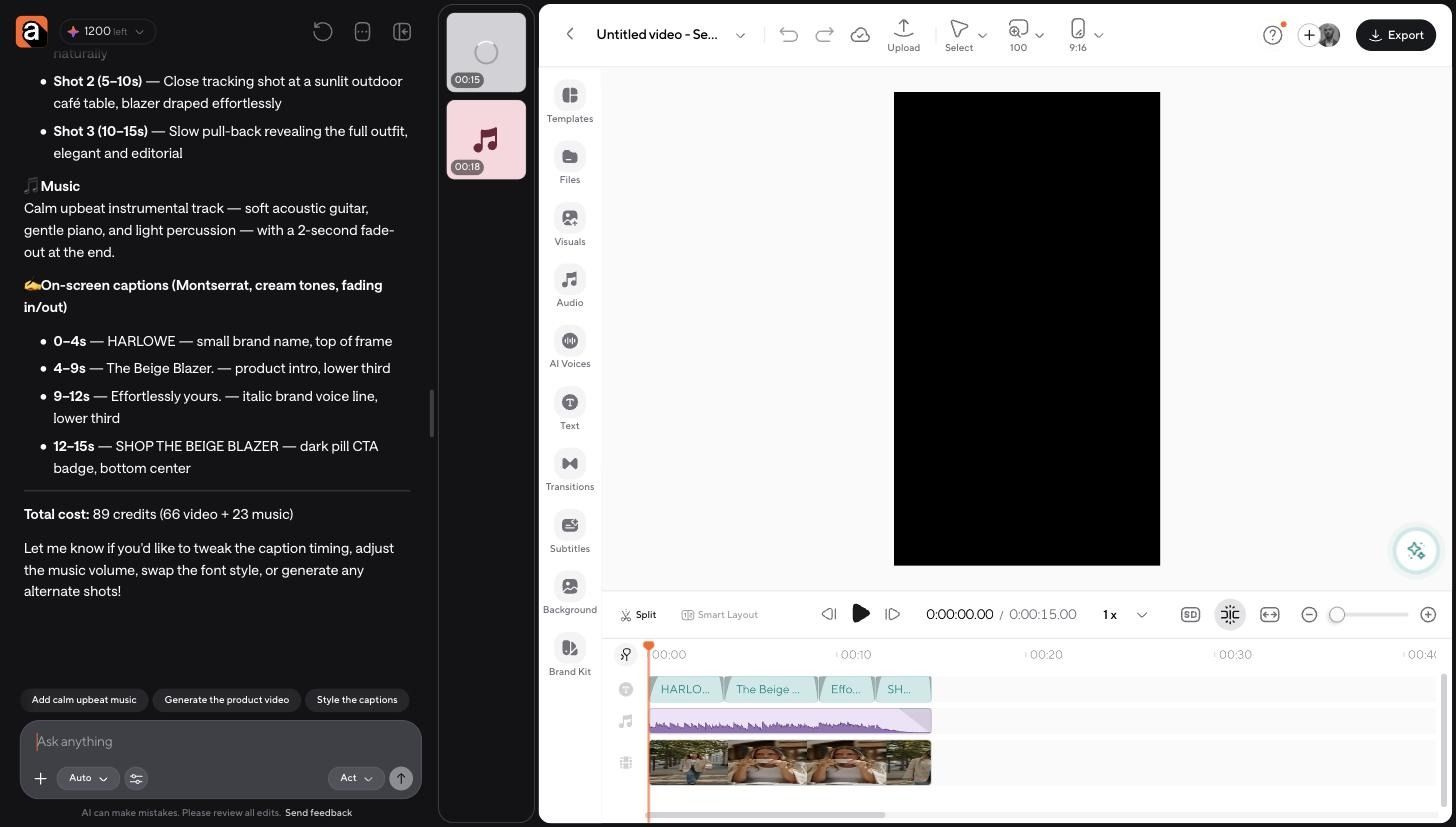
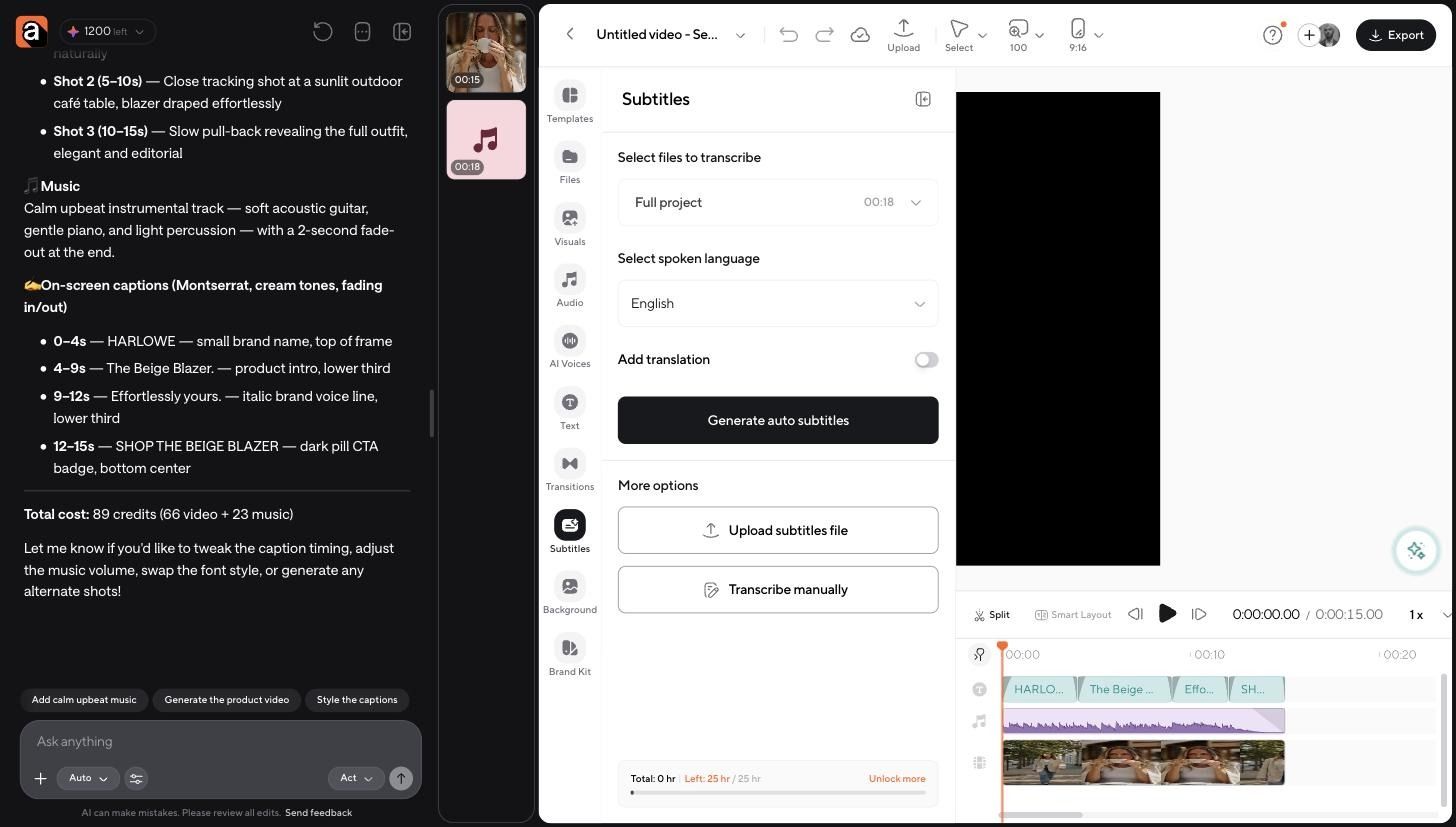
Add captions. Subtitles are generated from the spoken audio, with a language selector and a translation toggle if you market to buyers in more than one language. You can also upload an existing subtitle file or transcribe manually.
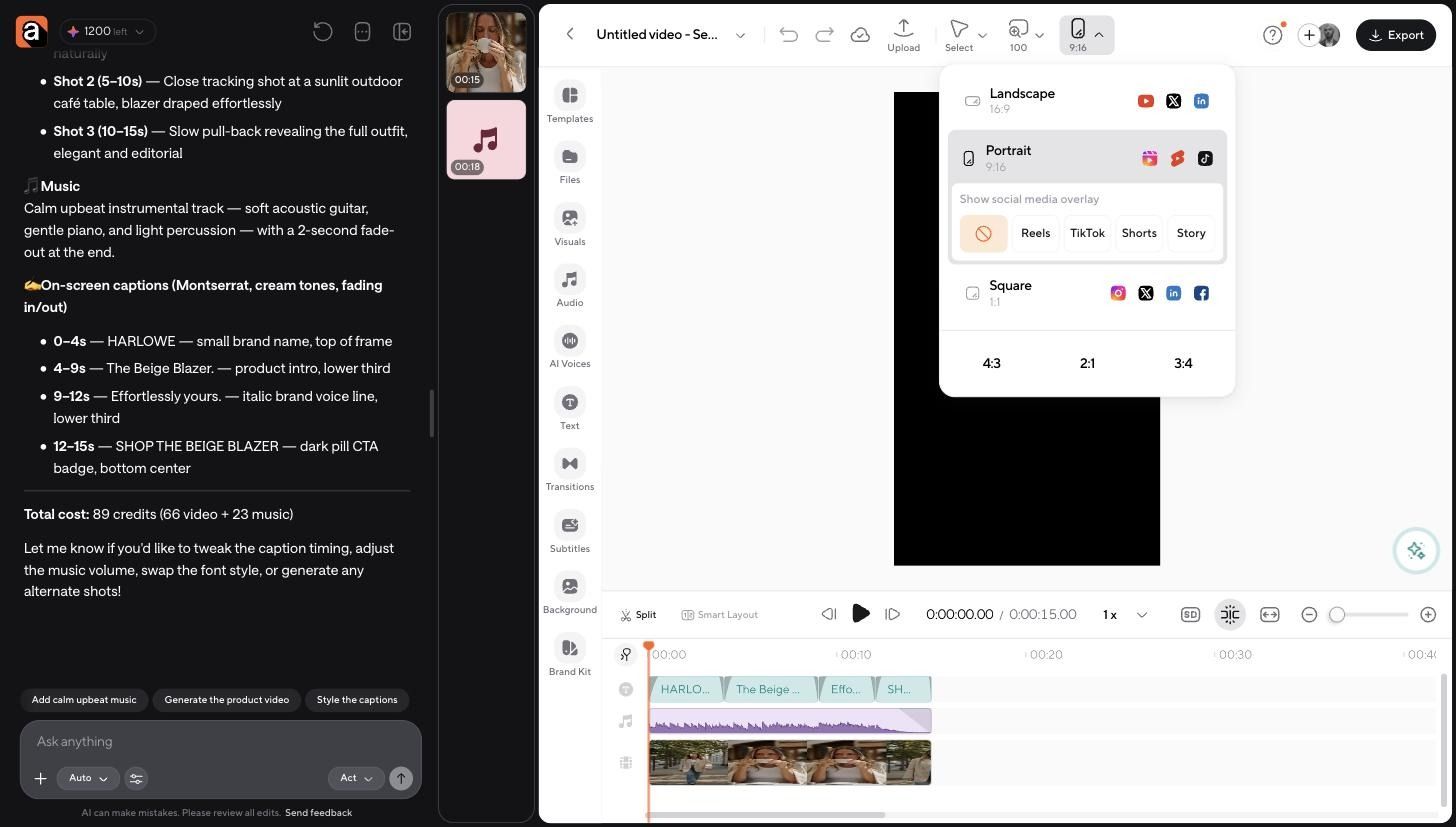
Resize and export. Switching the project between landscape, portrait, and square is a single control, with social overlays for Reels, TikTok, Shorts, and Stories so you can check that captions and property text are not sitting under the platform UI.
If you edit every listing the same way, you can save that editing style as a skill and reuse it on the next property instead of writing the same prompt again.
Turn one property shoot into multiple videos
This is where the time-saving actually shows up. One 25-minute shoot at Larkspur Lane should produce:
- A full property walkthrough for the listing page and YouTube
- A 30 to 60-second Reel built from the strongest rooms
- An open-house teaser with the date and time on screen
- An agent-branded social clip using your logo, colors, and fonts
- A vertical ad cut, tighter and hook-first
- A short highlight montage for the seller to share
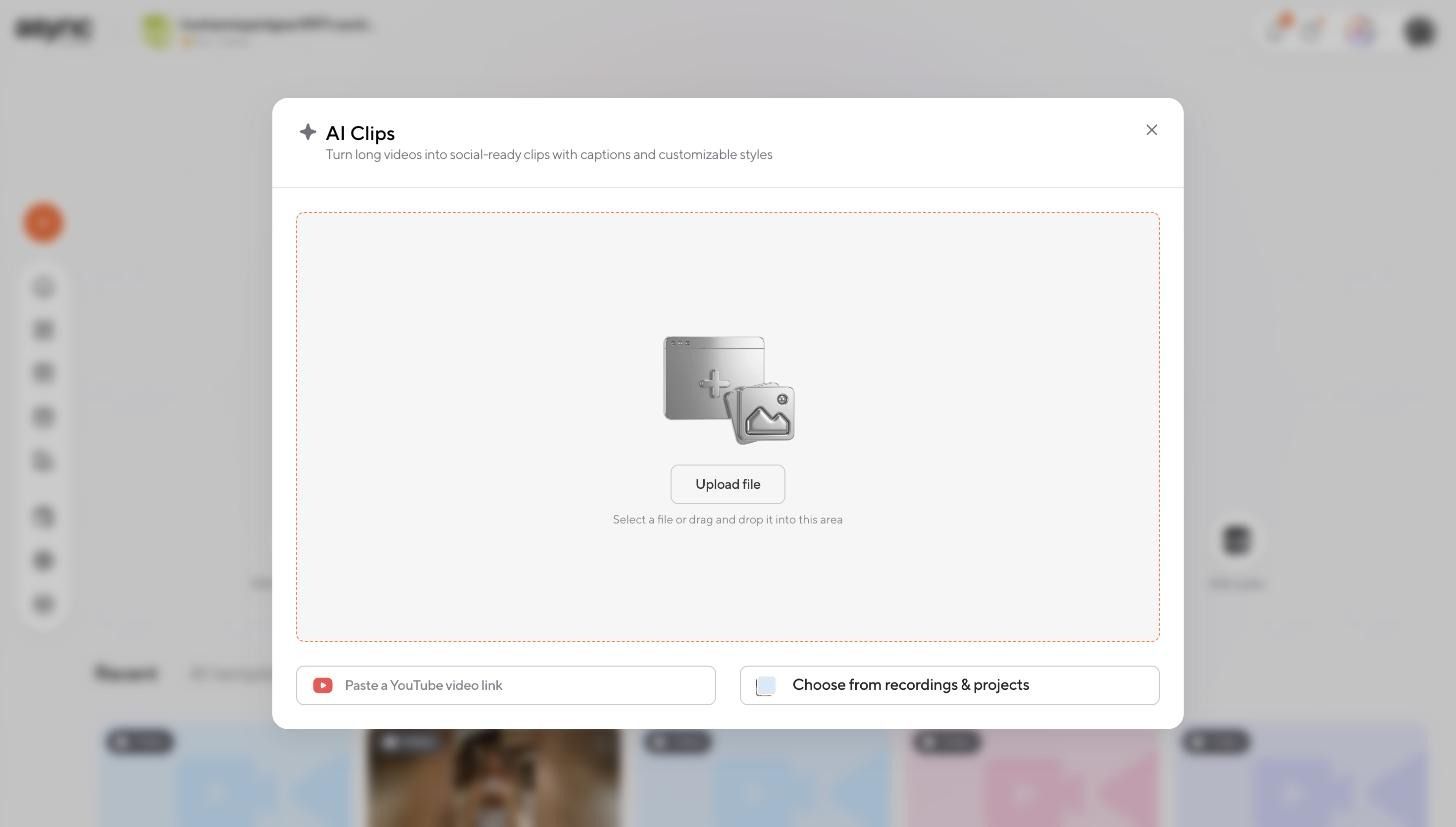
Async's AI Clips finds the strongest moments in a long video and turns them into social-ready clips with captions and customizable styles. You can point it at an uploaded file, a YouTube link, or a project already in your workspace.
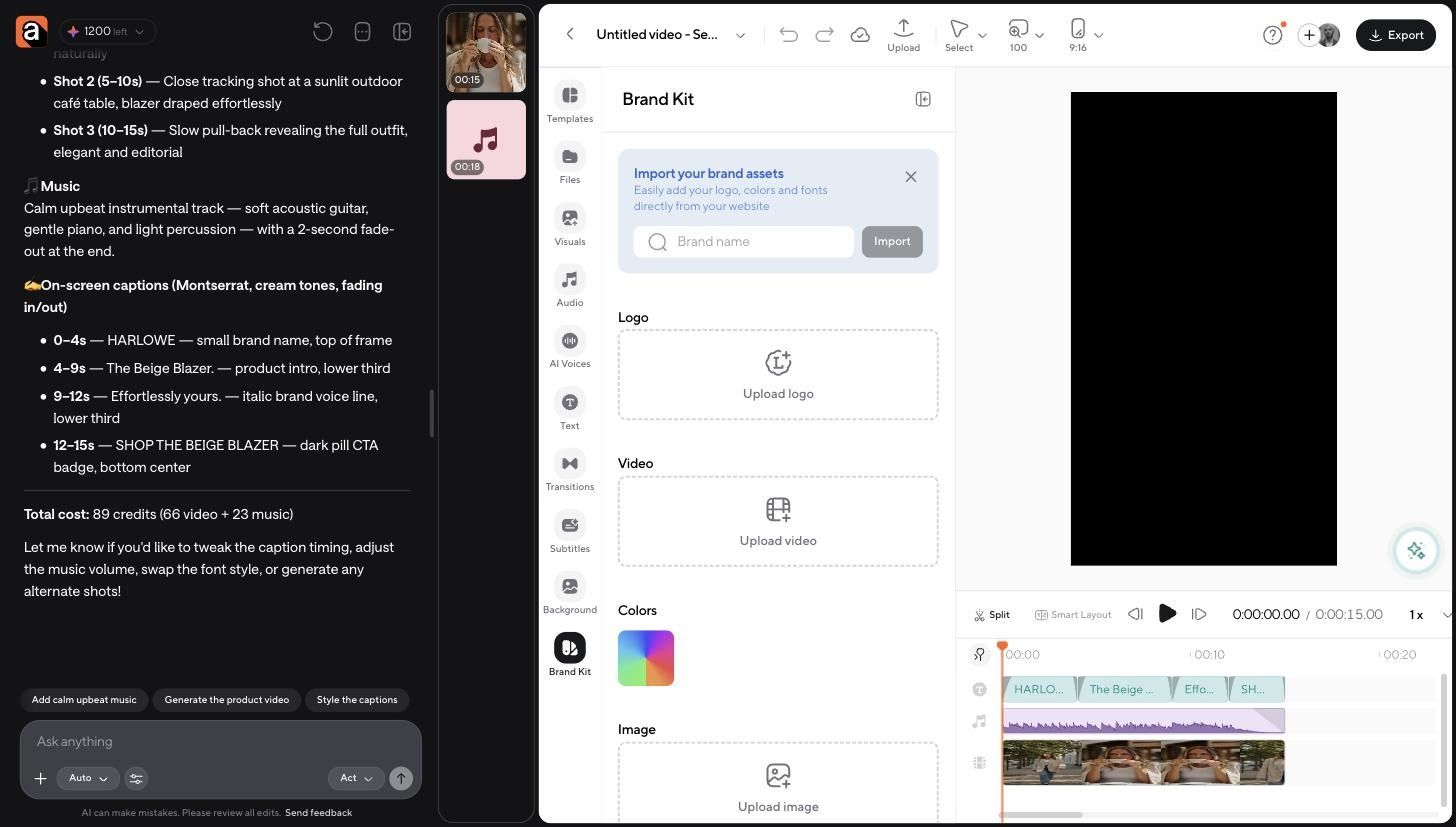
The branding side matters if you work under a brokerage. A Brand Kit holds your logo, colors, fonts, and intro or outro video, so every clip from every listing looks like it came from the same agent.
Six deliverables from one shoot is the difference between posting when you have time and posting on a schedule. It also changes how you shoot. Once you know one property becomes six videos, you start grabbing an extra exterior angle and a ten-second piece to camera at the end, because you know exactly where both will be used.
Real estate video editing software: what should agents look for?
Run any real estate video editing software through this checklist before you commit:
- Easy learning curve. If it takes a weekend to learn, it will not get used in a busy month.
- AI-assisted cuts. Removing filler and dead space automatically is the single biggest time saver.
- Captions. Non-negotiable for social.
- Audio cleanup. Empty rooms echo. Streets are loud.
- Vertical resizing. One project, multiple aspect ratios.
- Brand assets. Logo, colors, fonts, saved once.
- Music. Licensed tracks you can use commercially.
- Fast export. Rendering should not be an overnight job.
- Manual override. You need to be able to fix the AI's choices on a timeline.
That last point is the one agents underrate. Any tool that only offers automation traps you the moment the automated version is 90 percent right.
Real estate video editor vs outsourcing
Hiring an editor is a legitimate answer, especially for luxury listings where production value is part of the pitch. It is a poor answer for volume.
The practical split most teams land on: edit listing walkthroughs and social content yourself, and outsource the two or three flagship properties a year where a cinematic edit earns the fee.
Revision speed is the factor agents feel most strongly about. A seller who wants the garage added back into the video has a two-minute fix in software you control and a two-day fix through a service. Multiply that across a full pipeline of listings, and the software version wins on responsiveness long before it wins on cost.
When to use a dedicated real estate video tool vs a general AI editor
Dedicated real estate video apps do one thing well. If your main need is turning listing photos into a templated slideshow video with the address, price, and your headshot, a purpose-built real estate video maker is the faster path. The templates are built for exactly that output, and you will not fight them.
A broader AI video editor makes more sense when you have:
- Raw video footage rather than photos
- Talking-head content where you are on camera
- Drone clips to cut against interior footage
- Several social formats to produce from one shoot
- Editing needs that do not fit a template
Async is the second kind of tool. It is not an MLS or listing platform, and it will not pull your listing data. It is an AI-assisted video editor for agents, property marketers, brokerage social media managers, and real estate creators who shoot their own footage and need it edited fast, repeatedly, in more than one format.
Final workflow: From raw listing footage to published video
Shoot, upload, edit, review, resize, publish.
Shoot with the edit in mind: steady room entrances, a few seconds of hold in each space, and one clean intro take. Upload everything. Describe the edit you want instead of building it. Review the first pass against the property, because you know what matters and the software does not. Resize for the platforms you actually post on. Publish.
The agents producing video consistently are not the ones who got better at editing. They are the ones who stopped treating every listing as a fresh editing project.
Upload your next walkthrough to Async and see how far the first pass gets you.
FAQs
How long should a real estate video be?
Listing walkthroughs work best at 60 to 180 seconds. Social cuts should be 15 to 60 seconds. Anything longer than three minutes loses most viewers before the bedrooms.
Can AI edit a property walkthrough on its own?
AI can produce a solid first pass: trimming dead space, sequencing rooms, cleaning audio, and adding captions. It cannot judge which features sell the property, so plan on reviewing and correcting before you publish.
Do I need editing experience to use a real estate video editor?
Not for AI-assisted editing. You describe what you want and correct the result. Timeline skills help when you want precise control, but they are not the entry requirement they used to be.
What is the best video editing software for real estate agents?
It depends on your input. Photo-to-video tools are best for templated listing slideshows. A general AI video editor is better when you shoot real footage and need multiple formats from each property.
Should I add captions to real estate videos?
Yes. Most social video is watched without sound, and captions keep the property details readable in the feed.