Right now on Pinterest, searches for "casual blazer outfits" are up 2,500% in a month. Somewhere there is an apparel brand sitting on a rail of beige blazers that will find this out in December, from a spreadsheet, eight weeks after anyone cared.
Pinterest Trends exists so you are not that brand. It is a free tool inside Pinterest Business that shows what people search, save, and shop on Pinterest, going back up to two years. Pick a region, type a keyword, read the curve.
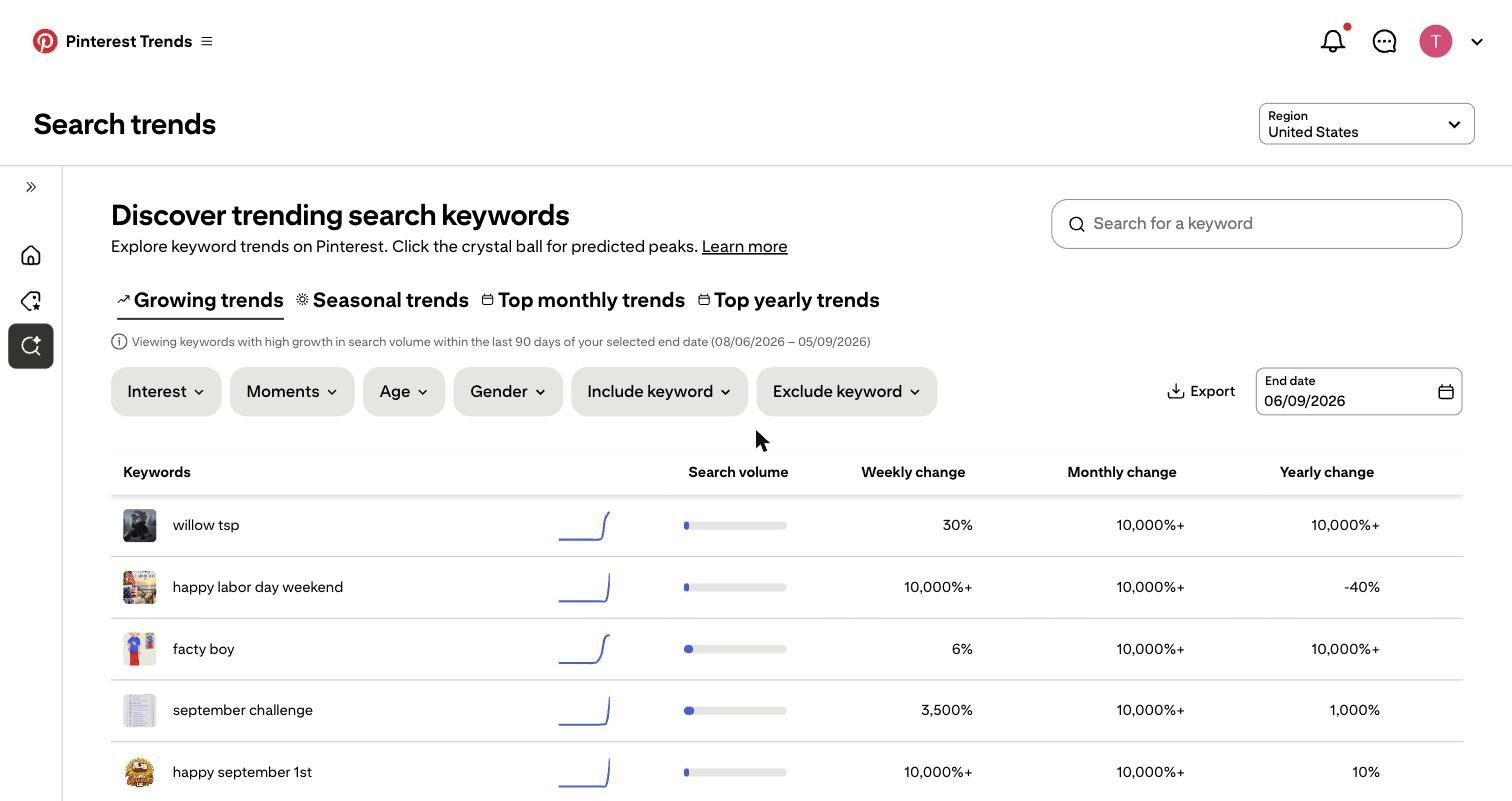
Now, the inconvenient part. A rising curve is not a strategy. Plenty of things are going vertical on Pinterest this week that have nothing to do with your catalog, your buyer, or your margins. "Happy September 1st" is up more than 10,000%. Congratulations, that is worth exactly nothing to you.
The trick is telling the blazers from the birthday greetings, and then moving fast enough to matter. So this guide does three things. It walks the tool as it actually works today, hands you a six-point filter for separating a real opportunity from a pretty chart, and then takes one live trend all the way to a finished vertical product ad.
No mockups. No stock screenshots borrowed from someone else's blog. Everything below was captured while writing this, including the ad.
What are Pinterest Trends?
Pinterest Trends is Pinterest's own trend research tool. It reports on four kinds of behavior: what people search, what they save, what they click through to buy, and what is rising around seasonal moments. Because Pinterest is where people plan purchases rather than react to them, that data tends to move earlier than it does on feed-based platforms.
The tool has four main areas:
- Search trends. Keyword-level demand with weekly, monthly, and yearly change, related terms, demographics, and top Pins.
- Shopping trends. Product categories ranked by outbound click growth, updated weekly.
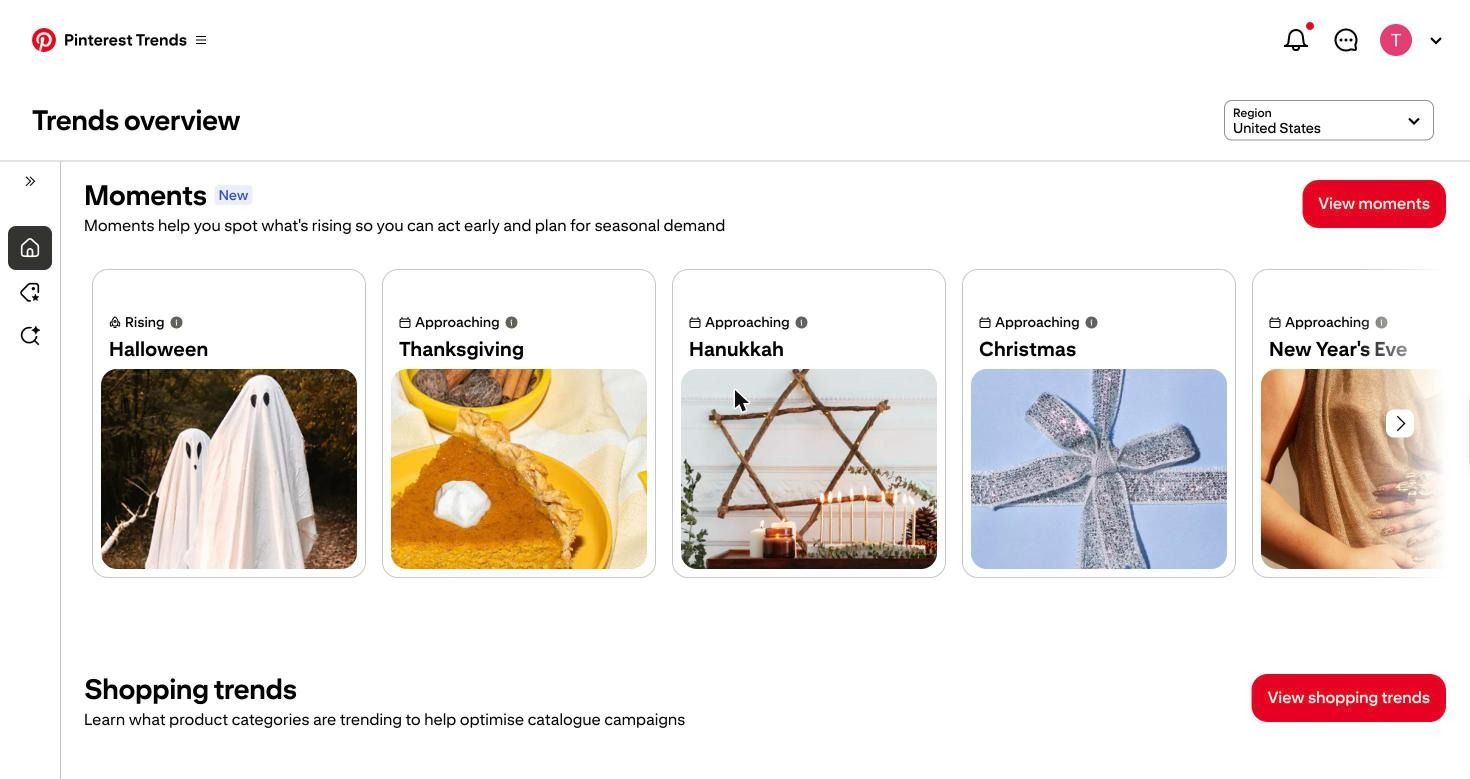
- Moments. Seasonal events are labeled as rising or approaching, so you can time campaigns.
- Pinterest Predicts. The annual forecast of trends with long-term growth potential.
You need a Pinterest business account and a desktop or mobile browser. The tool does not run inside the Pinterest app.
How to use the Pinterest Trends tool
Here is the current workflow, step by step.
1. Set your region
Region is the first control on every screen, and it changes everything below it. Alongside the US, you get Great Britain and Ireland, Canada, Germany, France, the Nordics, Benelux, Australasia, Brazil, Mexico, and more. If you ship to two markets, run the same keyword twice. Aesthetic trends rarely peak in the same week in both.
2. Start from the growing trends table
The Search trends screen opens on four tabs: Growing trends, Seasonal trends, Top monthly trends, and Top yearly trends. Growing trends show keywords with high growth over the last 90 days of your selected end date, with columns for search volume, weekly change, monthly change, and yearly change. There is an Export button for pulling the table into a sheet.
Filters sit above the table: Interest, Moments, Age, Gender, Include keyword, and Exclude keyword. Including the keyword is what most marketers miss. Type your product word into it, and the table only returns rising searches that contain it, which turns a general discovery feed into a category-specific one.
3. Search for a keyword and read the autocomplete
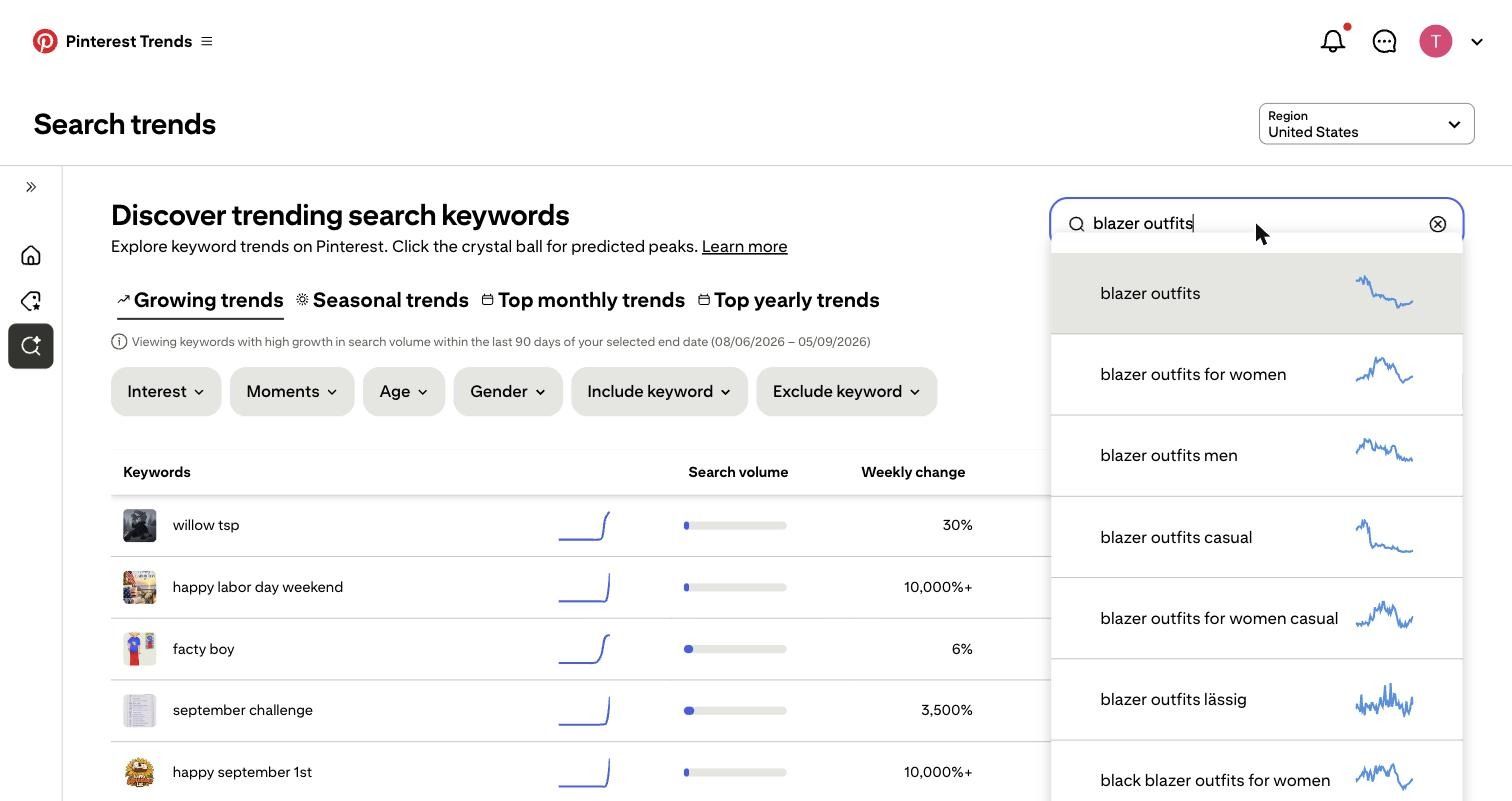
Type into the keyword search box, and Pinterest suggests related phrasings with a mini sparkline next to each, so you can see the shape of the curve before you commit to a term. Searching "blazer outfits" returns blazer outfits for women, blazer outfits for men, blazer outfits for casual, and black blazer outfits for women, each with a different trajectory.
4. Compare up to four terms
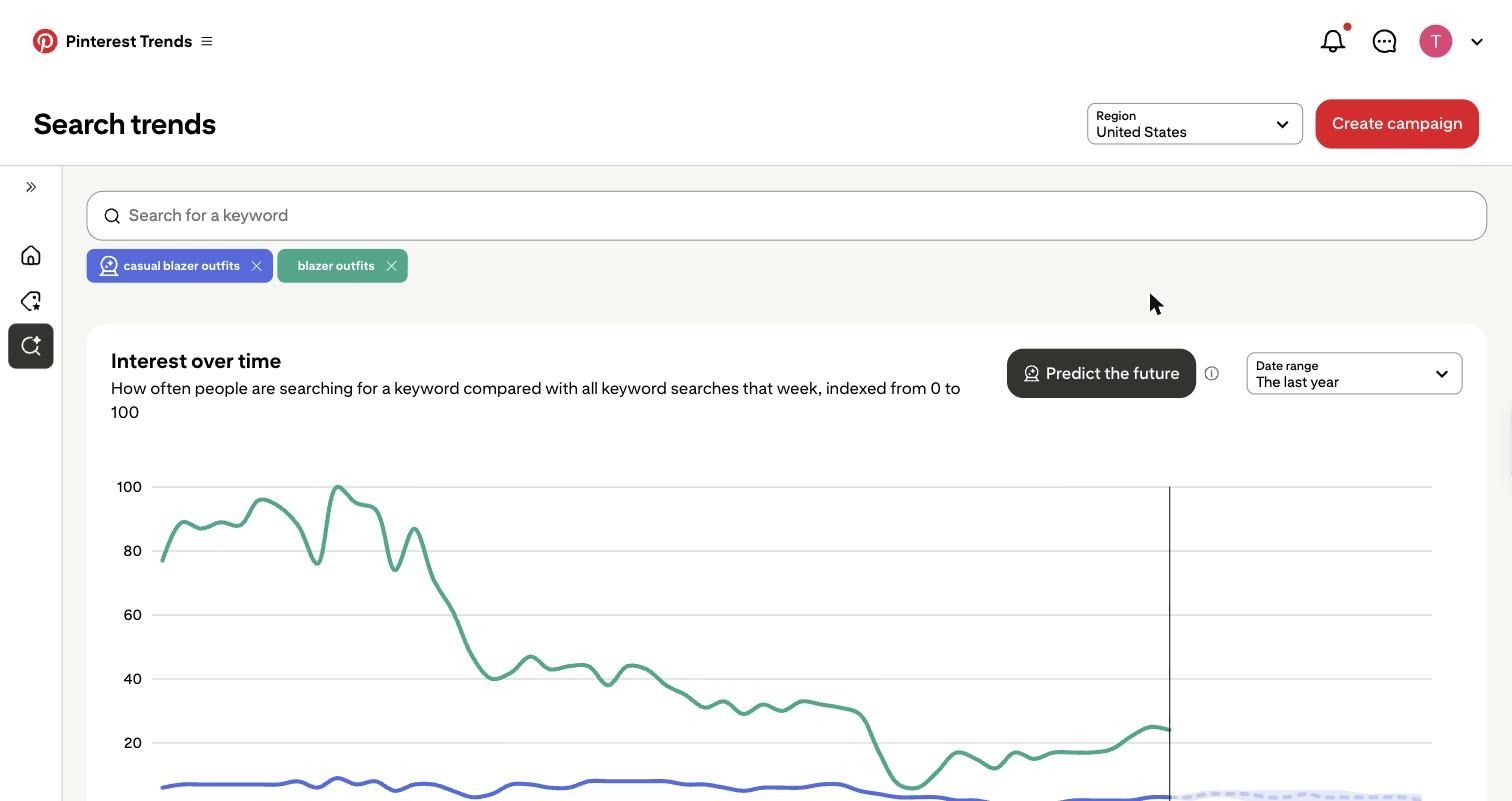
You can add up to four keywords to the same graph. Interest over time is indexed from 0 to 100 and measures how often people search a keyword compared with all keyword searches that week, so it shows relative demand, not raw volume. The date range runs from the last three months to the past two years.
In the comparison below, "casual blazer outfits" and "blazer outfits" tell two different stories. The broad term holds a low, flat line all year. The specific styling phrase spikes hard, collapses through spring, and starts climbing again into September. That gap is the whole argument for comparing terms instead of trusting one.
5. Check seasonality and the forecast
Set the range to two years, and you can see whether a curve repeats. A shape that appears in the same weeks for two years running is a planning input. A single spike is not.
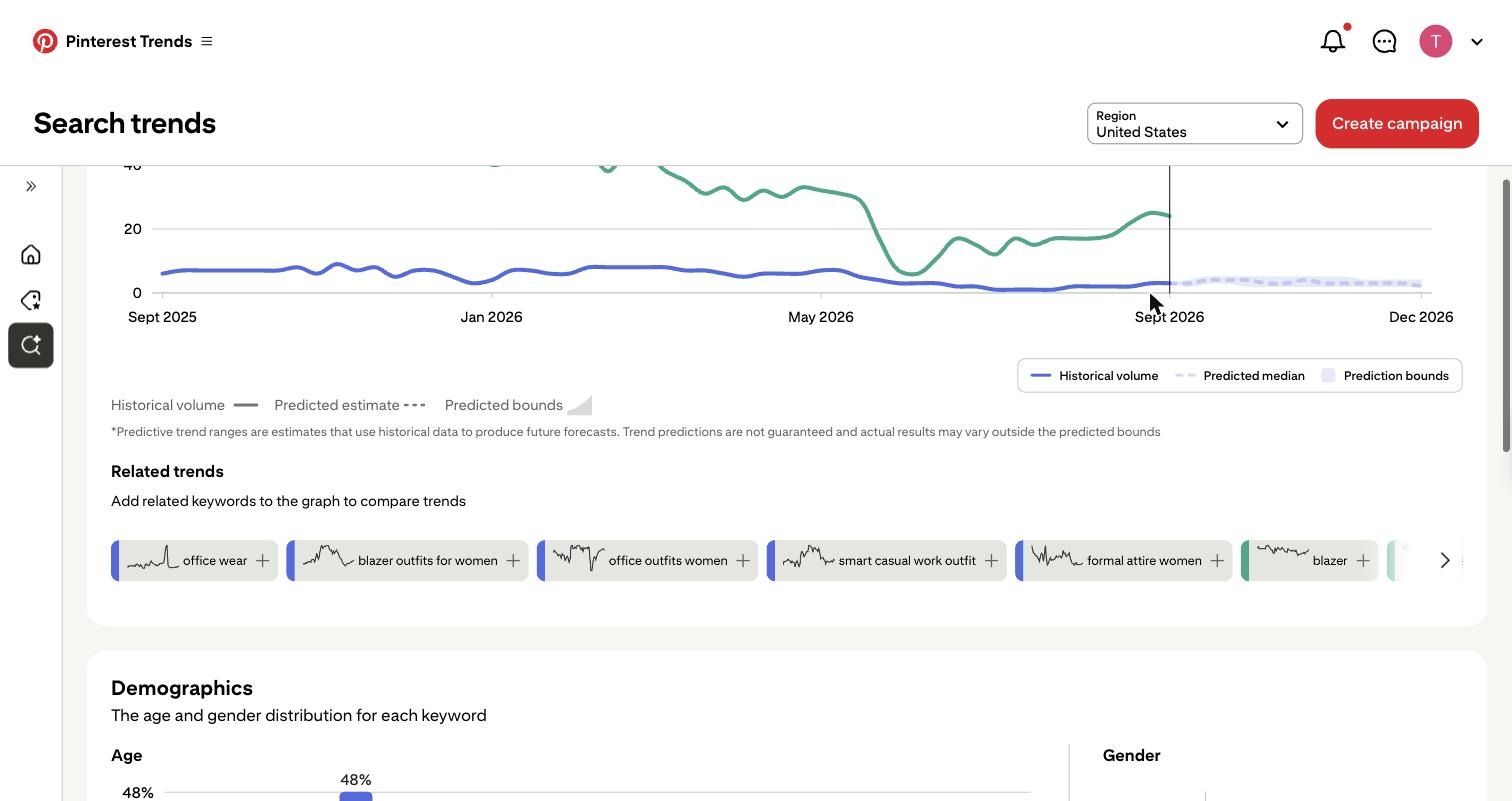
The crystal ball icon, labeled Predict the future, adds a forecast to the graph with a predicted median and shaded prediction bounds running forward past the current week. Pinterest is explicit that these are estimates and are not guaranteed, so treat them as a timing hint rather than a promise.
6. Read related trends and popular Pins
Under the graph, Related trends offers keywords you can click to add to the comparison. For blazer outfits that list is office wear, blazer outfits for women, office outfits for women, smart casual work outfit, formal attire for women, blazer, suits for women, and black blazer outfit. Read that list as the context the trend lives in. Every one of those terms is workwear, which tells you the searcher's intent is getting dressed for the office, not dressing up for an event.
Popular Pins at the bottom show the creative that is actually winning on those keywords. This is your reference for color, framing, and styling, not a library to copy from.
7. Check the audience behind the trend
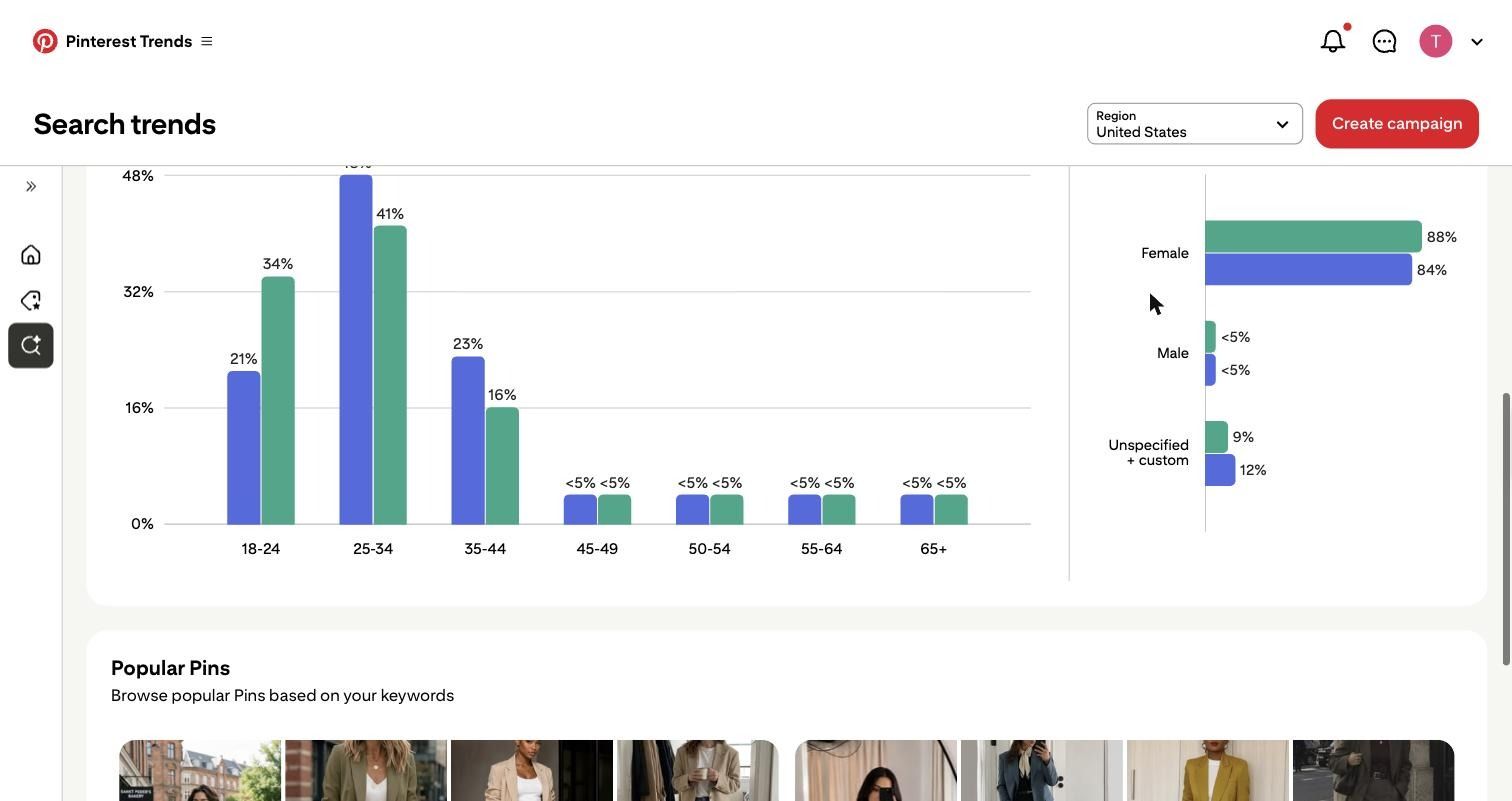
The Demographics panel splits age and gender per keyword. For casual blazer outfits, 48% of searchers are 25 to 34, 23% are 35 to 44, and 21% are 18 to 24, with 84% female. For the broader blazer outfits, the 18 to 24 share jumps to 34%. Same product category, two different buyers, two different creative directions.
How to tell if a Pinterest trend is worth using
A rising trend is not automatically a good trend for your business. Run each candidate through six checks and drop it if it fails more than two.
- Direction. Is the monthly change still climbing, or are you looking at the back half of a spike? Weekly change turning negative while monthly stays positive usually means you are late.
- Seasonality. Switch to a two-year range. If the curve repeats, you can plan for it. If it does not repeat, you are betting on a one-off.
- Product relevance. Can you connect this trend to something already in your catalog in one sentence? If the connection needs a paragraph, your customer will not make it either.
- Audience fit. Does the age and gender split match who actually buys from you? A trend that skews 18 to 24 is a poor fit for a brand whose repeat buyers are 35 plus.
- Related searches. Read the related trends list as an intent signal. Workwear terms mean a practical buyer. Aesthetic terms mean a mood buyer. They need different creativity.
- Saturation. Scan Popular Pins. If every winning Pin already looks identical, you are entering a crowded look with no differentiation. Sometimes the better move is the adjacent, less saturated term from the related list.
One caveat on the numbers. Some growing keywords are noise: the live table currently includes "happy september 1st" and "happy labor day weekend" at 10,000%+ monthly growth, which are calendar artifacts. And 10,000%+ is a ceiling, not a measurement, so a keyword hitting it started from nearly zero.
Use shopping trends to find e-commerce opportunities
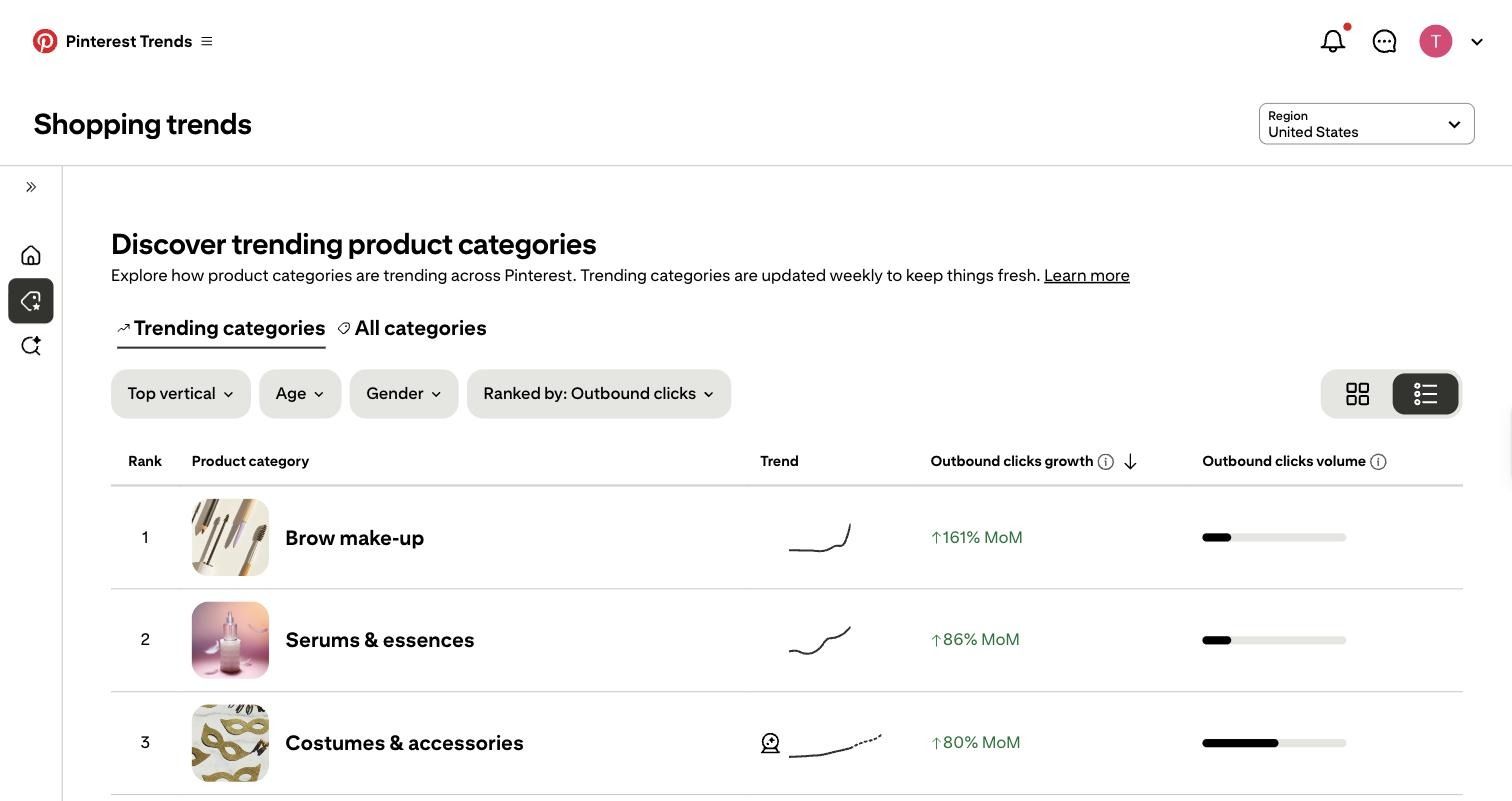
Shopping trends are the most directly commercial screen in the tool. It ranks product categories by outbound click growth, which means people did not just save the idea; they clicked through to a retailer. It refreshes weekly and filters by top vertical, age, and gender.
The current US table reads like a merchandising memo:
Four ways to use a table like this:
- Product angles. Brow make-up leads beauty by a wide margin, and the eye area is where the budget is moving. A brow product buried three clicks deep deserves its own landing page this month.
- Campaign themes. Boots, coats, outerwear, and knitwear all sitting at 38 to 44% is not four trends; it is one: layering.
- Merchandising. Decorations and wreaths climbing in mid-September are your cue to move holiday inventory forward in navigation and in your catalog feed, weeks before the search peak.
- Creative direction. High click growth tells you which product types justify video rather than static, because people are already in a buying frame of mind.
Use Pinterest Predicts for bigger trend signals
The difference is simple:
- Pinterest Trends shows what people are searching, saving, and shopping for right now, updated continuously.
- Pinterest Predicts is Pinterest's annual forecast, published each December, of trends with long-term growth potential.
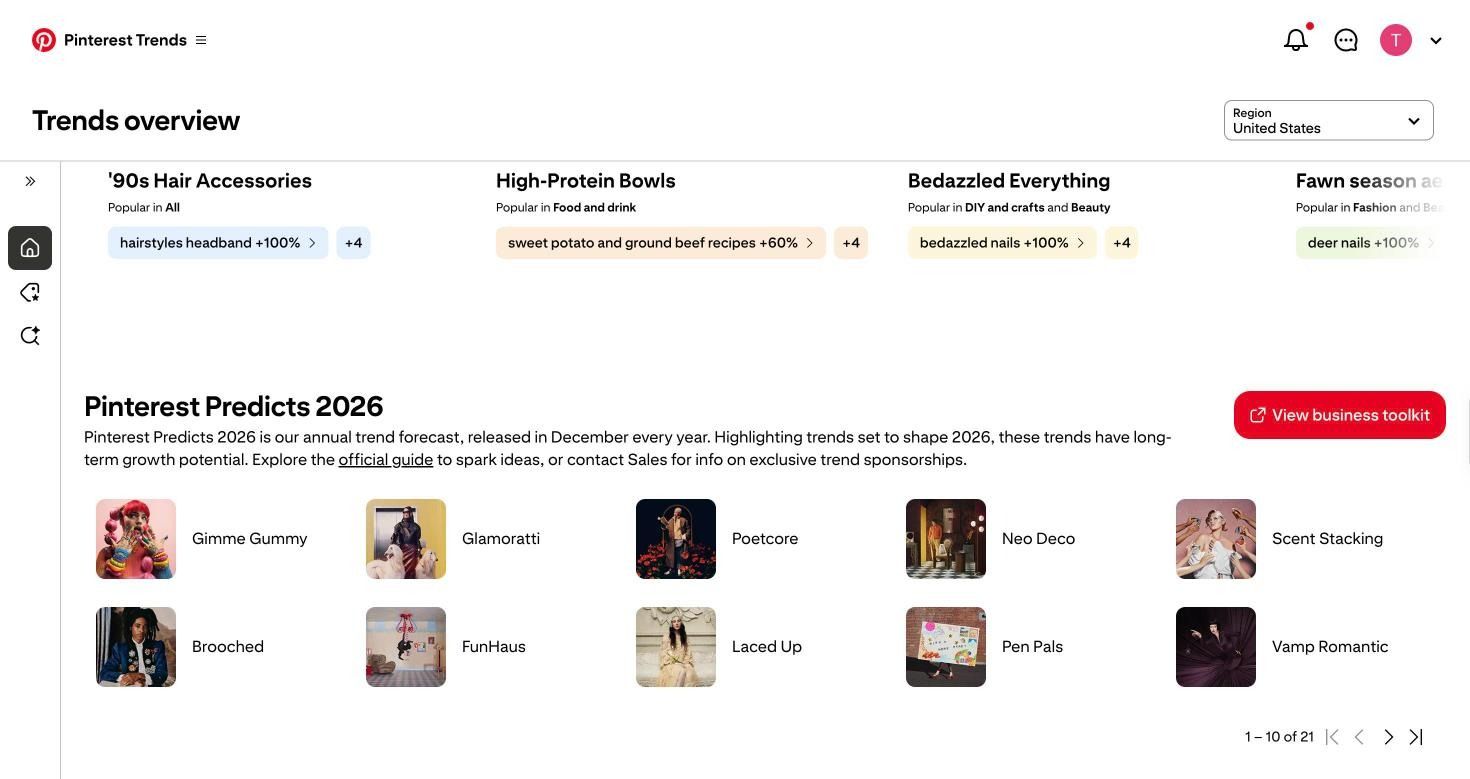
Predicts 2026, naming 21 trends, including Gimme Gummy, Glamoratti, Poetcore, Neo Deco, Scent Stacking, Brooched, FunHaus, Laced Up, Pen Pals, and Vamp Romantic. Pinterest says its Predicts calls have been 88% accurate over six years.
Use Predicts for range planning and Trends for timing. The two work best together: Poetcore, a Predicts 2026 trend built on oversized turtlenecks and vintage blazers, is the slow-moving forecast. The blazer search curve climbing week over week right now is the live confirmation that it is landing.
Turn Pinterest trends into e-commerce campaign ideas
Use one chain for every trend: trend, customer relevance, product connection, campaign idea. Here are three built from the live data above.
Example 1. Casual blazer outfits, up 2,500% month over month
Customer relevance: 48% of searchers are 25 to 34, 84% are female, and the related terms are office wear, smart casual work outfit, and office outfits for women. This is a return-to-office styling problem, not a fashion-show moment.
Product connection: any relaxed blazer, plus the tee and denim already in the catalog.
Campaign idea: "One blazer, five mornings." A five-piece set showing the same blazer restyled for five working days, each look shoppable as a bundle. It answers the actual search, which is not "show me a blazer" but "show me what to wear it with."
Example 2. Brow make-up, up 161% in outbound clicks
Customer relevance: the fastest-growing shopping category on the platform, sitting beside the Editors' pick Bedazzled Everything, where bedazzled nails are up 100%. Detail-level beauty is where attention is.
Product connection: brow pencil, gel, and a shaping tool.
Campaign idea: a "brow in three products" routine, merchandised as a kit priced below the sum of its parts, with the tutorial as the ad and the kit as the destination.
Example 3. Outerwear and boots, all up 44%, with Christmas approaching in Moments
Customer relevance: Moments labels Halloween as rising and Thanksgiving, Hanukkah, Christmas, and New Year's Eve as approaching. Click growth on layering categories is climbing before the holiday peak, not during it.
Product connection: coats, boots, and knitwear as one outfit rather than three product pages.
Campaign idea: "The layer stack." One video per layer, each ending in the complete outfit, published five to six weeks ahead of the Moment rather than in the week of it.
If you want to see this applied to a single season end to end, our guide on how to use Pinterest for Halloween marketing walks one Moment from research to campaign.
Turn a Pinterest trend into a product video ad with Async
Pinterest tells you which visual direction is gaining interest. Async turns that direction into an actual product ad. Here is the full run, using the blazer trend, done in one session.
Step 1. Pick the trend and write the ad concept in one sentence.
Trend: casual blazer outfits, up 2,500% month over month, skewing 25 to 34 and female, with workwear-related searches around it. Concept: a 15-second vertical ad for an oversized beige linen blazer, styled casually, shot in warm daylight, ending on a shop call to action.
Step 2. Open the workspace.
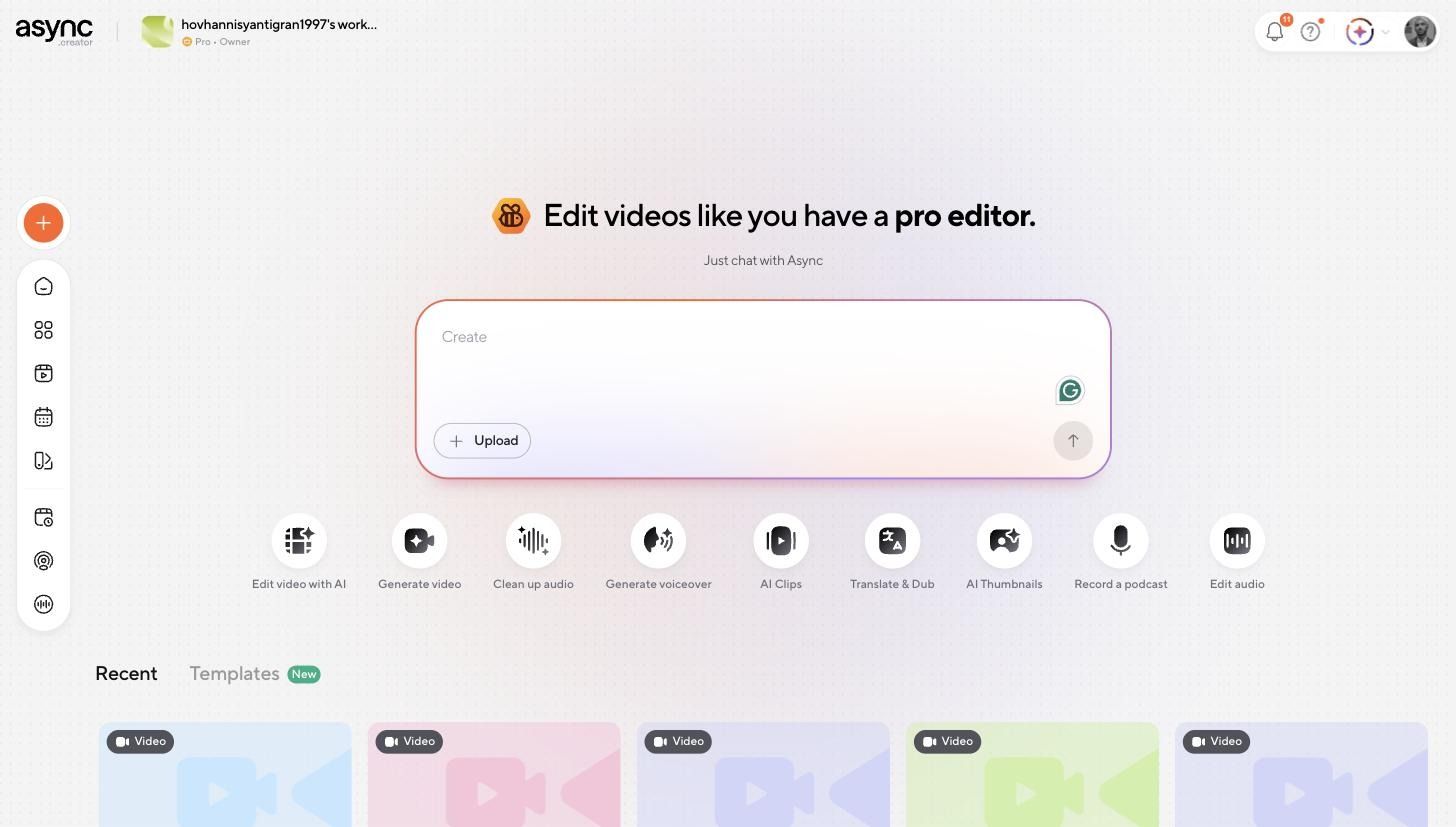
Async's home screen offers Edit video with AI, Generate video, Clean up audio, Generate voiceover, AI Clips, Translate and Dub, AI Thumbnails, and more. For a product ad, Generate video opens the editor with a chat panel on the left and a timeline on the right.
Step 3. Brief it with the trend baked in.
The visual direction from Pinterest goes straight into the prompt: warm neutral palette, soft daylight, minimal city street and cafe setting, white tee and straight-leg denim. If you have real product photography, upload it here, and Async builds around your assets instead of generating them. Our guide to writing AI video prompts covers how to phrase shot and pacing instructions.
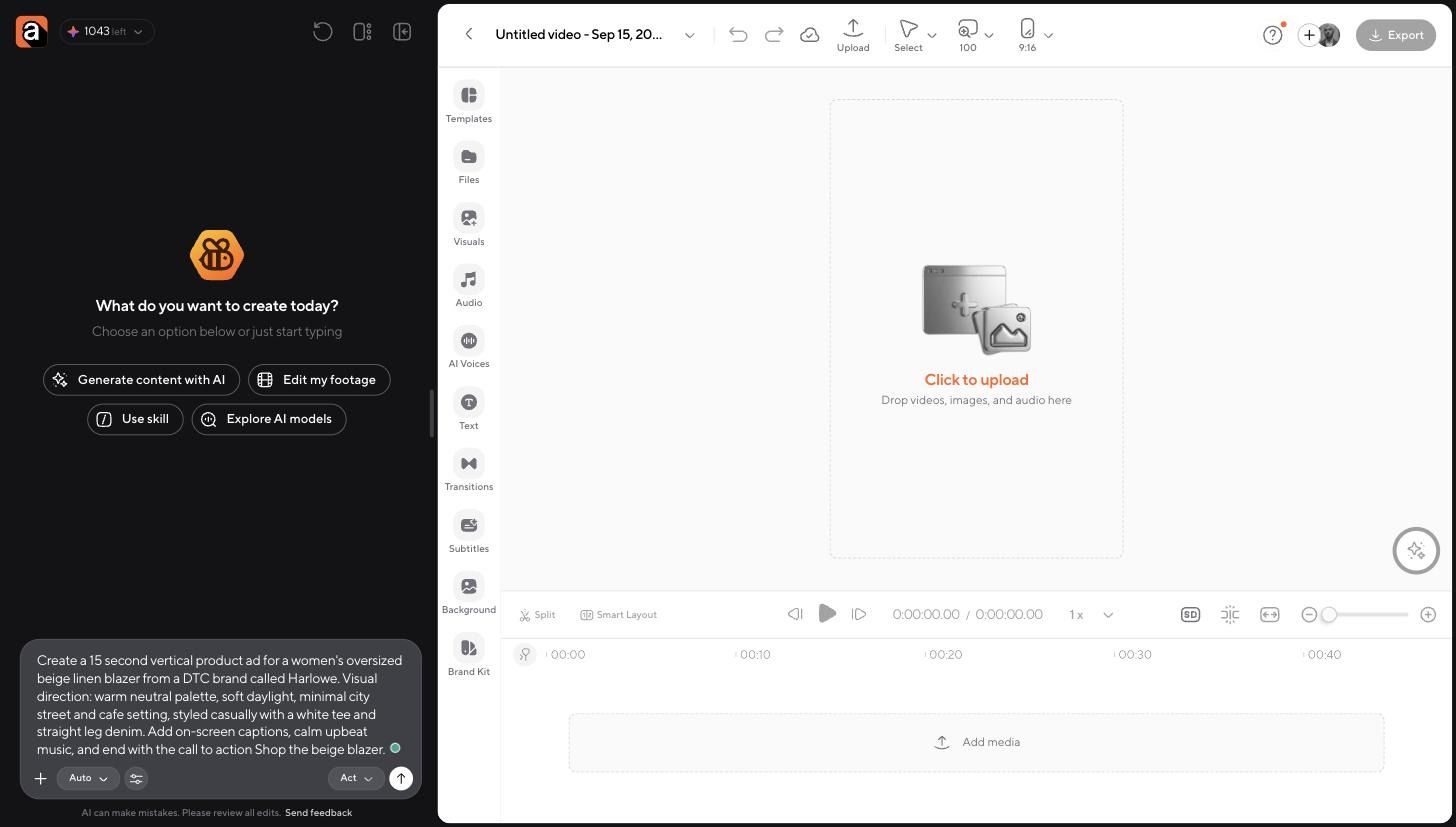
Step 4. Let it build the project, not just a clip.
Async planned the job, quoted the cost up front at 66 credits for video and 23 for music, generated a three-shot 9:16 sequence and an instrumental track, then assembled the timeline itself: video track, audio track, and four timed caption clips running brand name, product line, tagline, and CTA.
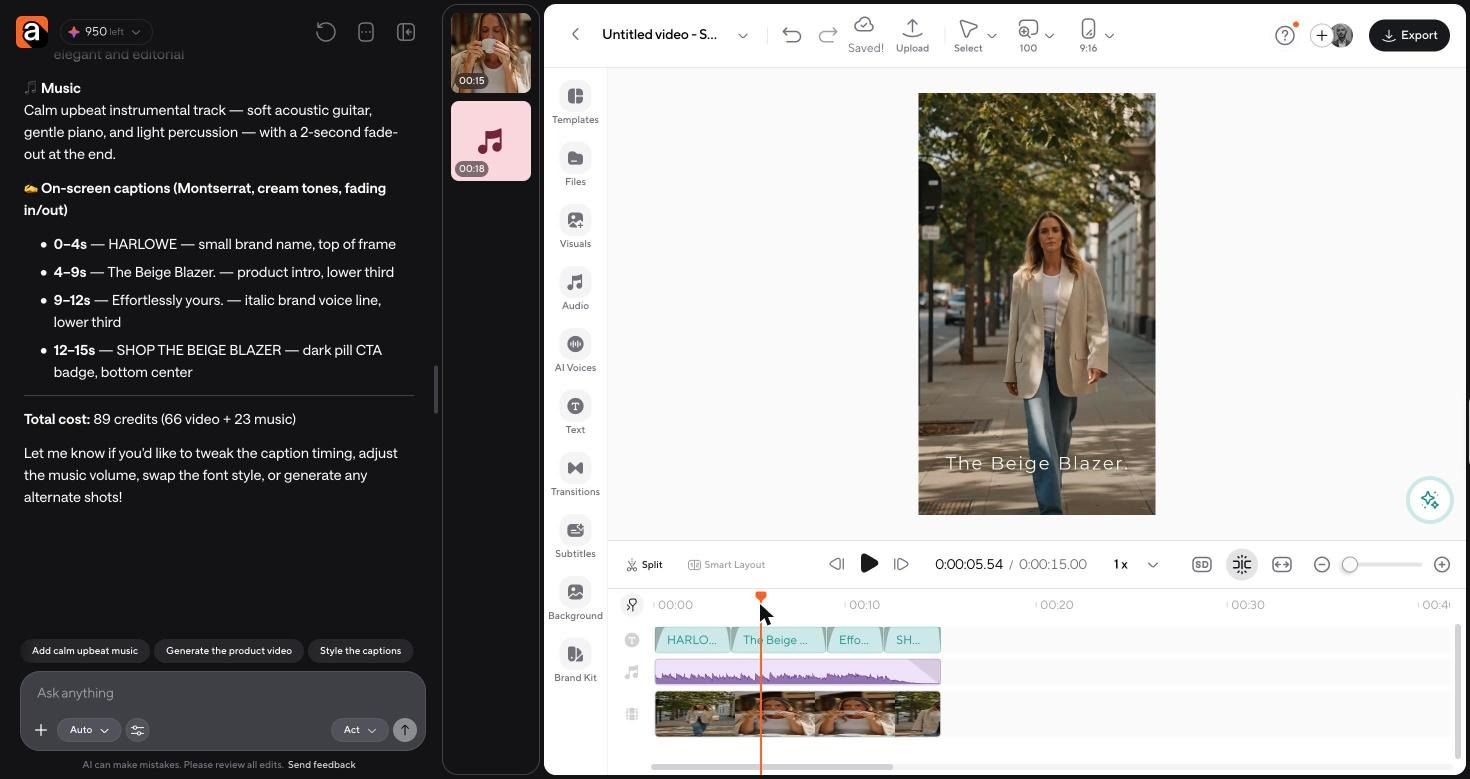
Step 5. Check the output and adjust in the editor.
The finished ad opens on the model walking a sunlit sidewalk in the beige blazer, cuts to a cafe table close-up, and lands on a dark pill CTA reading "Shop the beige blazer." Everything is editable on the timeline: caption timing, font, music level, individual shots. If you would rather start from your own product stills, the AI image generator creates the on-trend frames, and the image-to-video AI turns them into motion.
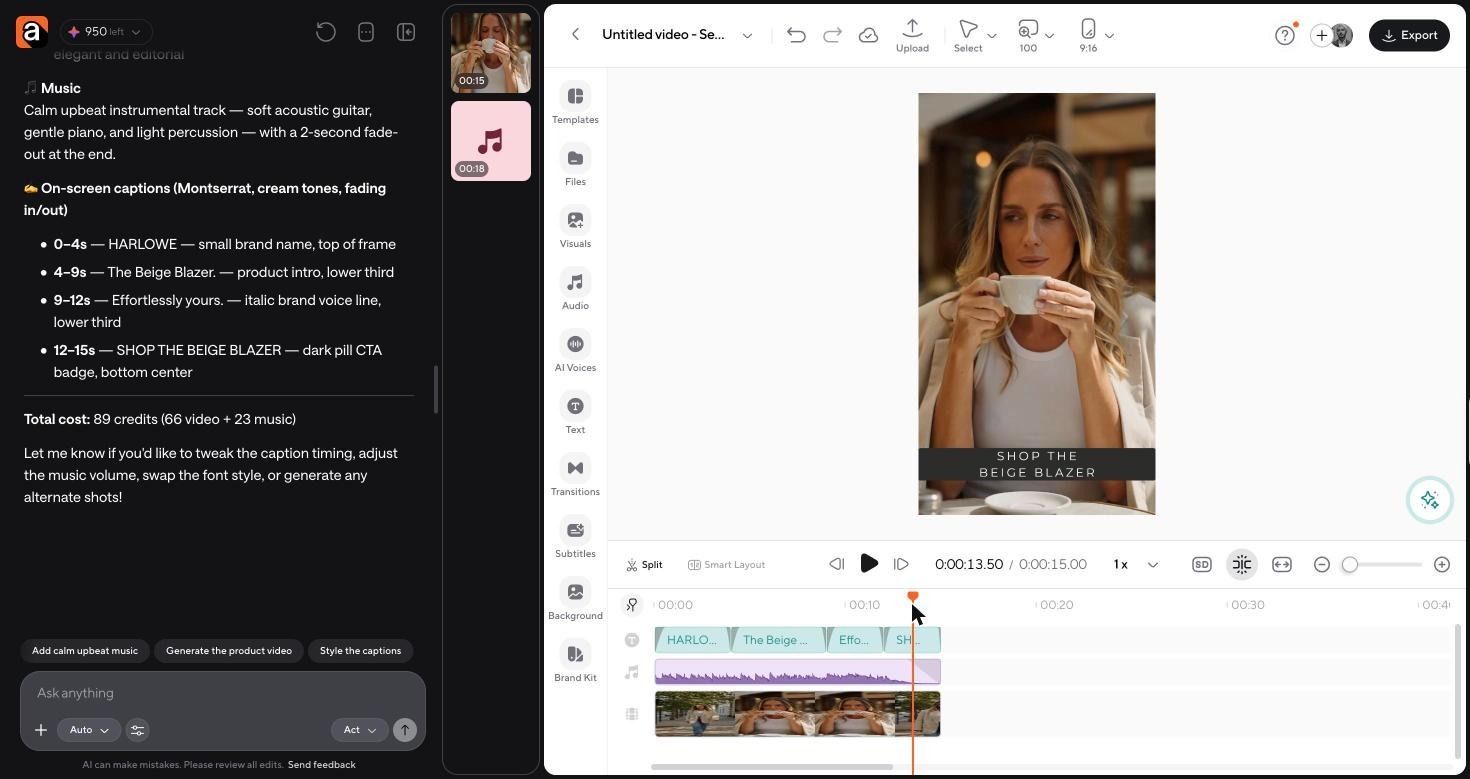
Repurpose your product ad across channels
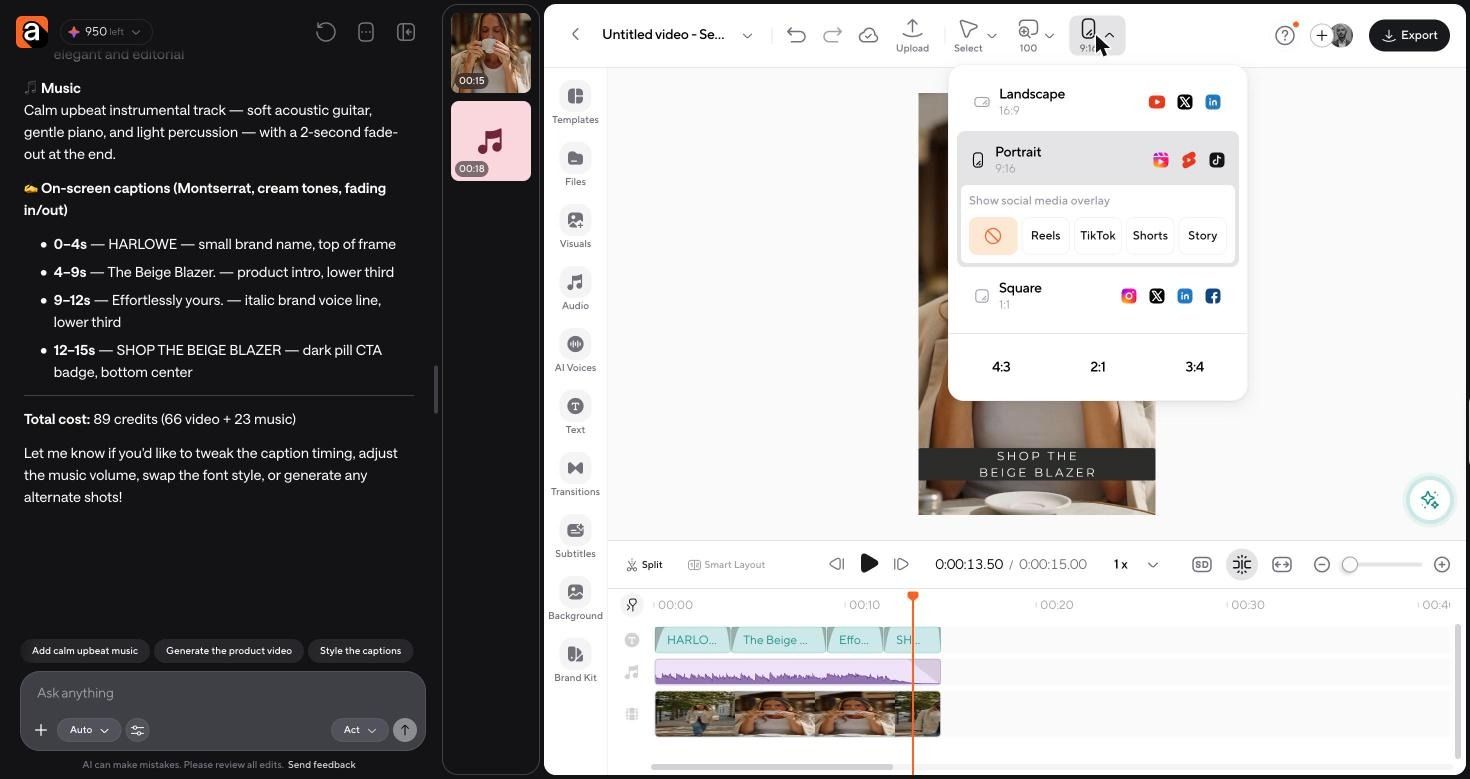
One concept, several placements. In the Async editor, the aspect ratio control resizes the project and keeps the layout intact.
- Pinterest video Pins. Keep 9:16 and use the trend keyword in the Pin title and description.
- Instagram Reels and TikTok. Same 9:16 export, with the platform safe-zone overlays on so captions clear the interface.
- Meta ads. Switch to 1:1 for feed, and cut a six-second version that opens on the CTA shot.
- YouTube and landing pages. Switch to 16:9 for a hero video, muted and looping.
- Product pages. Use a still from the strongest frame as the gallery image so the ad and the page match.
If you only need motion on an existing product photo rather than a full ad, you can animate images with AI and skip the generation step.
How to use Pinterest trends without copying
There is a real line between three things:
- Identifying a pattern is reading that workwear blazer searches are rising and that the winning Pins share a warm neutral palette and daylight. That is research.
- Adapting an aesthetic is applying that palette, mood, and framing to your own product, with your own model, location, and styling. That is what this whole workflow does.
- Recreating someone else's Pin is reproducing a specific image, layout, or piece of creative that another brand made. That will read as derivative to the exact audience you are trying to win.
Work from colors, moods, themes, formats, and customer interests rather than from assets. If you can describe what you are borrowing without naming a specific Pin, you are adapting. If you cannot, you are copying.
A simple Pinterest trend research workflow for ecommerce
Run this monthly. It takes about an hour.
- Search. Set your region, open growing trends, and use Include keyword to filter to your category.
- Compare. Put your best candidate against two or three related terms on the same graph.
- Validate. Check direction, two-year seasonality, product relevance, demographics, related searches, and saturation.
- Save references. Build a private board of the Popular Pins and Editors' picks that define the look, tagged by trend.
- Connect to the product. Write the one-sentence chain: trend, customer relevance, product connection, campaign idea.
- Create. Brief the ad in Async with the trend's visual direction in the prompt, then resize for each placement.
- Test. Ship two cuts against one audience, read Pinterest analytics after two weeks, and keep the winner as the template for the next trend.
FAQs
Is the Pinterest Trends tool free?
Yes. The Pinterest Trends tool is free with a Pinterest business account. You open it in a desktop or mobile browser, not in the Pinterest app.
How far back does Pinterest Trends data go?
Up to two years of historical search, save, and shopping behavior, which is enough to confirm whether a seasonal curve repeats.
What is the difference between Pinterest Trends and Pinterest Predicts?
Pinterest Trends shows current behavior, updated continuously. Pinterest Predicts is the annual forecast released every December of trends expected to grow over the coming year. Use Predicts to plan the range and Trends to time the campaign.
How do I find Pinterest keywords for my products?
Type a product word into the keyword search box and read the autocomplete suggestions, then open the Related trends list under the graph. Both are drawn from real Pinterest searches, which makes them a stronger keyword source for Pinterest SEO than general search tools.
Does Pinterest Trends help with Pinterest SEO?
Yes, indirectly. The keywords and related terms it surfaces are the ones to use in Pin titles, descriptions, and board names, and the seasonality data tells you when to publish so your Pins have time to gain saves before the peak.
How do I use Pinterest for business if I have no audience yet?
Start with search and shopping trends rather than audience data. Audience-specific trends need enough followers and engagement volume to display, so early on, the public data is the better signal.
How often should I check Pinterest trends?
Monthly for planning and weekly during a seasonal Moment you are actively running. Shopping trends refresh weekly, and Moments move from approaching to rising with enough lead time to act.
What does the crystal ball icon in Pinterest Trends mean?
It is the Predict the Future " forecast. It extends the graph forward with a predicted median and prediction bounds. Pinterest states these are estimates, and actual results may fall outside the bounds.
What can Pinterest analytics tell me that Pinterest Trends cannot?
Pinterest Trends is platform-wide demand. Pinterest analytics is your own performance: which of your Pins earned impressions, saves, and outbound clicks. Use Trends to choose the bet and analytics to grade it.