The idea of an apartment makeover might not sound like a YouTube trend, but watching someone turn a tiny space into a functional home gives viewers a reason to stick around. That's what makes YouTube trends in 2026 worth exploring: it’s a tried-and-tested idea, customized by each creator.
This guide is for creators who want very simple ideas they can quickly film or edit this week. It covers ten formats, and each one comes with a recent example, the audience it suits, a hook to open with, and an editing approach. It also separates short-lived trends from formats that last, so you know what to test and what to build on.
YouTube has also changed how creators discover trends and share their videos. The public Trending page is gone, Shorts can run up to three minutes, and YouTube Studio offers audience insights to help creators find new ideas. With so many ways to create and discover content, knowing which trends are worth your time matters more than ever.
Examples and menus change quickly, so treat every link as a snapshot.
Quick answer: Which YouTube trends are worth your time
Start with the format that matches the video you can make well. Low-effort formats like real-life vlogs and commentary are good for testing ideas. Higher-effort formats like series, animation, and cinematic travel pay off when you can repeat them. Here is the short version.
If you want to go from idea to edited video without juggling separate tools, Async can help you cut, caption, and reframe your footage from one workspace.
Current trends vs enduring formats
A current trend is tied to a moment, such as a season, a platform feature, or a sound. An enduring format works year after year. Test trends as short experiments, and build your channel on formats you can repeat without running out of ideas.
Take Halloween makeup transformations, for example. A particular look might be everywhere in October and barely show up by November. But the before-and-after reveal? That works just as well for a haircut, a bedroom makeover, or a DIY project in the middle of March.
New YouTube features are worth watching, too, but for a different reason. Shorts Series, for instance, makes it easier to organize connected episodes. It doesn't automatically make those videos more popular or guarantee extra reach.
10 YouTube formats to adapt in 2026
Some videos take days of planning and editing. Others start with a phone and a funny idea. There's room for both on YouTube, and the examples below show how different creators make these formats work, with a few ideas you can borrow for your own videos.
1. Challenges and big builds
You know that moment when you're watching an impossible-looking internet challenge and think, "That can't be so hard"? Michael DiCostanzo takes that impulse and runs with it in We Tried the Internet's HARDEST Challenge…. It's the kind of idea you could try with a friend and a phone. Half the fun is finding out whether it really is as difficult as it looks.
- Type: Enduring format. Best as a long video, with Shorts cut from the hardest moments.
- Audience fit: Viewers who like watching effort and results in fitness, food, finance, gaming, and DIY.
- Hook: Open on the hardest moment or the final result, then rewind to day one.
- Editing approach: Show how the challenge progresses, skip the boring parts, and don't edit out the moments when things go wrong. You can also get your audience involved by letting them choose your next challenge or decide what happens along the way.
2. Real-life vlogs and day in the life
Not every vlog needs a 5 a.m. routine or a packed schedule. Moya Mawhinney's Slow Days in Japan is a good example of how quieter moments can be interesting too. Sometimes, watching someone explore an unfamiliar place and go about their day is enough to make you want to keep watching.
- Type: Enduring format. Works as a 15- to 60-second Short or an 8- to 15-minute video.
- Audience fit: Lifestyle, student, career and "a day as a [job]" niches.
- Hook: Start with the most interesting moment of the day, or a specific promise like "I work 14 hours as a night nurse. Here's hour one."
- Editing approach: When editing a café visit, leave in the sound of cups clinking and someone calling out an order. You could even let the camera linger while you find a seat. That bit of everyday noise gives the scene some character, and you can move on once the coffee arrives.
3. POV skits and non-verbal Shorts
POV videos put the viewer inside a scene, like "POV: you're the barista who just fell in love." Non-verbal Shorts rely on gestures, expressions and sound instead of speech, so they travel across languages. Both work when the premise is clear in the first second.
- Type: POV is an enduring format. Non-verbal Shorts are a current trend, flagged in YouTube's trends coverage for 2026. Shorts format.
- Audience fit: Comedy and storytelling creators, and anyone with an audience that speaks more than one language.
- Hook: Imagine turning around to find your bike has disappeared. That confused reaction could be the very first shot. There's no need to explain the joke before it even starts.
- Editing approach: Give the viewer a second to catch the confused look before the next ridiculous thing happens. A well-timed sound effect can make the moment even funnier, but filling every second with them might ruin the joke.
4. Transformations and makeovers
Where do you even put everything in a 350-square-foot apartment? That's what makes Alexandra Gater's studio makeover interesting. You start wondering how she'll make such a small space work, and suddenly you're invested in furniture placement and storage solutions. By the time the finished room appears, you've got a reason to care about more than just how pretty it looks.
- Type: Enduring format. Works in Shorts for quick reveals and long-form videos for complete transformations.
- Audience fit: Beauty, fashion, DIY, home and cosplay niches.
- Hook: Show the "before" in the first second with a bold text promise, or open on the finished look and rewind.
- Editing approach: In a tiny apartment makeover, the struggle to fit a sofa through the doorway might be more entertaining than watching someone assemble it. Leave moments like that in, even when things get a little messy. For the final reveal, film from the same corner as your original shot so viewers can see exactly how much the space has changed.
5. Video podcasts with a cold open and clips
A video podcast is a long conversation on YouTube that you also cut into Shorts. The cold open, which is the strongest line from the episode placed before the intro, gives viewers a reason to stay. YouTube keeps adding podcast tools, so the format keeps growing.
- Type: Both. Long episodes with Shorts clips.
- Audience fit: Interviews, expert conversations and niche communities.
- Hook: Open with the most surprising 15 to 30 seconds of the episode, then roll the intro.
- Editing approach: Cut between cameras, remove silences and filler words, add captions, and pull three to five Shorts from each episode.
6. Serialized shows and Shorts Series
Serialized content is a recurring show with the same structure in each episode. On YouTube, it ranges from hour-long TV-style shows to short microdramas. YouTube announced Shorts Series at Made on YouTube on September 23, 2026, so short, sequential stories now have a dedicated home.
- Type: Shorts Series and microdramas are a current trend. The series itself is an enduring format.
- Audience fit: Storytellers, comedians, and anyone with a premise you can repeat every week.
- Hook: Give each episode a familiar starting point, like a recurring character, question, or challenge. Use cliffhangers for connected stories, and consistent visual elements for episodes that stand alone.
- Editing approach: In a series like Keep the Meter Running, I'd keep the moment the taxi driver decides where to go, including any hesitation before answering. From there, the conversation can take its own course. Some rides might turn funny, others surprisingly personal, and the editing should leave room for both.
7. Niche tutorials and explainers
Niche tutorials and explainers answer one specific question: how to restore a tool, how a policy works, or why a market moved. They match what people search for, so they keep earning views long after upload. In this case, more specific topics give you a better chance of answering a question that other videos have overlooked.
- Type: Enduring format. Long videos, with Shorts for single tips.
- Audience fit: Viewers who search "how to" and "why."
- Hook: State the problem and the payoff in the first ten seconds, like "By the end of this video you'll be able to do X."
- Editing approach: Add chapters, show steps on screen, zoom in on the screen or hands, use B-roll to cover cuts, and add captions.
8. Animated and faceless storytelling
Animated and faceless videos use illustration, motion graphics or AI-assisted visuals instead of an on-camera host. They suit creators who prefer to stay off camera. Furthermore, note that AI-assisted storytelling needs extra care, since YouTube's monetization policies target repetitive and mass-produced content. Each video needs a real script and a point of view.
- Type: Current trend, with caution. Works in long videos and Shorts.
- Audience fit: History, true stories, science and fiction. Viewers interested in longer stories, explanations, and visual narratives.
- Hook: Open with the strangest fact or the cliffhanger.
- Editing approach: Write an original script, generate more appealing content by using better AI video prompts, use a consistent visual style, and don’t forget to label AI visuals. Also, avoid reusing one template across many videos.
9. Commentary, reactions, rankings and storytime
These formats put your opinion at the center. You react to a clip, rank a list, or tell a story. They are quick to make and easy to start. The strongest examples give viewers a reason to watch beyond the original footage: your perspective is why people watch, not the footage you are reacting to.
- Type: Enduring format, and the one most affected by originality rules.
- Audience fit: Fandoms, gaming, pop culture and news.
- Hook: Lead with your take, like "This ranking is wrong, and here is why."
- Editing approach: Use short clips only when you are commenting on them. Add freeze frames and comparison screens, cut dead air, and credit your sources. Tier lists work well here because viewers love to disagree in the comments.
10. Cinematic travel and silent vlogs
Cinematic travel and silent vlogs rely on visuals, ambient sound and music instead of talking. They suit calm, repeatable content like cooking, cleaning, journaling and travel. They take effort to film well, but strong visuals can reach viewers across languages, especially when the storytelling doesn't depend heavily on dialogue. Also, these videos are easy to caption, dub and reuse in any language.
- Type: Enduring format. Long videos, with Shorts for the best shots.
- Audience fit: Travel, slow living, food and study vlog audiences.
- Hook: Open on the most striking shot with a one-line text promise.
- Editing approach: Stabilize footage, color grade, cut on the music, and add light voiceover or text. Subtitles help with accessibility and silent viewing.
How to find YouTube trends with the tools that exist now
To find trending YouTube topics, use YouTube Charts for category rankings, the Trends tab in YouTube Studio for audience insights, and search suggestions or Google Trends to explore search interest. Each tool answers a different question, so pick the one that matches yours.
1. YouTube Charts for category rankings
Still looking for YouTube's old Trending page? You're not missing it. YouTube removed it in 2025. Now, someone researching video podcasts can use YouTube Charts to see which shows are ranking that week. But a DIY creator won't find a similar chart for room makeovers. Charts covers selected categories, including music and movie trailers, while gaming trends still have their own place in Explore.
2. The Trends tab in YouTube Studio
The Trends tab shows what your audience and viewers across YouTube are searching for. In YouTube Studio, open Analytics, then click the Trends tab. Per YouTube Help, it includes Top searches, Breakout videos from similar creators, Recent videos and Content gaps for Shorts.
Two cautions. Some insights are limited by country, language and device. And YouTube began rolling out an updated Studio experience in July 2026, so your tab may look different from this description.
3. Ask Studio for ideas from your own channel data
Ask Studio is a chat assistant inside YouTube Studio. It helps you summarize comments, understand channel stats and brainstorm video ideas. It is available to most creators globally, according to YouTube Help. YouTube began deprecating the older Inspiration tab in August 2026 and points creators to Ask Studio for brainstorming. Use it for ideas based on your own channel, and use the Trends tab for what is moving across YouTube.
4. Search suggestions and the Shorts feed
Type a keyword into the YouTube search bar and read the autocomplete suggestions, since they reflect what people are searching for. To spot YouTube Shorts trends, spend ten minutes in the Shorts feed looking for recurring formats, sounds and editing styles. If three unrelated channels use the same structure, you are probably looking at a trend.
5. Google Trends
On Google Trends, you can compare topics by region and time frame, and filter results to YouTube Search. It is useful for checking whether interest is rising, seasonal or flat before you commit to a series.
6. Keyword tools and competitor checks
Tools like TubeBuddy, vidIQ and Ahrefs estimate search demand and competition. Then check the results yourself: open a competitor's channel, sort videos by Popular, and compare it with their recent uploads. Topics that appear in both lists are worth your attention.
How to turn a trend into your own video
A trend gives you the starting point, but your subject, personal input, and editing choices make the video actually unique. Here are two practical Async workflows: one using footage you've filmed yourself and another built with AI-generated visuals. Your best bet is to make one small test version first, then decide if it deserves a full production.
Example 1: A filmed day-in-the-life Short, edited through chat
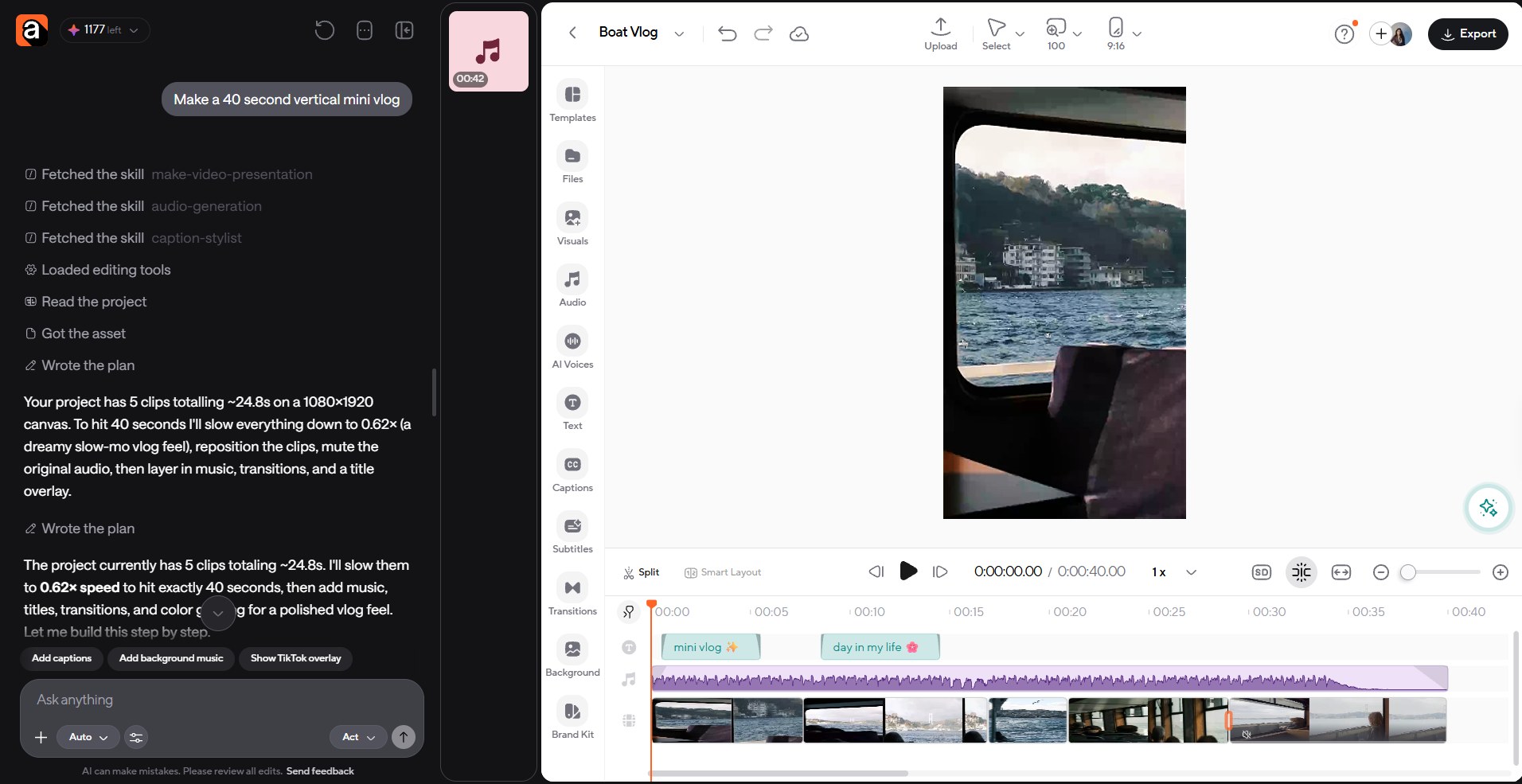
Film a normal day on your phone, upload the raw clips to Async, and describe the cut in plain language. The goal is a 30 to 45 second vertical mini vlog with captions, edited by conversation instead of by hand in one session.
- Film 8 to 12 short clips of your day: the start, two or three specific moments, and the end.
- Upload them to the Async AI video editor and write a prompt like: "Make a 40 second vertical mini vlog. Keep the coffee, the commute and the last scene. Remove pauses and filler words. Add captions."
- Refine with follow-ups, like "Start on the coffee pour" or "Keep me centered in the vertical frame."
- Export and upload through YouTube. A vertical or square video up to three minutes is categorized as a Short.
Example 2: A clearly labeled AI-generated POV sequence
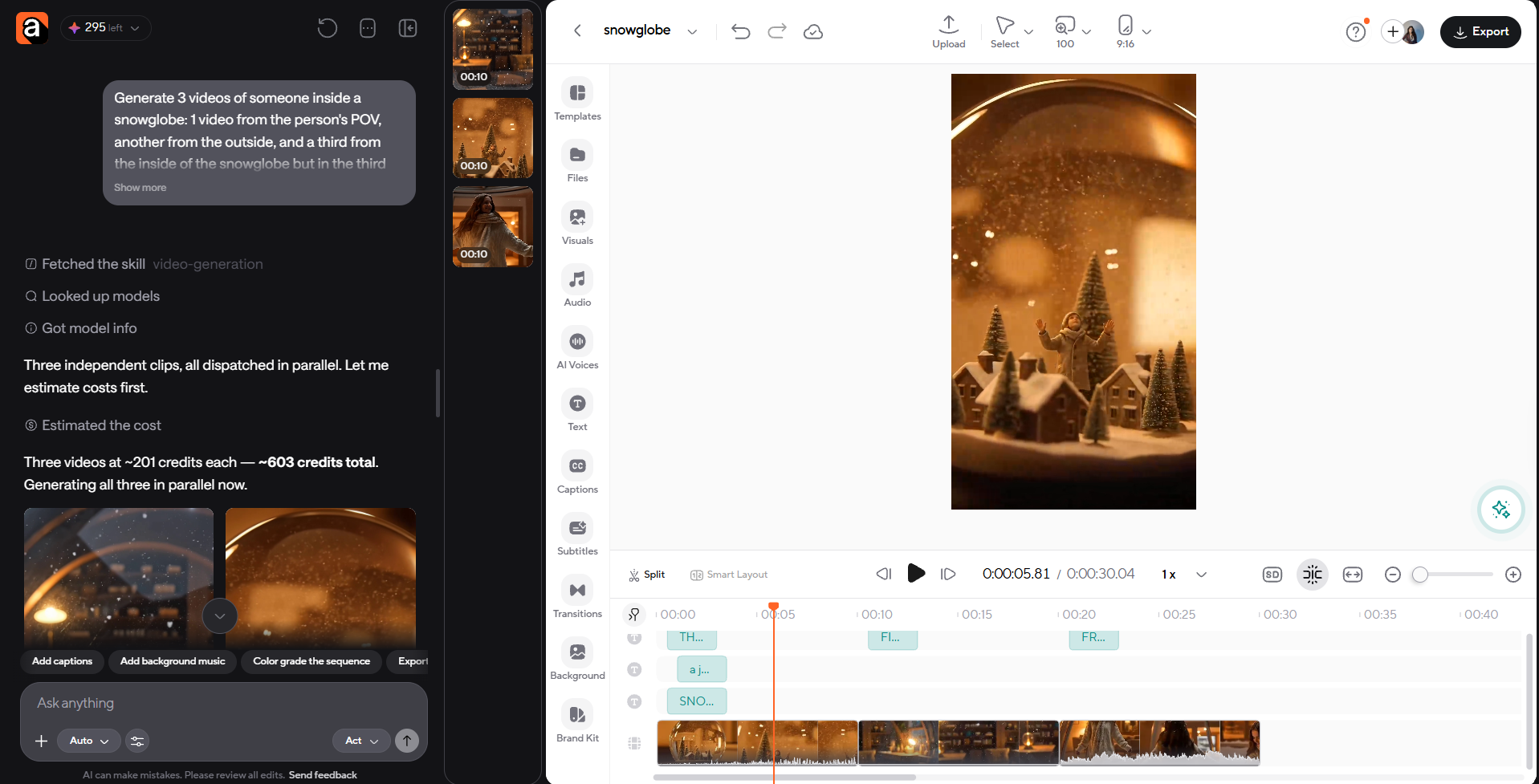
For a POV or fantasy idea you cannot film, generate the shots with AI, then edit them and label the result. Plan a short sequence of four or five shots, write a structured prompt for each, and put an on-screen "AI-generated" label in the first seconds.
- Write the concept as one line, like "POV: you wake up inside a snow globe."
- Write each shot prompt with the following formula: subject, action, environment, motion, camera, style and constraints.
- Generate the shots in Async's video generator, then trim, reorder and add captions and music through chat.
- Add a visible "AI-generated" label and mention it in the description for transparency.
On disclosure: YouTube requires creators to disclose meaningfully altered or synthetic content that seems realistic, using the altered content setting in Studio. Clearly unrealistic or animated content does not need it, and YouTube says disclosing does not limit a video's audience or its eligibility to earn money. When in doubt, disclose.
Standalone generators can help with one step, but they often leave you with extra trimming, captions, resizing and exports. Async is useful when you want the generating and the editing to happen in the same place.
How long can a YouTube Short be in 2026?
A YouTube Short can be up to three minutes long. The old 60-second limit no longer applies. According to YouTube Help, a square or vertical video up to three minutes uploaded on or after October 15, 2024 is categorized as a Short.
Three minutes is a ceiling, not a target. Our Shorts length guide covers the best durations for different formats. Music rules tighten as Shorts get longer: most songs in the Shorts Audio Library can be used for up to 90 seconds in a three-minute Short, and some tracks allow only 60 or 30 seconds. A Short over one minute with an active copyright claim is blocked globally. For longer Shorts, original or royalty-free audio is the safer choice.
Originality and AI: what to check before you copy a trend
Copy the structure of a trend, not the video itself. YouTube is giving more weight to original work. The latest YouTube monetization update, applied on October 1, 2026, announced changes to its Shorts recommendation system to prioritize original content and reduce the reach of channels that primarily repost other creators' videos without adding meaningful value.
Separately, YouTube's July 2025 monetization update clarified rules for repetitive and mass-produced content. Reaction videos, compilations and AI-generated Shorts are not automatically penalized, but they need your own commentary, story or creative change. Ask yourself what a viewer gets from your version that they would not get from the original.
Assess before you copy: AI celebrity covers
AI voice covers that imitate a real singer or celebrity are an example to assess, not a shortcut. They can raise questions about likeness, copyright and disclosure, and they can fall short of the originality bar if the only thing you added is a cloned voice. If you want to try the idea, use an original voice or original music, get permission where it applies, and disclose realistic synthetic content.
What to do after you pick a format
Picking a format is only one part of how to go viral on YouTube. What matters next is testing your idea, seeing where viewers lose interest, and using what you learn to improve the following video. A few habits matter more than any single trend:
- Test the hook. Compare retention in the first 30 seconds across videos, and rewrite the opening when viewers leave early.
- Pair long and short. Cut Shorts from long videos so viewers who find you in the feed have a next step.
- Keep what is yours. Your voice, footage and opinion are what make a borrowed format work.
Start with one YouTube format and make it your own
The best YouTube trends in 2026 are the ones you can make your own. Pick a format that fits your audience, check it against YouTube's tools, and test a small version before you commit to a series. The goal isn't to follow every trend. It's to find a format your audience enjoys and that you can realistically keep producing.
Ready to try your first test video? Sign up for Async and start recording, editing and repurposing your next YouTube video from one place.
FAQ
What are the biggest YouTube trends in 2026?
The biggest YouTube trends in 2026 include non-verbal and POV Shorts, seasonal transformations, video podcasts with clips, Shorts Series and microdramas, and AI-assisted animation. Long-form formats like challenges, tutorials and cinematic vlogs remain strong. Treat seasonal trends as short tests and build your channel on formats you can repeat.
How do I find trending topics on YouTube now?
Use YouTube Charts for category rankings, and the Trends tab in YouTube Studio under Analytics for audience searches, breakout videos and Shorts content gaps. Add search suggestions, the Shorts feed and Google Trends for demand. Each tool answers a different question, and availability varies by region and device.
Is the YouTube Trending page still available?
No. YouTube removed the Trending page and the Trending Now list in 2025. Popular content now appears in category-specific charts on YouTube Charts, including music videos, podcasts and movie trailers. Gaming trends are on the Gaming Explore page. Creators can use the Trends tab in YouTube Studio for audience-based ideas.
How long can a YouTube Short be?
A YouTube Short can be up to three minutes long. The video must be square or vertical and uploaded on or after October 15, 2024. The 60-second limit is outdated. Use only as much time as the idea needs, and check music rules for Shorts over one minute.
Should I copy a YouTube trend exactly?
No. Copying a format exactly gives viewers no reason to choose your version, and YouTube is giving more reach to original work. Keep the structure, change the subject, and add your own footage, voice or opinion. A trend is a starting point, not a template to reupload.