Getting more views on YouTube usually comes down to five things working together:
- viewers knowing what your channel is for
- more people clicking on your video when they see it
- choosing topics people are already searching for
- having a hook strong enough to keep people watching
- catching the pacing and retention issues easy to miss when you're editing manually
The reason you never manage to get past a couple hundred views, even when you put in a lot of effort with each upload, is usually that you have a problem in one or more of those five areas.
This guide goes through five practical fixes for low views and tips on how to get more views on YouTube based on patterns that show up in channels that break out of a period of slow growth. In action, each fix is something you can apply this week, starting with the one most creators skip: getting specific about who the channel is actually for.
5 Fixes to Get More Views on YouTube
1.Make it obvious who your channel is for
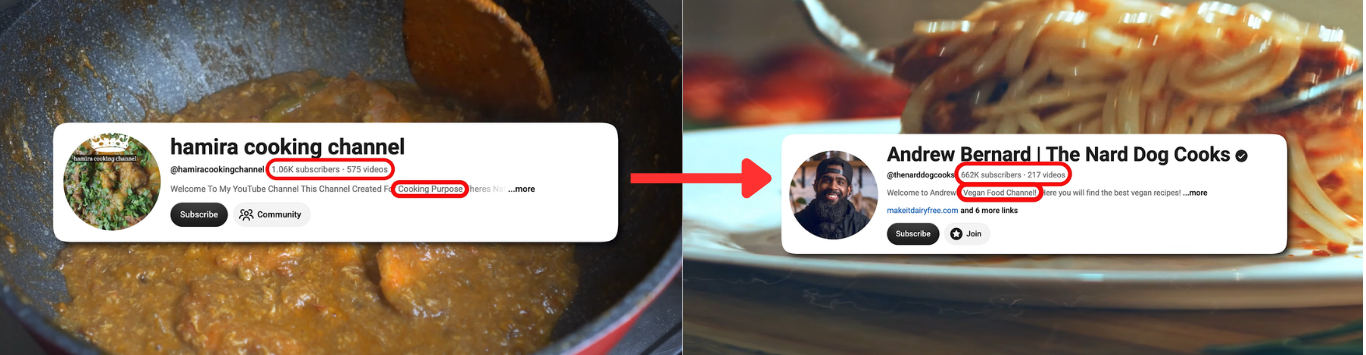
The fastest way to break a slow-growth pattern is to narrow your channel down to one clear, recognizable area of focus instead of trying to cover a variety of topics. This is because YouTube's recommendation system learns who a channel is for by watching what it consistently publishes, so a specific, repeated focus gives the system a much simpler signal to match with the right viewers than a channel that jumps between unrelated ideas.
This is actually something that a lot of new and mid-sized channels fall for. Posting whatever seems interesting that week feels faster and more efficient, but it basically makes every upload a fresh introduction to your channel. There's no accumulated context for the algorithm to pick up on, and there's nothing for a viewer to hold onto that tells them what they'll get if they return.
A channel built around a specific angle, like budget backpacking in one region, or beginner tutorials in one specific software, tends to grow its early audience faster than a general-interest channel covering the same broad subject area since it's easier for both YouTube and viewers to know what the channel is about.
Here’s a practical way to test this on your own channel: pull up your last ten uploads and see how many different topics they cover. Put yourself in the shoes of a stranger; if you couldn't guess your next video from the last five, that's usually a problem worth solving before doing anything else.
2.Set channel keywords
Once you’ve got your niche set, make sure the algorithm knows about it. Go into YouTube Studio and fill out your channel keywords under Settings > Channel > Basic info. This is because leaving the field blank gives the system less information to send your videos to the right audience. This acts as a small nudge to set the algorithm on the right track to find new audiences. However, no need to stress about this too much because things like titles, descriptions, and how viewers actually behave once they land on a video carry far more weight in how YouTube decides what a channel is about.
This same concept is also the core behind how to get more subscribers on YouTube, since a viewer who understands a channel's focus after one video is way more likely to subscribe than someone who isn't sure what they just watched will be the same style and topic in future videos.
3. Improve your titles and thumbnails
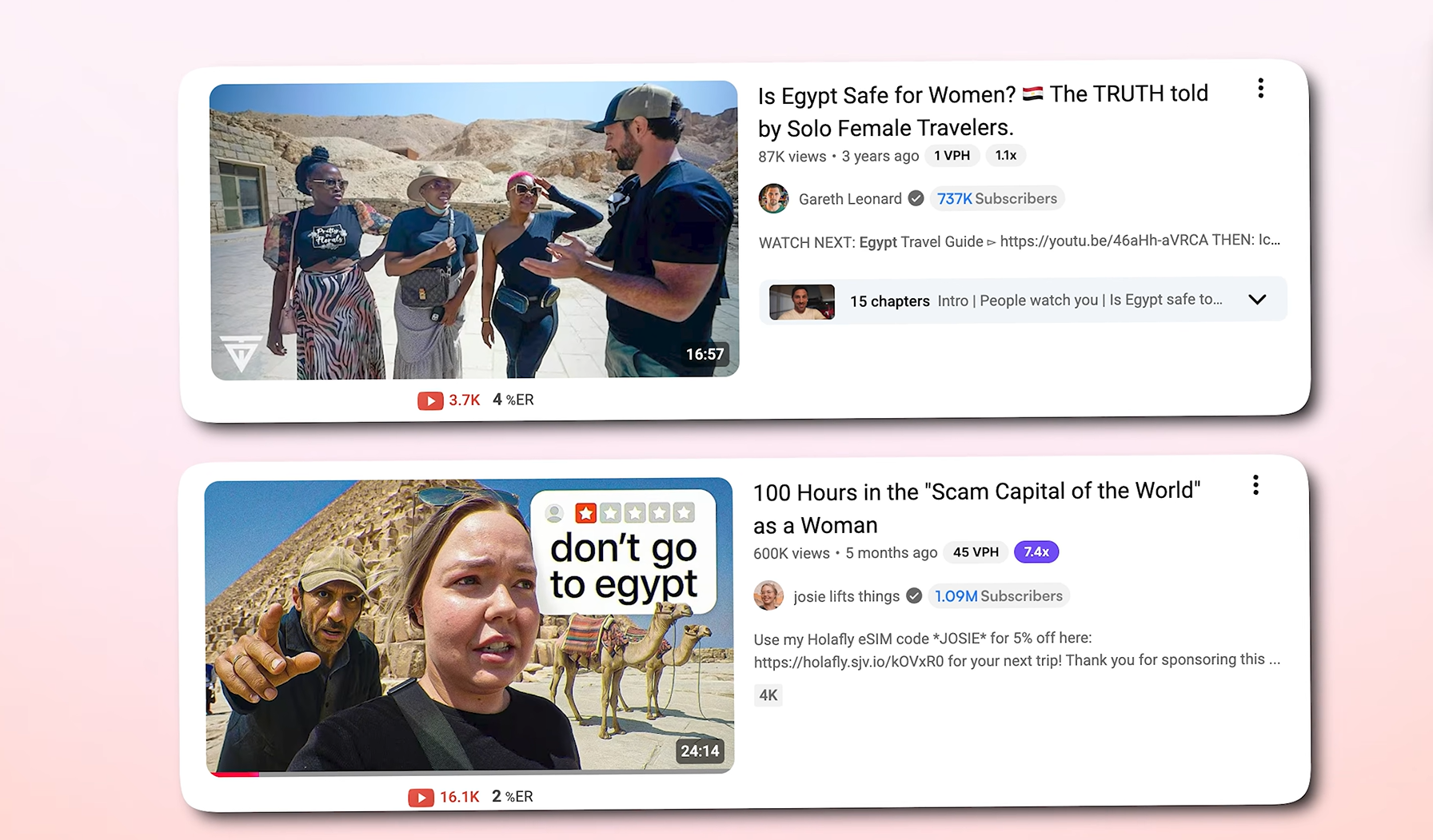
Something to remember is that no matter how great your video is, it won’t get watched if nobody clicks on it, which is why your title and thumbnail need as much attention as your video itself. Having “packaging problems” is one of the most common reasons a video underperforms. So make sure you have a clear, specific promise in the title paired with a simple, high-contrast thumbnail to make sure viewers click.
NOTE: Before you press record, it helps to be able to answer a few basic questions about your video’s topic and title to set it off on a good start:
- Would a total stranger be curious?
- Does the title promise an outcome?
- Does it trigger an emotion?
- Would someone share this with a friend?
On the visual side, a cluttered thumbnail with too much text, too many colors, or a busy background will not do as well as a simple one with a single clear focal point, even when the video itself is weaker. So make sure your thumbnails are simple to understand, grab attention quickly, and tell a story instantly.
But don’t worry if design isn't your strength; you can always create YouTube thumbnails with AI using tools like Async. With it, you can upload a reference image or a still from your footage, add a short description of the video, and have it generate several thumbnail options built around that idea, which you can then refine with simple conversational prompts for adjusting text size or brightening the background. This saves you from spending hours in a design tool, especially when packaging is what's actually holding your videos back.
So in brief, the thumbnail gets someone to stop scrolling; the title gets them to click. Get both right consistently, and you’ll be setting your videos up for success before viewers even press play. And if you're already recording, editing, and publishing in Async, generating a few thumbnail concepts with the platform means one less tool to open before your video gets published.
4. Choose searchable YouTube topics first
New and smaller channels grow faster by creating videos that directly answer a specific question people are already searching for rather than by making broad, personality-led videos that depend on existing trust. Basically, video topics based on user searches give YouTube's system a direct match between what someone typed and what your video is talking about, which is much easier than trying to pop up in someone's suggested feed.
A "day in my life" video or a broad opinion piece relies on people already caring who you are,
which is a hard ask before you have an audience. Meanwhile, a specific, answerable question, like a city travel guide for a weekend trip or a step-by-step fix for a common software error, gives YouTube a query to match your video against, and it gives viewers a reason to click even if they've never heard of your channel. Google's guidance on search and discovery also confirms that topic interest and competition both shape how far a video can reach beyond your existing audience, which is exactly why picking a topic with real search demand but not too much competition early on is one of your best strategies.
So, strategy confirmed, how do you find search topics to make YouTube videos for? Tools like TubeBuddy or Ahrefs can help you find topics with decent search volume and lower competition, basically the sweet spots of "people are asking this" and "not many good answers exist yet." A topic with huge search volume but a ton of established channels already answering it well means a much harder video to break through with than a smaller, more specific question with less results for it.
Now once you've picked a topic, make sure you’re using the keyword naturally in your title, the first couple of sentences of the description, and out loud early in the video to help YouTube confirm the video actually delivers on what it's about.
These tips are extra useful if you’re thinking of making faceless videos. If you're weighing whether to make a faceless YouTube channel, searchable topics matter even more, since there's no personal brand pulling in views and gaining trust, so the topic has to do that work instead.
5. Improve YouTube watch time with a stronger hook
Making the most of the first few seconds of a video can be one of the key factors in how to get more views on YouTube, as they decide whether the rest gets watched. It’s in these opening moments that the viewer decides whether the video is actually going to deliver on what the title and thumbnail promised. That’s why you should build a hook that pays off the initial topic or question immediately, then previews what's coming next to keep more viewers past the first part of the video, where videos usually lose most of their audience.
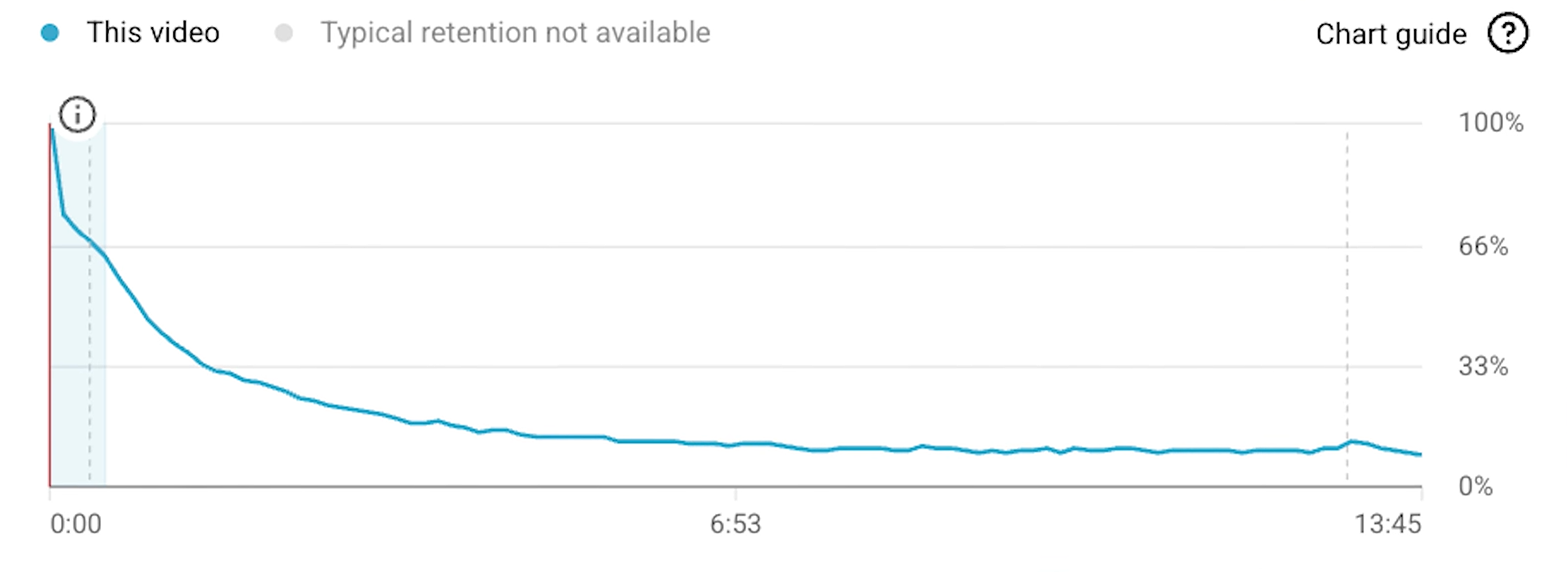
If you look at a retention graph for a video that opens slowly, with a long introduction or a delayed answer, it usually shows a steep drop in the first thirty seconds. However, a video that confirms its promise right away tends to show a much smoother curve instead, meaning viewers get hooked and keep watching, making for a more successful and pushed video.
This graph below, for example, shows a bad retention video:
A useful way to think about the opening isn't about having a rigid script, but about making sure you do these 3 things in your opening:
- show or state the result you promised almost immediately
- briefly set expectations for what's coming without giving everything away
- open a small loop or question that only gets resolved by watching further
No need to meet exact timestamps, but use them as a flexible guideline to work off of. What matters is the order those ideas happen in.
The same principle applies to YouTube Shorts too, just with a compressed timeline, since a vertical, quick format leaves almost no room for a slow build before someone moves on. This exact breakdown, including real retention graphs, is covered in more depth in this video guide.
Fix retention problems automatically with Async
Once you’ve got the topic ready, keywords set, thumbnail created, and title set, you’ve got to edit your YouTube video in a way that actually keeps the viewers interested and wanting more. But manually fixing every small drop-off, weak pacing, filler words, slow opening, or uneven audio is exactly the kind of repetitive editing that eats hours per video and doesn't get less time-consuming no matter how consistently you post.
That’s where you can really benefit from an AI-powered editing tool to help speed things up. Async's Engagement Booster, for example, analyzes your recording, shows a projected engagement lift, and applies hook, pacing, and story-flow fixes you can review before applying to your video.
Here's how it works: upload or record your video to the AI Video Editor, and type “Engagement Booster” in the AI chat section. From there, Async analyzes the footage and shows its analysis alongside a set of suggestions: a stronger opening hook, tighter pacing with filler words and dead air removed, highlight reels, smoother transitions, or a restructured story flow, just to name a few. You can then review the suggestions, go back and forth with the AI chat to fine-tune the changes if you wish, apply the changes, and export a publish-ready video, or keep fine-tuning manually in the editor if you'd rather do one last pass yourself. You might also be asked to narrow down what you’re looking for or simply tick the areas you want to improve based on your preferences or what you want to boost first; all in all, it’s just a couple of clicks for your video to be analyzed, edited, and exported.
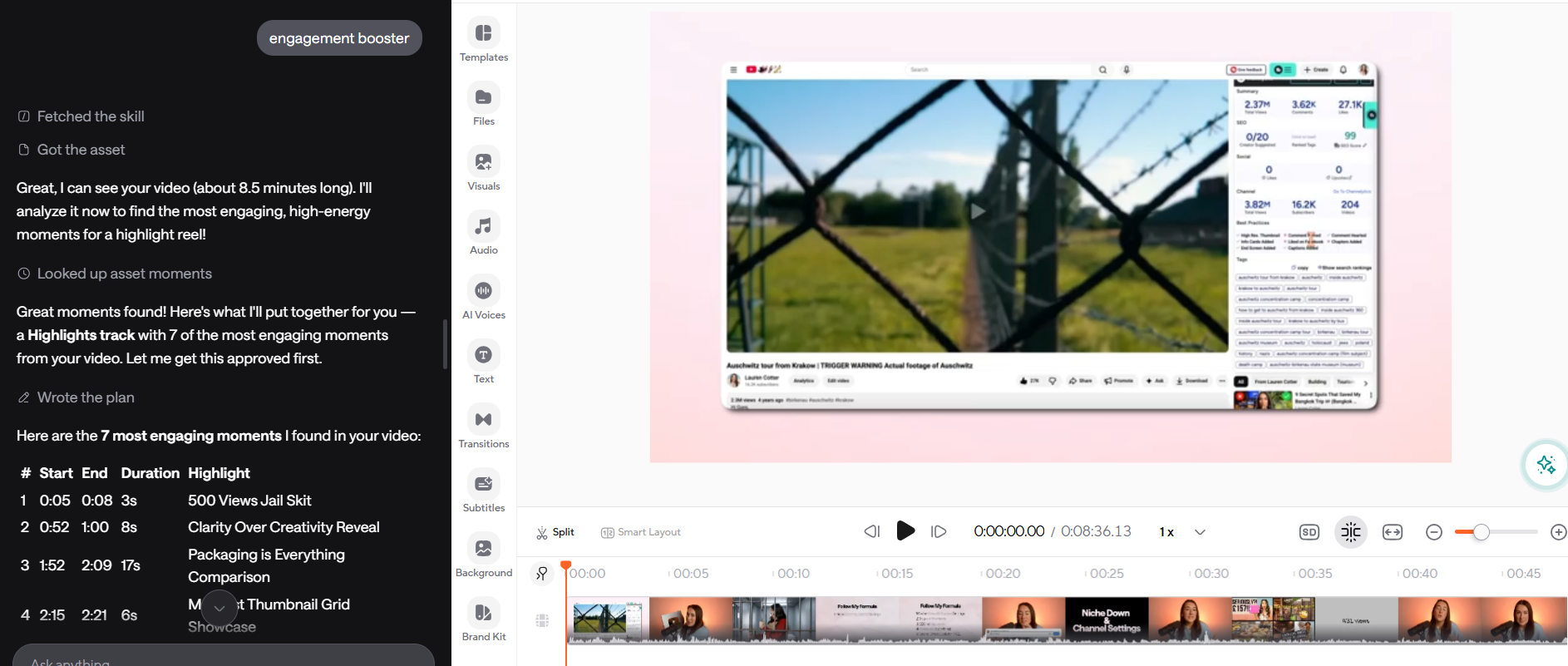
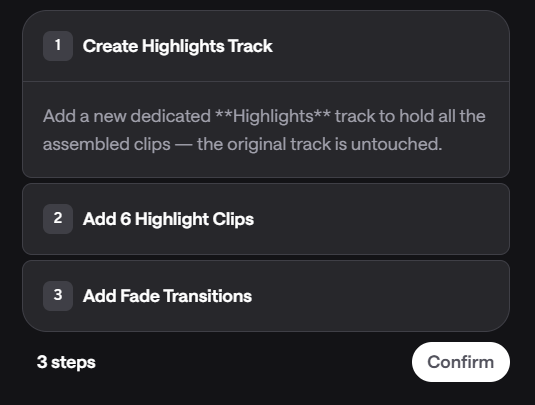
You can actually use the Engagement Booster inside the Async YouTube video editor, the same place you already trim, caption, and export. Async's video editor lets you edit, review, apply, and export in one project instead of bouncing between separate tools.
Final thoughts
Fixing low views almost never comes down to one fix. What you usually need to get more views on YouTube is a clearer niche, better packaging (titles and thumbnails), topics people are already searching for, and a stronger hook that keeps people watching once they click on your video. Work through each of the five fixes above, and pay attention to where your own videos are actually losing viewers to adapt priorities rather than applying every tip evenly.
If the editing side of that, including cleaning up pacing, tightening hooks, fixing dead air, is the part eating most of your time, you can always pass your videos through Async's Engagement Booster to see what it flags and apply the changes it suggests for easy, fast, and effective editing made for better-performing YouTube videos.
Sign up for Async to try it on your next upload.
FAQ
How do I get more views on YouTube?
To get more views on YouTube, it’s best to focus on five things together: a clear, specific channel niche so the algorithm knows who to show your videos to, thumbnails and titles that earn clicks, topics people are actively searching for, a hook strong enough to keep people watching past the first thirty seconds, and cleaning up the pacing and retention issues that are easy to miss when you're editing manually using AI editors like Async’s Engagement Booster. Views usually stall when one of these areas is weak, not because of one big mistake, so make sure to target all of these issues.
Why are my YouTube videos only getting a few hundred views?
Low view counts usually point to a viewer targeting problem rather than a quality problem. If your channel covers too many unrelated topics, YouTube has a harder time matching your videos to the right audience. Weak thumbnails and titles can also cause low views, regardless of video quality, since a video that doesn't get clicked never gets the chance to perform. Making clickable titles and thumbnails, and making sure your channel covers specific, niche topics, are great ways to fix low views on YouTube.
How can I increase YouTube watch time?
Watch time improves when more of your video gets watched properly, not when more people click on it. So make sure you have a hook that delivers on the title's promise in the first few seconds, tighter pacing with less dead air, and a story structure that avoids a slow middle section. This makes viewers stay through to the end instead of dropping off early.
Does YouTube SEO still matter?
Yes, though it works a bit differently than it used to. Keywords in your title, description, and spoken early still help YouTube match your video to relevant searches, but YouTube's guidelines make it clear that how viewers actually respond to your video, including watch time, click-through rate, and satisfaction signals, carry more weight than just keyword placement. So rule of thumb: treat SEO as just a way of getting the right video in front of the right search, not a way to force it to be pushed by the algorithm on its own.
What is a good YouTube click-through rate?
Click-through rate varies a lot by channel size, niche, and where the impression came from, so there isn't one universal target to aim for. It's usually more useful to compare a video's CTR against your own channel's average in YouTube Studio than against a fixed industry number. Actually, having a thumbnail and title combo that consistently beats your own standards is a stronger signal than hitting any specific percentage.
How do you improve audience retention on YouTube?
Start with the opening seconds, since that's where most retention is won or lost; make sure you have viewers interested and hooked for more. Then, look at pacing throughout the rest of the video and remove filler words, tighten dead air, and cut sections that don't move the story forward. You can actually see exactly where your specific videos lose people by reviewing your own retention graphs in YouTube Analytics.
Can AI help improve YouTube video retention?
AI editing tools can speed up the repetitive parts of keeping retention high on your videos, like spotting filler, dead air, and pacing issues that would otherwise take a big chunk of time to catch yourself. Tools like the Async AI Video Editor and, within it, the Engagement Booster can analyze a recording and suggest specific fixes, hooks, pacing, and story flows that you review and apply.