Somewhere inside your last episode is a 40-second video that could outperform the entire hour. Right now it's hiding between a sponsor read, a tangent about someone's coffee order, and a long "so yeah, anyway."
Most people who make podcast clips grab a moment that felt great in the room, slap captions on it, and post it. Then it gets 212 views, and one of them is their mom. The clip wasn't bad. It just wasn't built to survive without the other 59 minutes.
This guide fixes that. Instead of theory, we took one real episode and turned it into a finished vertical clip, documenting every decision: which moment we picked (and which we rejected), what we cut from the opening, how we framed it, and how we packaged it with a template.
How do you turn a podcast into social media clips?
To turn a podcast into TikToks, Reels, or Shorts, choose a moment that works without the full episode, cut straight to the strongest line, reframe the speakers for vertical video, add readable captions, tighten the pacing, and finish with a CTA that matches the platform.
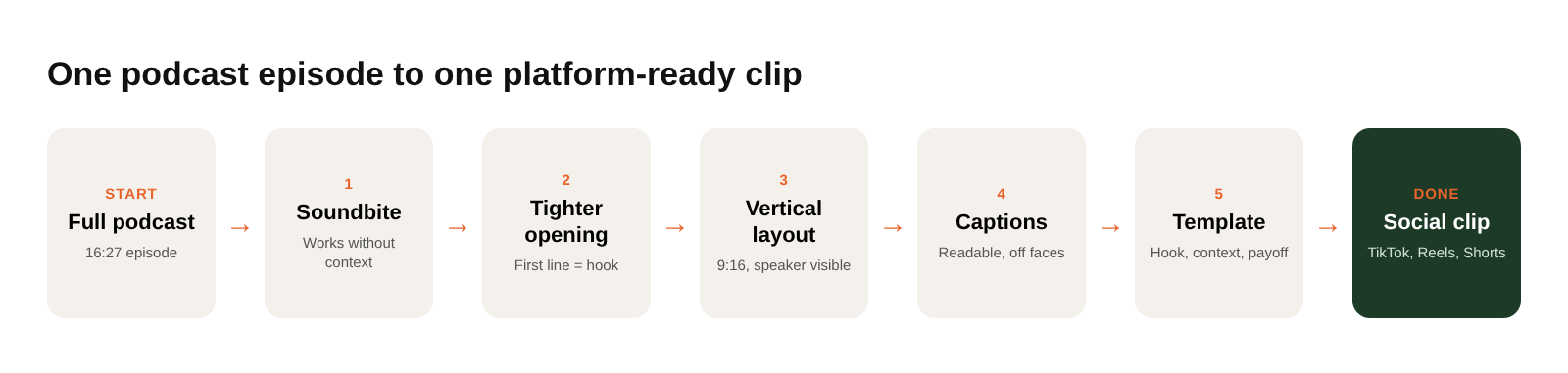
Turning one podcast into several short-form videos is one of the simplest content repurposing workflows. For the broader strategy, see our full guide to content repurposing.
The episode we used
Our test subject: Episode 22 of Video Mavericks: Small Business Video Podcast, "How to AVOID THESE Business Video Mistakes." It runs 16:27, has two hosts on two mics, and was shot horizontally. In other words, a very typical video podcast.
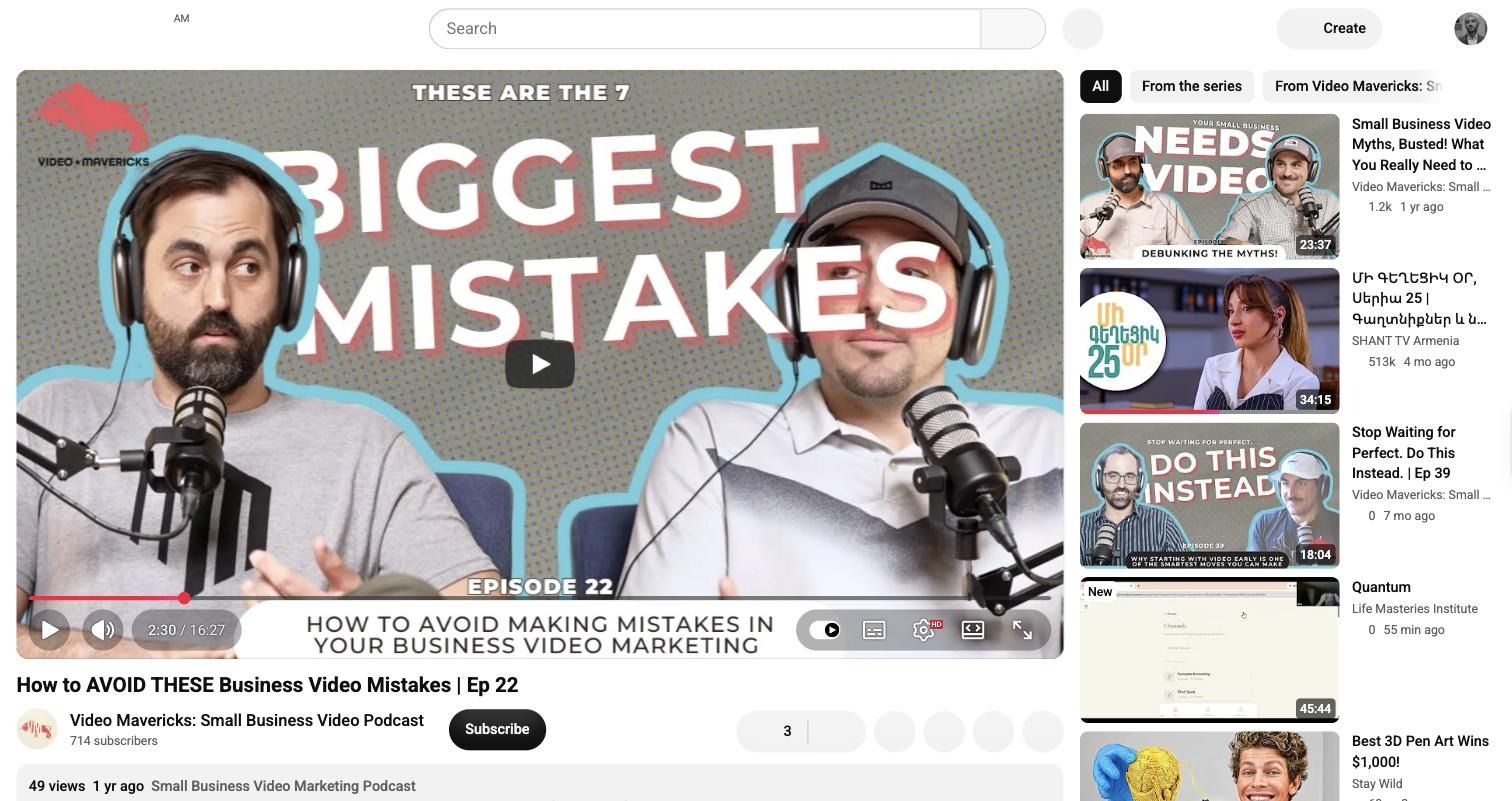
We pasted the YouTube link into Async's AI Clips tool, kept the default 9:16 output with Smart crop on, and hit Generate.
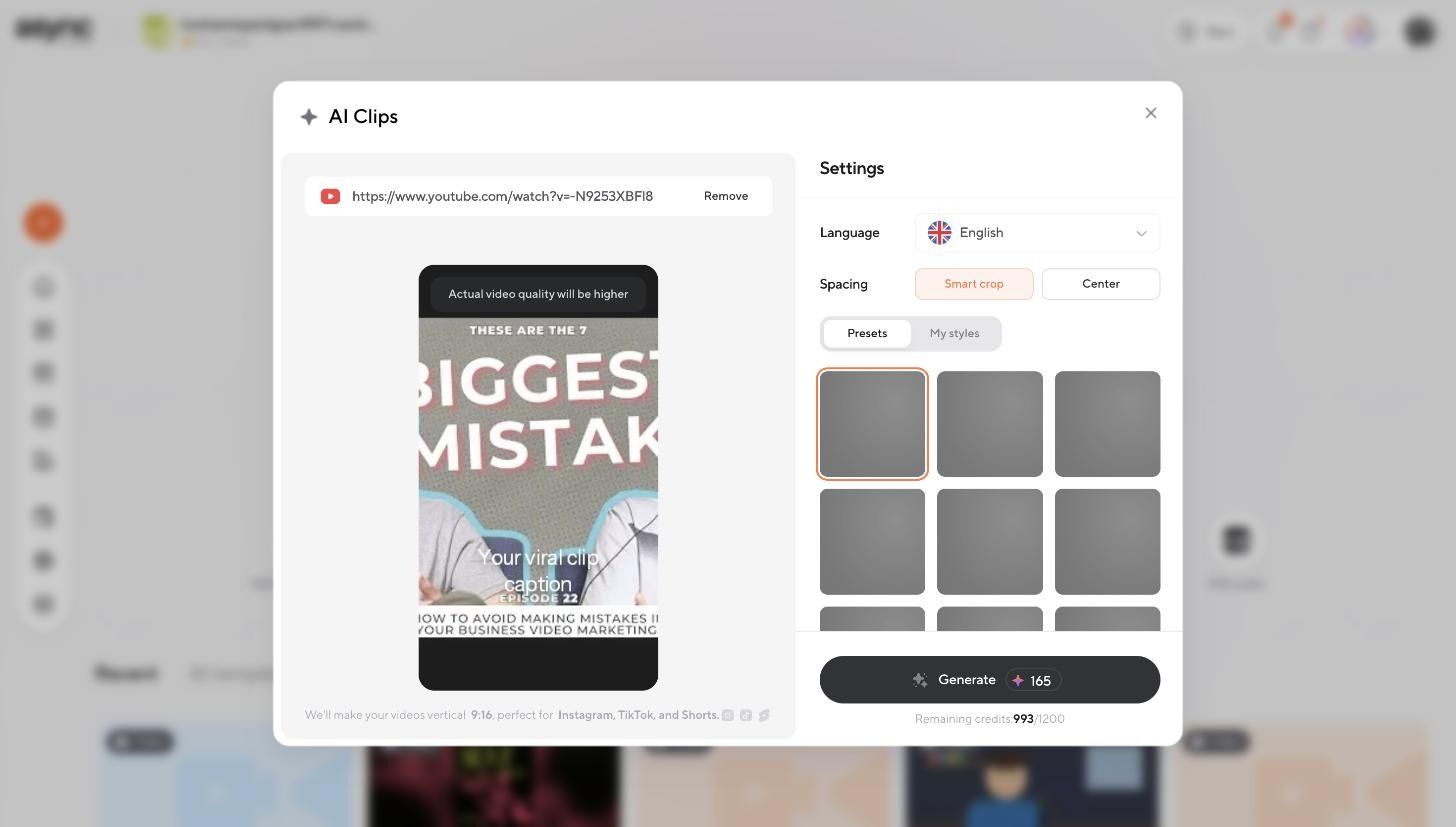
A few minutes later, we had 13 candidate clips, each with a title, a transcript preview, and a score from 81 to 96.
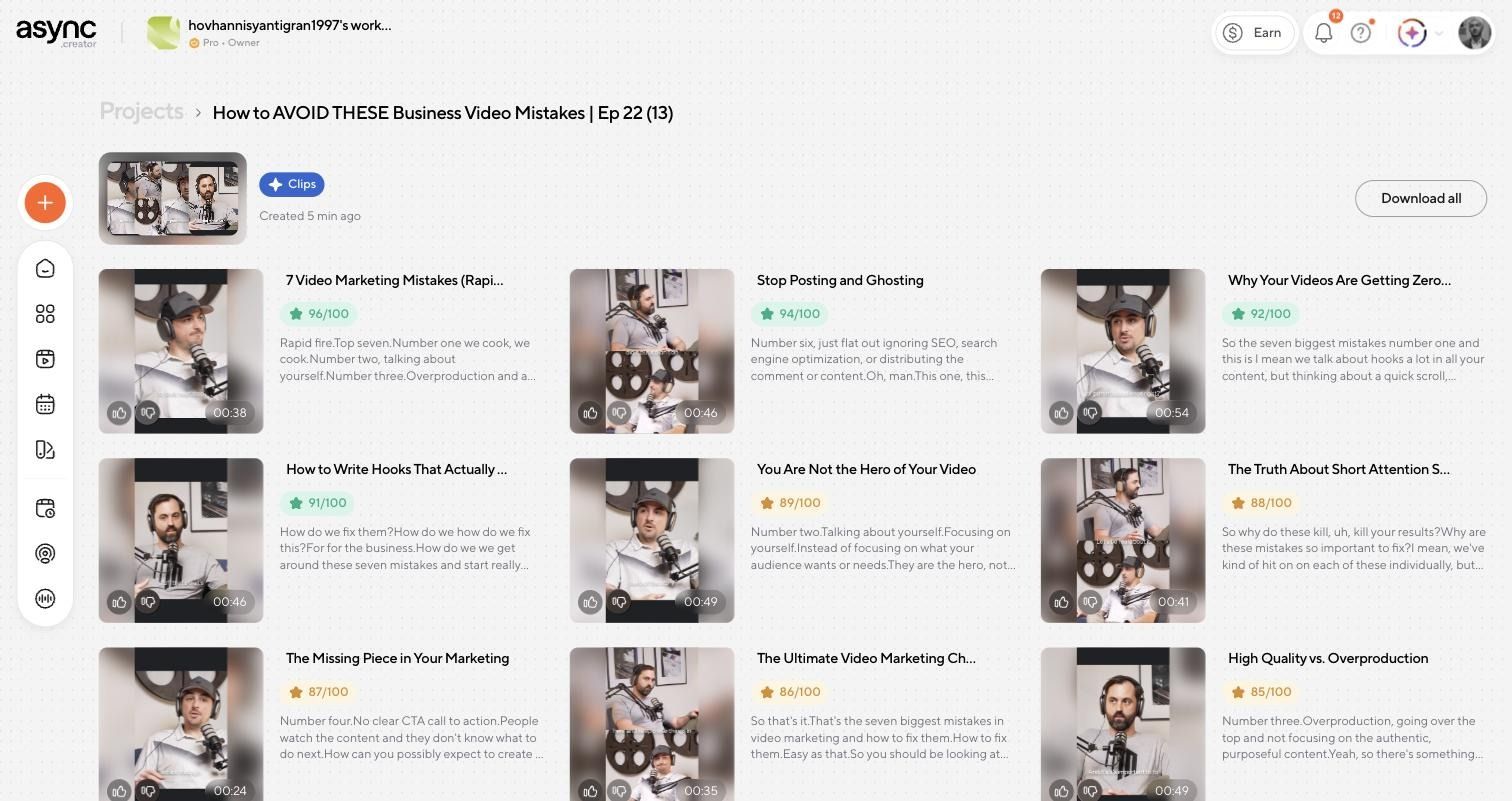
That's a great starting point. It is not the finish line.
Step 1: Choose a soundbite that works on its own
A clip that sounds interesting in context is not the same as a clip that works for a stranger scrolling at 11pm. Before picking, read the transcripts like a viewer who has never heard of the show.
Here are three real candidates from the episode:
Notice that the highest score didn't win. AI scores are good at spotting energy and structure, but they can't tell you whether a moment still makes sense once you strip away the episode around it.
Use this quick test on every candidate:
- Good clip: makes sense independently, has one clear idea, creates curiosity, and pays it off without 30 seconds of setup.
- Weak clip: starts mid-thought, depends on earlier context, leans on vague references ("this one," "that thing we said"), or has no clear ending.
Step 2: Tighten the opening
Podcast openings are built for listeners who have already chosen to be there. Social openings are built for people who are about to leave. So the first line has to work as the hook.
Our chosen clip opened with a list label. Here's what we changed:
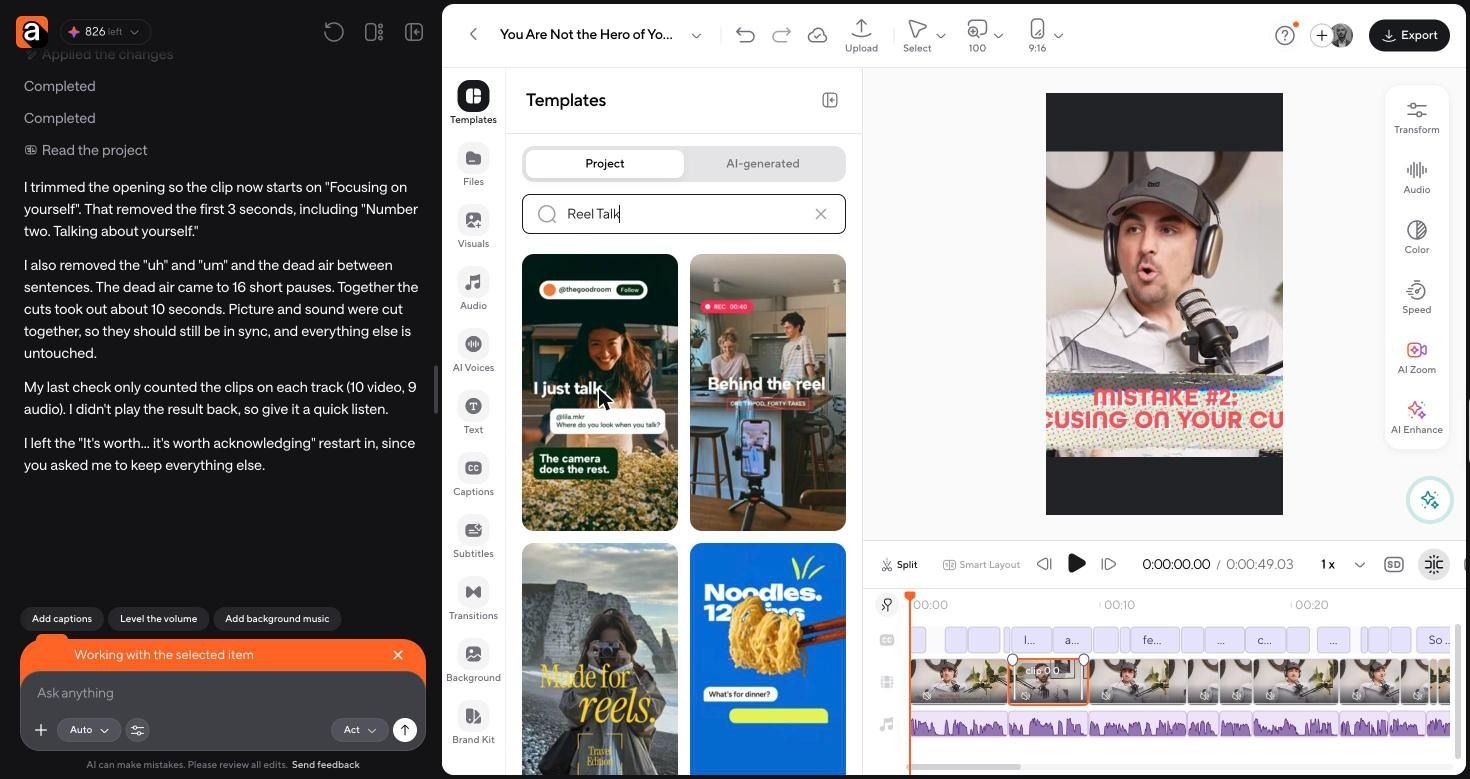
"Number two" only means something if you have heard number one. Cutting it means the clip starts on the problem, and the hook lands in the first three seconds.
We made the edit in the Async editor by typing one instruction into the chat: trim the opening to start at "Focusing on yourself," then remove filler words and dead air.
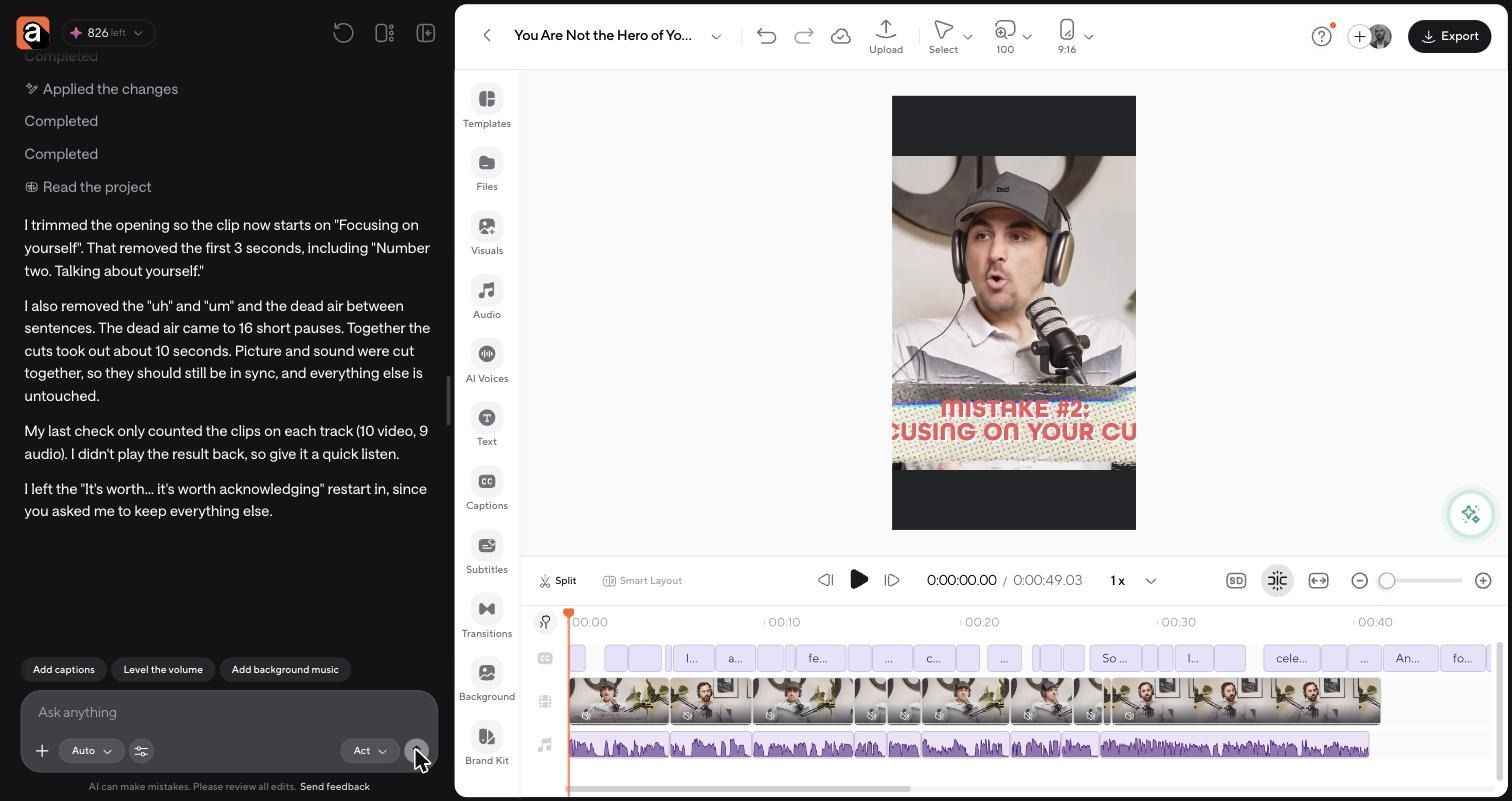
The result: the first 3 seconds and 16 short pauses gone, about 10 seconds in total. The clip dropped from 49 seconds to just under 42, and it already felt faster before we touched anything else.
What to cut from almost every podcast opening:
- Greetings and list labels ("Number two," "So the next one is...")
- "So yeah," "I mean," and throat clears
- Setup that repeats the question
- Pauses longer than a beat
Step 3: Choose the right layout
A horizontal podcast frame has two people, two mics, and a lot of wall. Cropped badly to 9:16, you get half a face and a microphone.
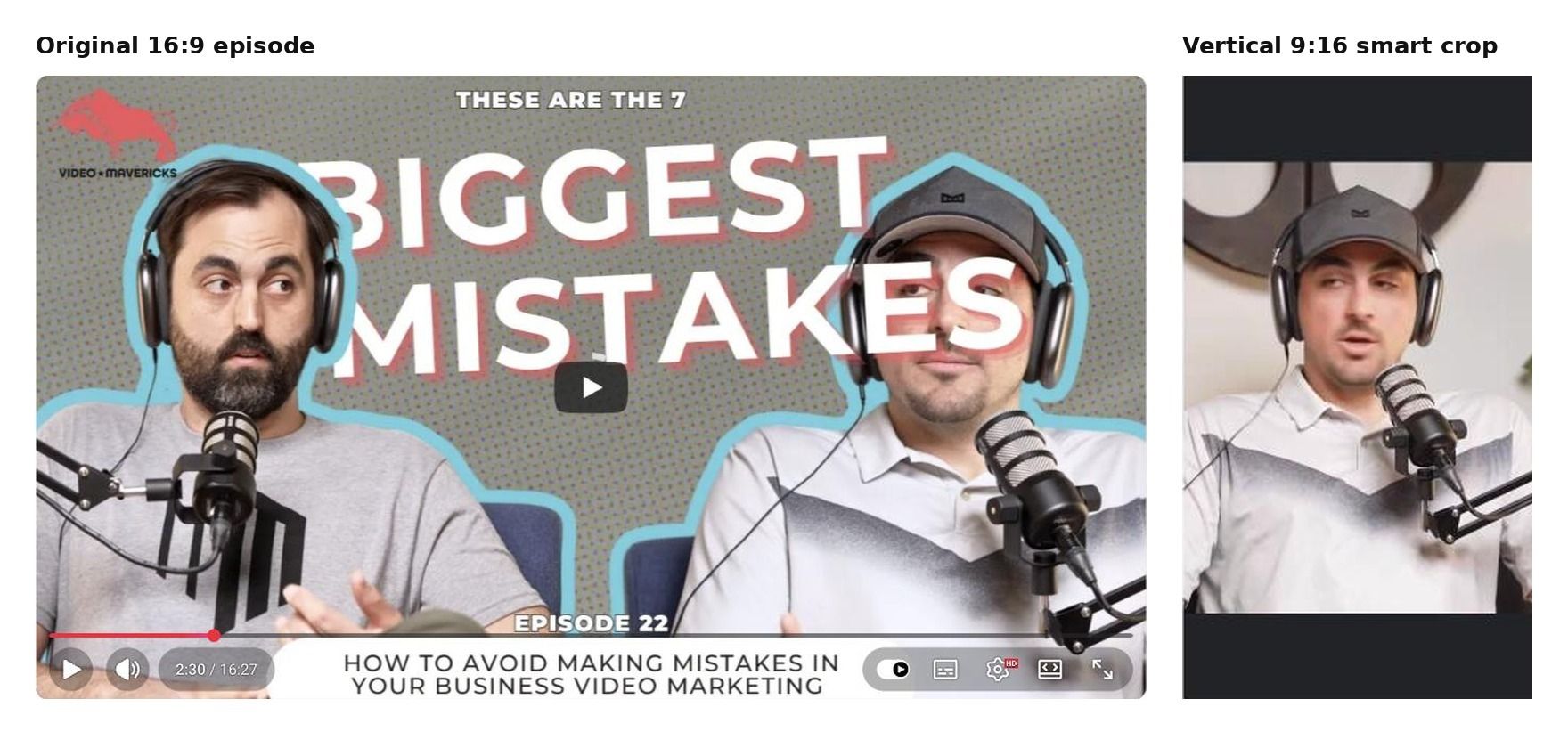
Our clip is mostly one host making a point while the other reacts, so an active-speaker crop was the right call. Smart crop handled it automatically during clip generation.
One thing to watch: on-screen graphics designed for widescreen. The episode labels each mistake with a lower-third banner, and in vertical, ours got chopped to "MISTAKE #2: CUSING ON YOUR CU." We covered it with a strip in the template's green, so it reads as part of the bottom bar. Trimming around it works too.
Step 4: Package the clip with the Reel Talk template
Async has several social templates, so we reviewed three before choosing:
- Case Study is built around a single result on a billboard-style headline. Great if your guest drops one big number, not ideal for an opinion clip.
- Behind the Reel adds a recording badge to casual footage. Useful for a setup or bloopers teaser from recording day.
- Reel Talk frames a talking-head clip with a profile bar, a bold headline, a comment-style prompt, and a takeaway box. That maps almost perfectly onto a podcast soundbite.
Here's how each Reel Talk element translated to our clip:
We added the template in the editor, then used chat to remove the sample footage, update the text, and stretch every element to the full clip length. The first pass already looked like a native post, with a few layout issues left to fix in Step 5.
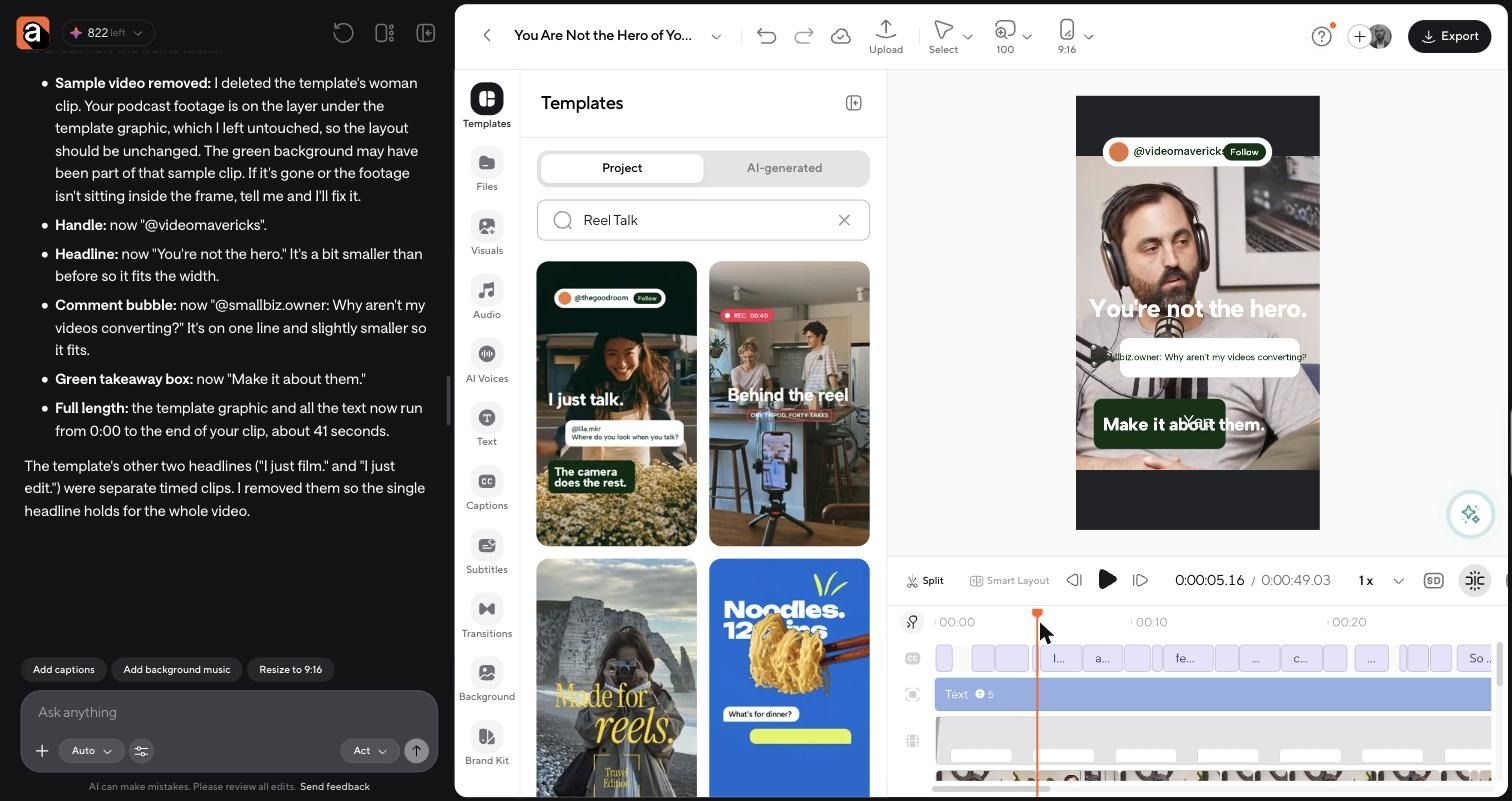
The comment bubble does a lot of quiet work here. It frames the clip as an answer, which gives a cold viewer a reason to keep watching before the host has finished his first sentence.
Want the same layout? Start editing the Reel Talk template in Async and drop in your own episode.
Step 5: Finish the clip
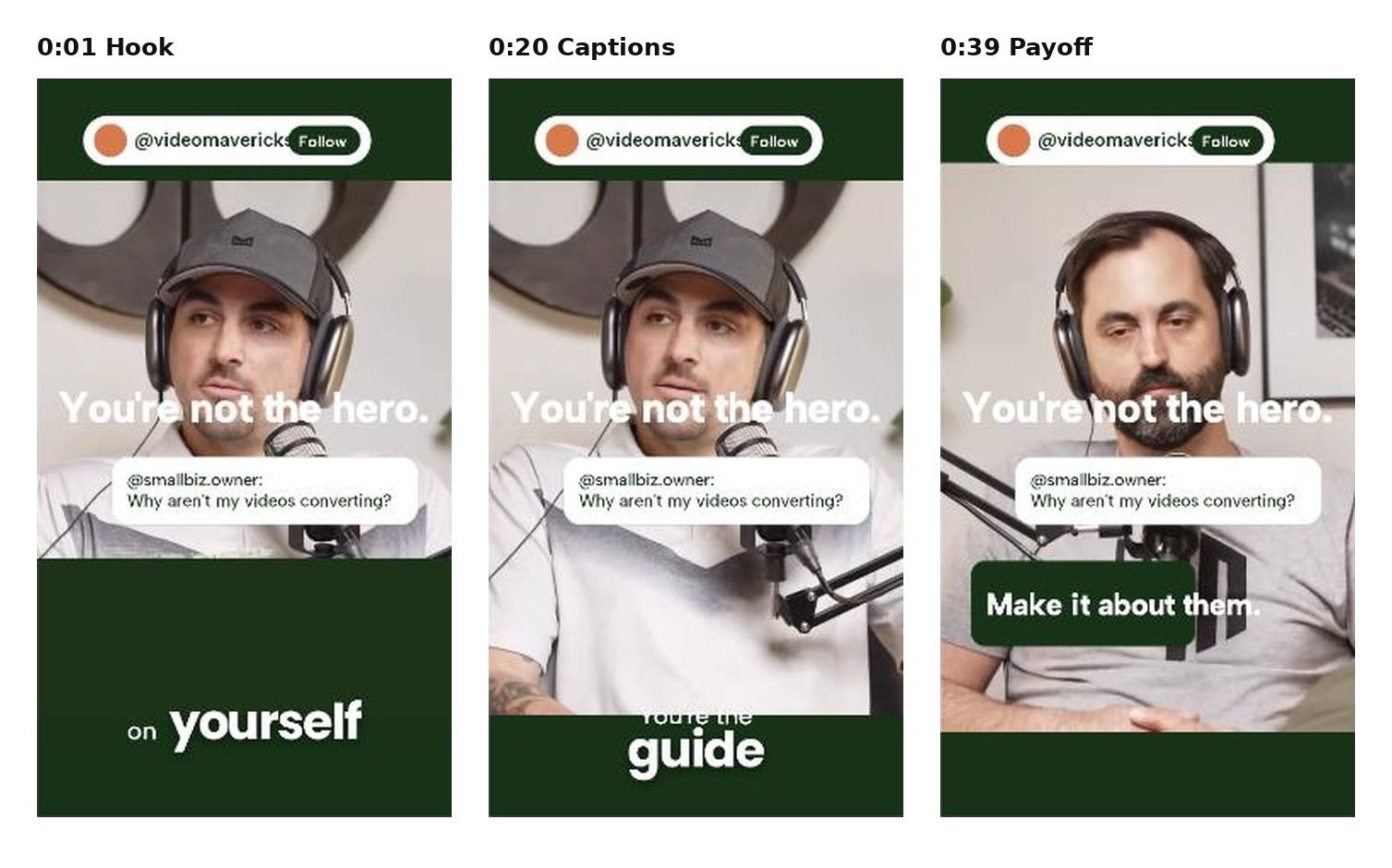
Our first pass had a real problem: the word-by-word captions landed right on top of the headline and comment bubble. Two text layers fighting for the same spot is the fastest way to make a clip unreadable.
We moved the captions into the green bar below the speaker and showed the "Make it about them." takeaway box only in the last four seconds, so it reads as the payoff instead of competing with the speech.
Here's the finished clip at three moments: the hook, the captioned middle, and the payoff.
Run every clip through this checklist before exporting:
Step 6: Make platform-specific versions
The source clip can stay the same. The opening, caption, CTA, or length is what changes.
Don't assume one exact edit performs equally everywhere. For deeper platform tips, see how to edit TikTok videos and how to edit Instagram Reels.
How AI helps with podcast clipping
AI did a lot in this workflow. It transcribed the episode, surfaced 13 candidate moments, removed filler and silences, reframed the footage vertically, and generated captions. That's hours of scrubbing and keyframing compressed into minutes inside one AI video editor.
But look at Step 1 again. The highest-scoring clip wasn't the best one, and an 84-scoring clip depended on a callback nobody outside the episode would get. AI can find candidate moments. A human still needs to decide whether the moment actually works as standalone social content.
How to turn one podcast episode into multiple social assets
This single 16-minute episode could easily fill a week:
- 3 short clips: "You're not the hero," "Write hooks that actually work," "Stop posting and ghosting"
- 1 quote video: "You can't improve if you don't understand what's happening."
- 1 educational Reel: the rapid-fire list of all seven mistakes (the 96-scoring clip)
- 1 teaser: a Behind the Reel style look at the recording setup
- 1 YouTube Short: the hooks clip, titled for search
The same principle works beyond podcasts: written content can also be adapted, so you can turn a blog post into a video rather than simply reposting a link. A social media video editor keeps all of these versions in one place.
Make podcast clips that stand on their own
Good podcast clips aren't just short sections of a long episode. Each one is a standalone piece of content with its own hook, framing, pacing, captions, and CTA. Pick the moment a stranger would understand, cut to the line that matters, and package it so the point is obvious before anyone thinks about scrolling.
FAQ
How do you make podcast clips for social media?
Pick a moment that makes sense without the rest of the episode, trim it so the first line is the hook, reframe it to 9:16, add captions, and finish with one clear CTA. Tools like Async AI Clips can surface candidate moments first.
How do you turn a podcast into TikTok videos?
Cut a 20- to 45-second standalone moment, open on the strongest line, crop to vertical, and add bold captions. TikTok rewards a fast, conversational hook, so cut any warm-up before the point.
How do you turn a podcast into Instagram Reels?
Use the same vertical clip, but put extra care into visual packaging: clean captions, on-screen text, and a template that frames the speaker. Many Reels viewers watch on mute.
How do you choose good podcast clips?
Read the transcript as if you've never heard the show. Choose moments with one clear idea, a curiosity gap, and a payoff. Skip clips that open mid-thought or reference earlier parts of the episode.
How long should podcast clips be?
Most strong podcast clips land between 20 and 45 seconds. Our finished example ran just under 42 seconds after trimming: long enough for a complete idea, short enough to hold attention.
Can AI automatically make podcast clips?
Yes. AI can transcribe, find candidate moments, remove silences, reframe, and caption. You should still review each clip because AI scores don't always reflect whether a moment works on its own.
What is the best layout for podcast clips?
It depends on the moment. Use a single-speaker crop when one person carries the point, an active-speaker switch for conversation, and split or stacked layouts for debates and reactions.
Should podcast clips have captions?
Yes. Captions keep clips watchable on mute and help viewers follow fast speech. Keep them readable, accurate, and placed where they don't cover faces or other text.
How do you repurpose podcast content?
Turn one episode into short clips, quote videos, an educational Reel, a teaser, and a YouTube Short. Then schedule them across the week to drive people back to the full episode.
Can one podcast clip be used on TikTok, Reels, and Shorts?
Yes, the same source clip works on all three. Adjust the opening, on-screen caption, CTA, or length for each platform rather than posting an identical file everywhere.